
Authentication is the first and most critical step in securing access to a Pega application. Pega provides a flexible and extensible mechanism called the Authentication Service rule to control how users are authenticated when they attempt to log in. Instead of relying only on local Pega credentials, authentication services allow Pega to integrate with external identity systems and enterprise security platforms.
Using an Authentication Service, organizations can authenticate users through standard protocols such as OpenID Connect (OIDC), SAML 2.0, LDAP, or other supported mechanisms. The rule defines how Pega validates user credentials or tokens, how the authenticated identity is mapped to a Pega operator, and how login requests are processed securely.
Authentication Service rules are especially important in modern Pega applications deployed in cloud environments, where Single Sign-On (SSO), centralized identity management, and compliance with enterprise security standards are mandatory. By configuring authentication services correctly, organizations can improve security, reduce password management overhead, and provide a seamless login experience across applications.
What is an Authentication Service in Pega?
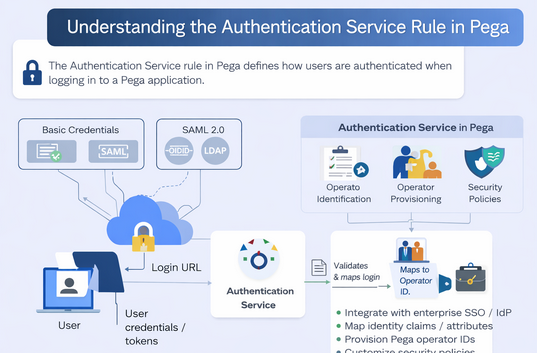
An Authentication Service in Pega defines how user identities are verified and authenticated when they log into a Pega application.
It is used to override or extend the default login behavior, enabling support for various authentication protocols such as Basic Credentials, SAML 2.0, OpenID Connect, Kerberos, and custom mechanisms.
Where Do You Create It?
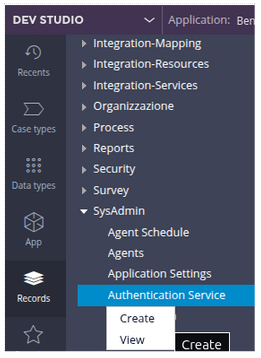
You create an Authentication Service using the Pega UI:
Records → SysAdmin→ Authentication Service → Create Authentication Service
Why Do We Use Authentication Services?
Pega uses Authentication Service rules to support various authentication use cases:
✔ To use enterprise identity providers (SSO)
✔ To integrate with external directories (e.g., LDAP)
✔ To allow token-based authentication
✔ To customize default login logic
✔ To enable Just-In-Time operator provisioning
Supported Authentication Types
When creating an Authentication Service, you choose from the following types:
| Authentication Type | Description |
| Basic Credentials | Standard username/password authentication |
| SAML 2.0 | Web SSO via SAML provider |
| OpenID Connect (OIDC) | Modern OAuth-based SSO |
| Kerberos | Windows domain SSO |
| Custom | Any custom authentication implementation |
| Anonymous | Allows guest access, useful for public pages |
Key Sections of the Authentication Service Rule
Once created, the Authentication Service rule has multiple important areas:
- Authentication Type
This defines the protocol used for validating user credentials or tokens (e.g., SAML, OIDC). Each type brings its own configuration fields depending on the protocol.
- Login URL
Pega auto-creates a URL using PRAuth servlet and the authentication alias. When this URL is accessed, the configured authentication logic kicks in.
- Operator Identification
This section maps claims or attributes from the identity provider (IdP) to a Pega operator. For example, you can map an email or username from a SAML/OIDC token to the Pega Operator ID.
- Operator Provisioning
You can enable operator provisioning, so if a user logs in via SSO and there is no existing operator, Pega will create one on the fly. This is commonly used with SAML or OIDC integrations.
- Mapping and Security Policies
- Mapping: Allows you to map attributes from the authentication response (like SAML attributes or JWT claims) to Pega properties.
- Security Policies: Configure session timeouts, token validation, or MFA requirements.
These features allow you to fine-tune how authentication integrates with your enterprise security model.
How It Works at Runtime
- User accesses the login URL for the Authentication Service.
- Pega forwards authentication requests to an IdP (if configured).
- The IdP authenticates the user.
- Pega receives authentication data (token or assertion).
- The Authentication Service maps the token to a Pega operator ID.
- If operator provisioning is enabled, a new operator is created if needed.
- User is granted access based on mapping and security rules.
This entire flow ensures secure and flexible authentication aligned to enterprise standards.
Real-World Use Cases
🔹 Enterprise SSO
Configure SAML or OpenID Connect to authenticate users via corporate identity providers such as Okta, Azure AD, or Keycloak.
🔹 LDAP / Directory Integration
Use custom or LDAP-based authentication services to validate users against existing directories.
🔹 Token-Based API Access
Use authentication services to secure API access for internal or external applications.
–TeamEnigma
