

Introduction
The evolution of enterprise application development has shifted from static, tightly coupled user interfaces toward metadata-driven experiences that adapt dynamically to business requirements. Pega Constellation embodies this modern approach by leveraging DX APIs to deliver responsive, configurable, and reusable user interfaces without requiring extensive front-end development.
Unlike traditional UI architectures where screen layouts and business logic are deeply intertwined, Constellation separates presentation from implementation. At the heart of this architecture lies the DX API framework, which provides the metadata necessary for rendering dynamic screens across web and mobile channels.
This article explores how Constellation DX APIs build dynamic screens, the architectural principles behind them, and the advantages they bring to enterprise application development.
Understanding the Constellation Architecture
Constellation is a metadata-driven user experience architecture introduced in modern Pega Infinity releases. Instead of sending HTML components from the server, Pega delivers structured metadata describing how a screen should be rendered.
The architecture consists of three primary layers:
Business Layer
Contains cases, workflows, business rules, data models, and decision logic.
Experience Layer
Defines views, fields, sections, validation rules, and user interactions.
Presentation Layer
Uses React-based Constellation components to interpret metadata and render the interface dynamically.
This separation enables organizations to modify business processes without redesigning the front-end application.
What Are DX APIs?
Digital Experience APIs (DX APIs) are REST-based services that expose case and view metadata to external channels and Constellation applications.
These APIs provide:
- Case information
- View definitions
- Field configurations
- Validation rules
- Assignment details
- Actions and navigation metadata
- Data sources and reference information
Instead of returning rendered HTML, DX APIs return structured JSON payloads that describe the screen.
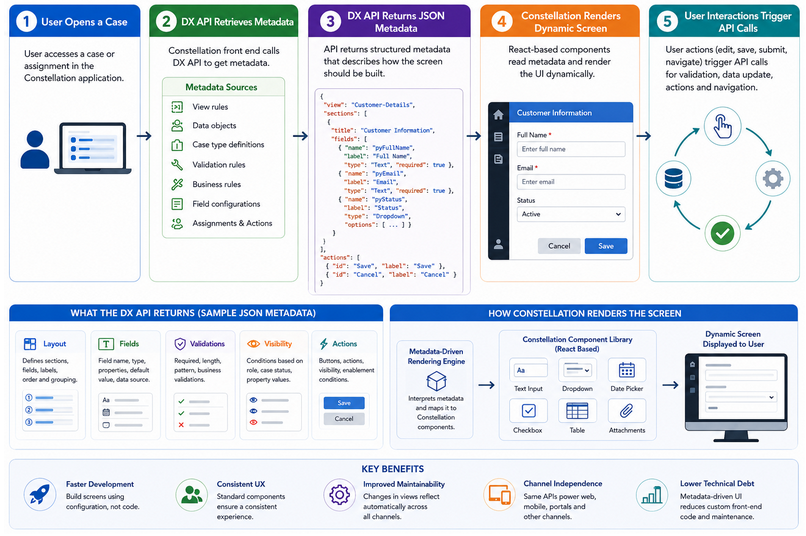
The Dynamic Screen Generation Process
Step 1: User Opens a Case
When a user accesses a case or assignment, the Constellation front-end sends a request to the DX API layer.
The request typically includes:
- Case ID
- Assignment ID
- User context
- Application context
Step 2: DX API Retrieves Metadata
The platform gathers metadata from multiple sources:
- View rules
- Data objects
- Case type definitions
- Validation configurations
- Business rules
- Field-level settings
This information is assembled into a unified response.
Step 3: JSON Metadata Is Returned
Instead of HTML markup, the API returns a metadata payload containing:
- Layout definitions
- Form fields
- Labels
- Data bindings
- Validation requirements
- Visibility conditions
- Action buttons
The response acts as a blueprint for the user interface.
Step 4: Constellation Components Render the Screen
React-based Constellation components interpret the metadata and automatically generate the user interface.
Examples include:
- Text fields
- Dropdowns
- Tables
- Attachments
- Date pickers
- Case summaries
- Action panels
No custom rendering logic is required for standard components.
Step 5: User Interactions Trigger API Calls
As users interact with the application:
- Data is validated
- Visibility rules are evaluated
- Actions are processed
- Case information is refreshed
All communication occurs through API interactions, ensuring synchronization between the UI and business layer.
Metadata-Driven UI Rendering
A major innovation in Constellation is its metadata-driven rendering engine.
Instead of developers creating forms manually, the platform uses metadata attributes such as:
Field Type
Determines whether a component should render as:
- Text input
- Numeric field
- Date selector
- Checkbox
- Dropdown
Validation Rules
Metadata specifies:
- Required fields
- Length restrictions
- Pattern matching
- Business validations
Visibility Conditions
Fields can dynamically appear or disappear based on:
- User role
- Case status
- Property values
- Business rules
Read-Only States
The API controls whether users can edit information based on runtime conditions.
This approach allows screens to adapt dynamically without front-end code changes.
Role of View Definitions
Views are the foundation of screen generation in Constellation.
A view defines:
- Fields displayed to users
- Layout structure
- Field groups
- Instructions
- Validation requirements
When a view is updated by a low-code developer, the DX API automatically reflects the changes.
As a result:
- No JavaScript modifications are required.
- No React code updates are necessary.
- User interfaces evolve automatically.
This significantly reduces development effort and maintenance costs.
Benefits of DX API-Driven Screens
Faster Development
Developers focus on business requirements rather than UI coding.
Consistent User Experience
All applications follow standardized design patterns and components.
Improved Maintainability
Changes to views are automatically reflected across channels.
Channel Independence
The same APIs can support:
- Web applications
- Mobile applications
- Customer portals
- Partner portals
Reduced Technical Debt
Because UI behavior is controlled through metadata, organizations avoid accumulating large amounts of custom front-end code.
Performance Considerations
While metadata-driven architectures provide flexibility, performance optimization remains important.
Best practices include:
- Minimizing unnecessary fields in views
- Using efficient data page strategies
- Avoiding excessive conditional visibility rules
- Optimizing API response payloads
- Leveraging client-side caching when appropriate
Well-designed view structures contribute significantly to application responsiveness.
Challenges and Limitations
Organizations adopting Constellation may encounter several challenges:
Learning Curve
Developers accustomed to traditional section-based UIs must understand metadata-driven design principles.
Customization Constraints
Constellation encourages configuration over customization. Certain highly specialized UI requirements may require extension mechanisms.
API Dependency
Since rendering relies on metadata services, API performance directly affects user experience.
Despite these considerations, the long-term benefits generally outweigh the initial transition effort.
The Future of Enterprise User Interfaces
The shift toward metadata-driven experiences represents a major advancement in enterprise application development. Constellation DX APIs demonstrate how organizations can build adaptive user interfaces that evolve alongside business requirements without repeated front-end redevelopment.
By separating business logic from presentation, Pega enables organizations to create scalable, maintainable, and channel-independent applications. As enterprises continue embracing low-code development and composable architectures, DX APIs will play an increasingly important role in delivering dynamic digital experiences.
Conclusion
Constellation DX APIs are the engine behind Pega’s dynamic user experience architecture. Rather than transmitting static screens, they provide rich metadata that enables front-end components to render interfaces intelligently at runtime.
This metadata-driven approach delivers greater agility, faster development cycles, improved consistency, and lower maintenance costs. As organizations modernize their applications, understanding how DX APIs generate dynamic screens becomes essential for architects, developers, and business stakeholders seeking to maximize the value of the Constellation framework.
