
Introduction
Modern enterprise applications demand secure, centralized, and seamless authentication. Single Sign-On (SSO) enables users to log in once and access multiple systems without repeated authentication prompts.
The Pega Platform supports OpenID Connect (OIDC) for SSO, allowing integration with external Identity Providers (IdPs). One of the most powerful open-source IdPs is Keycloak, widely used for enterprise-grade authentication and authorization.
This article explains how Pega integrates with Keycloak using OIDC, including architecture, flow, and configuration.
What is Keycloak?
Keycloak is an open-source Identity and Access Management (IAM) solution that provides:
- Single Sign-On (SSO)
- User federation (LDAP/AD integration)
- Social login support
- Multi-factor authentication (MFA)
- Token-based authentication (OIDC, OAuth2, SAML)
👉 It acts as the central Identity Provider (IdP) in your Pega architecture.
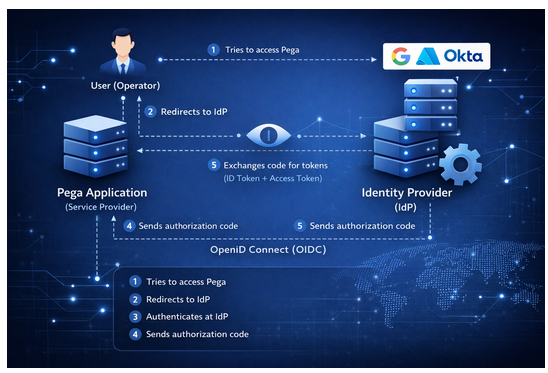
Architecture: Pega + Keycloak (OIDC)
Components:
- Pega Application → Service Provider (Relying Party)
- Keycloak → Identity Provider (IdP)
- User (Operator) → End user
Authentication Flow (Authorization Code Flow)
- User accesses Pega application
- Pega redirects to Keycloak login page
- User enters credentials in Keycloak
- Keycloak authenticates user
- Keycloak sends authorization code to Pega
- Pega exchanges code for:
- ID Token
- Access Token
- Pega validates token and creates user session
👉 This is the standard OIDC Authorization Code Flow, recommended for secure enterprise apps.
Configuration: Keycloak Setup
1️⃣ Create a Realm
- A Realm represents a security domain
- Example: pega-realm
2️⃣ Create a Client
- Client ID: pega-client
- Client Type: OpenID Connect
- Access Type: Confidential
Configure:
- Valid Redirect URI → Pega callback URL
- Base URL → Pega application URL
3️⃣ Generate Client Secret
- Used by Pega to authenticate with Keycloak
- Found in Credentials tab
4️⃣ Configure Mappers (Claims)
Map Keycloak user attributes:
- Map username → preferred_username
Used as the unique username in the OIDC token
- Map email → email
Passes the user’s email to Pega
- Map firstName → given_name
Sends the user’s first name in the token
👉 These claims will be consumed by Pega.
Configuration: Pega Setup
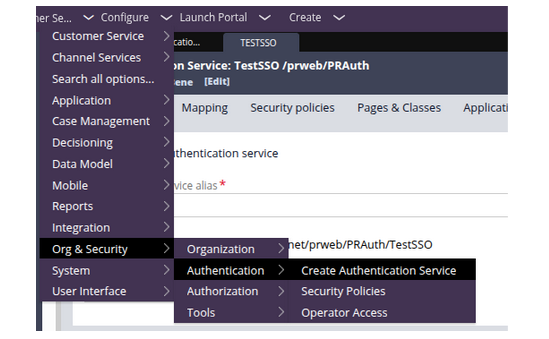
1️⃣ Create Authentication Service
- Go to:
Dev Studio → Configure → Org & Security → Authentication → Create Authentication Service
- Select:
- Type: OpenID Connect
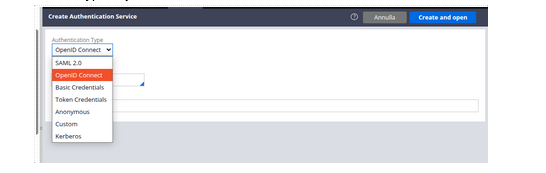
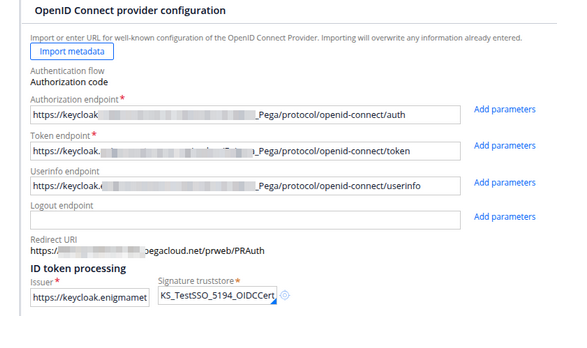
2️⃣ Provide Keycloak Endpoints
From Keycloak .well-known/openid-configuration:
- Authorization Endpoint
- Token Endpoint
- UserInfo Endpoint
- JWKS URL
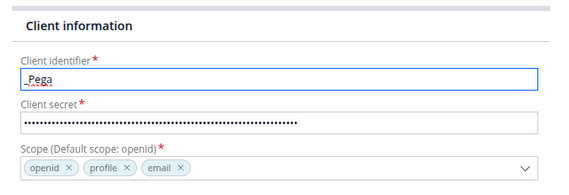
3️⃣ Configure Client Details
- Client ID → from Keycloak
- Client Secret → from Keycloak
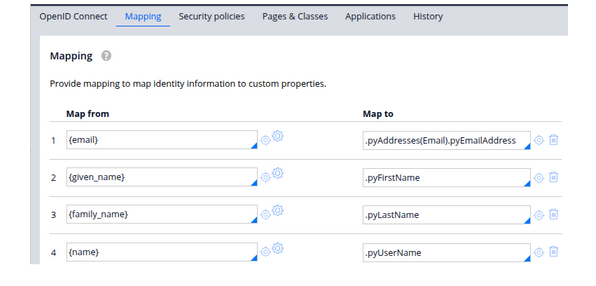
4️⃣ Operator Mapping
Map OIDC claims to Pega operator:
- Map email claim → Email Address
Used as the unique identifier for the user in Pega
- Map given_name claim → First Name
Populates the user’s first name in the operator record
- Map preferred_username claim → User Identifier
Used as the login/display username (if different from email)
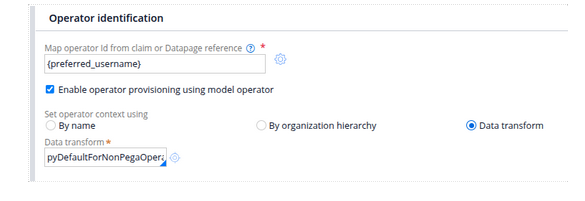
5️⃣ Enable Operator Provisioning (Optional)
- Automatically create operators on first login
- Assign default Access Group
Security Best Practices
- Always use HTTPS
- Validate JWT signature using JWKS
- Set proper token expiry
- Enable MFA in Keycloak
- Restrict redirect URIs
Benefits of Using Keycloak with Pega
✔ Open-source and cost-effective
✔ Full control over authentication
✔ Supports OIDC, OAuth2, and SAML
✔ Easy integration with enterprise directories (LDAP/AD)
✔ Scalable and cloud-ready
Conclusion
Using Keycloak with Pega OIDC SSO provides a flexible, secure, and enterprise-ready authentication solution.
It is especially beneficial for organizations that:
- Prefer open-source IAM
- Need custom authentication flows
- Want full control over identity management
👉 As modern architectures evolve, OIDC + Keycloak + Pega becomes a powerful combination for scalable and secure applications.
–TEAMENIGMA
