
Introduction
Automation and consistency are key aspects of building robust Pega applications. Often, you may want to automatically perform actions when records are saved or deleted, without adding extra steps in flows or activities everywhere. Pega provides a powerful way to achieve this using Declare Triggers.
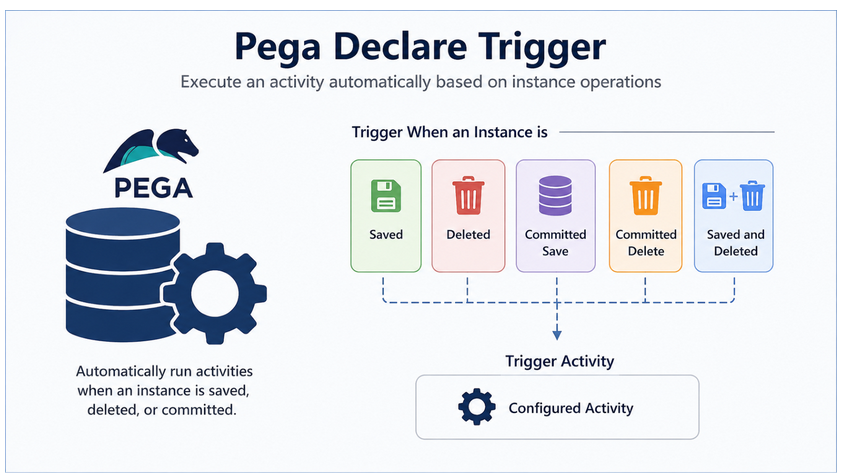
Declare Triggers are declarative rules that monitor object persistence events (save, delete, commit) and automatically run an activity when those events occur. This allows developers to enforce auditing, logging, or background processes without manually invoking them.
What is a Declare Trigger?
A Declare Trigger rule is a declarative mechanism that executes an activity when an instance of a class is saved, committed, or deleted. Unlike activities or flows, you don’t have to explicitly call it — Pega detects the event and runs the trigger automatically.
For example, you might want to:
- Log deleted records to a history table.
- Notify a user when a case is committed to the database.
- Keep related business entities synchronized when one is updated.
Trigger Events (Options)
When configuring a Declare Trigger, you select the event that causes the trigger to run. Pega provides several options:
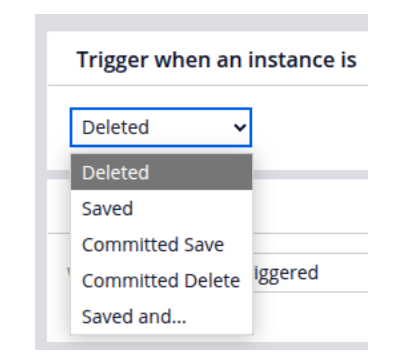
- Saved – Runs when an instance is saved (before commit).
- Deleted – Runs when an instance is deleted (before commit).
- Committed Save – Runs only after a save has been permanently committed.
- Committed Delete – Runs only after a delete is permanently committed.
- Saved and… – Lets you define additional conditions, for example, triggering only when a specific property changes.
Best practice: Use Committed Save/Delete when you want the action to happen only after the database change is guaranteed. Use Saved/Delete for scenarios where pre-commit actions are required.
Configuring a Declare Trigger
1. Trigger Event
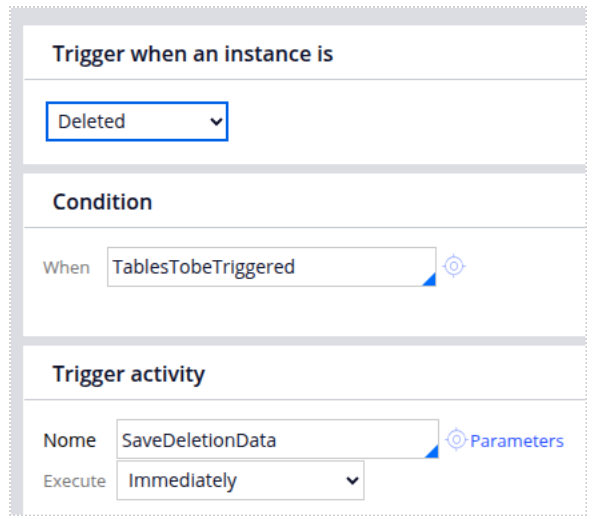
In the “Trigger when an instance is” dropdown, select the event. For example, selecting Deleted means the trigger runs whenever an instance of the specified class is deleted.
2. Condition
You can provide a When rule condition to control when the trigger should fire. For example, a rule named TablesToBeTriggered can ensure that the trigger only runs for specific tables or scenarios. This helps reduce unnecessary execution.
3. Trigger Activity
Specify the activity that should run when the condition is true and the event occurs. The referred activity type must be ‘Trigger’.
For instance, an activity named SaveDeletionData might insert details of the deleted record into a deletion log table.
You can configure:
- Name – The activity to execute.
- Parameters – Any input parameters needed by the activity.
- Execution Timing – Whether the activity runs Immediately (at the event)
Example Scenario: Logging Deleted Data
Imagine you have a class where customer consents are stored. When a record is deleted, you want to log its details into a separate deletion tracking table.
- Trigger Event: Choose Deleted.
- Condition: Use a When rule to filter which records should trigger logging.
- Trigger Activity: Point to an activity (e.g., SaveDeletionData) that:
- Creates a new page of type ba-bene-data-deletiondata.
- Copies relevant properties like deleted pkid, pxObjClass, and timestamp.
- Uses Obj-Save to insert the record.
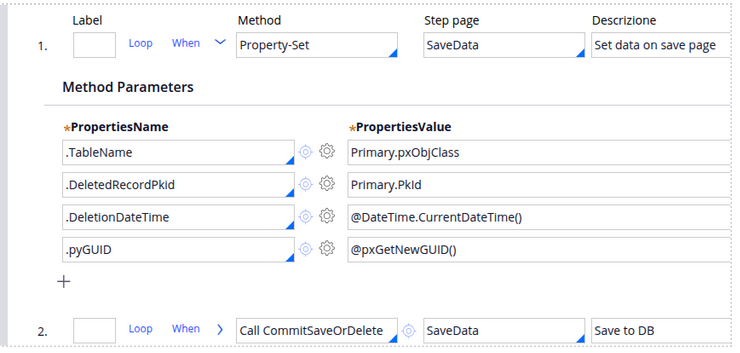
This way, every time a consent record is deleted, Pega automatically logs the details, ensuring auditability without manual effort.
Best Practices for Declare Triggers
- Keep trigger activities lightweight — they run frequently and can affect performance.
- Use When conditions to avoid unnecessary triggers.
- Prefer Committed Save/Delete for reliable post-commit actions.
- Always document your triggers, since they run in the background and may not be obvious during debugging.
