
As web applications become more complex, managing different environments for development, testing, and production can be challenging. A full-stack application typically consists of multiple components, such as a frontend interface, backend services, databases, and supporting tools. Ensuring that all these components work consistently across different systems is a common problem for development teams. Docker addresses this challenge by providing a standardized and portable way to package and deploy applications.
What Is Docker?
Docker is a containerization platform that allows developers to package an application along with all its dependencies into a lightweight, portable unit called a container. Unlike traditional deployment methods that rely heavily on the underlying operating system’s configuration, Docker containers include everything required to run the application. This ensures that the application behaves consistently regardless of where it is deployed.
Containers are isolated from one another, making it possible to run multiple services on the same machine without conflicts. This isolation also improves security and simplifies resource management.
Why Docker Matters for Full-Stack Development
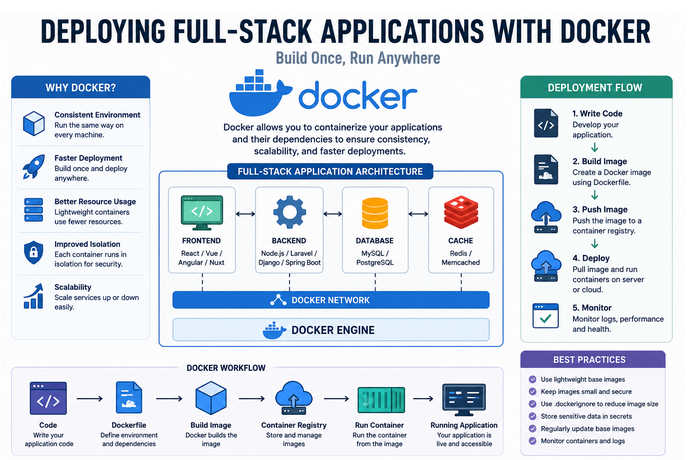
Full-stack applications often involve several technologies working together. A frontend application may communicate with a backend API, which in turn interacts with a database. Each component may have different runtime requirements, dependencies, and configurations.
Docker simplifies this ecosystem by allowing each service to run in its own container. Developers can define the exact environment required for each component and share that configuration with the entire team. As a result, applications become easier to develop, test, deploy, and maintain.
Another major advantage is consistency. One of the most common issues in software development is the phrase, “It works on my machine.” Docker eliminates this problem by ensuring that the same container image is used throughout the application’s lifecycle.
How Docker Supports Full-Stack Applications
In a Docker-based architecture, different parts of a full-stack application are typically separated into individual containers. The frontend, backend, database, caching systems, and web servers can all operate independently while communicating through Docker’s networking capabilities.
This separation provides several benefits. Teams can update one service without affecting others, scale specific components based on demand, and troubleshoot issues more effectively. It also encourages a modular architecture that is easier to manage as applications grow.
Simplified Deployment Process
Traditional deployments often require manually installing software, configuring servers, and resolving dependency issues. Docker streamlines this process by allowing developers to build an application image once and deploy it anywhere.
Whether the application is hosted on a local server, cloud platform, or container orchestration system, the deployment process remains largely the same. This consistency reduces deployment errors and accelerates release cycles.
Additionally, Docker works well with modern DevOps practices such as Continuous Integration and Continuous Deployment (CI/CD). Automated pipelines can build, test, and deploy containerized applications with minimal manual intervention, improving both speed and reliability.
Scalability and Resource Efficiency
As user demand increases, applications must be able to scale efficiently. Docker containers are lightweight compared to traditional virtual machines because they share the host operating system’s kernel. This allows organizations to run more services using fewer resources.
Containers can be replicated quickly to handle increased traffic, making Docker an excellent choice for applications that require high availability and scalability. Modern orchestration tools can automatically manage container deployment, scaling, and recovery, further simplifying operations.
Security Benefits
Docker enhances security through process isolation and controlled access to system resources. Each container operates independently, reducing the risk of one service affecting another. Security updates can also be applied more efficiently by rebuilding and redeploying updated container images.
Organizations can implement additional security measures such as image scanning, access controls, and network restrictions to strengthen their deployment environments.
Challenges to Consider
While Docker offers many advantages, it is not without challenges. Teams must learn container concepts, manage images effectively, and monitor containerized services. Logging, networking, and persistent data storage may require additional planning compared to traditional deployments.
However, with proper implementation and best practices, these challenges can be addressed effectively, allowing organizations to fully benefit from containerization.
Conclusion
Docker has transformed the way full-stack applications are deployed and managed. By providing consistent environments, simplifying deployments, improving scalability, and supporting modern development workflows, Docker helps teams deliver applications more efficiently and reliably. As containerization continues to grow in popularity, understanding Docker has become an essential skill for full-stack developers seeking to build and deploy modern web applications successfully.
