
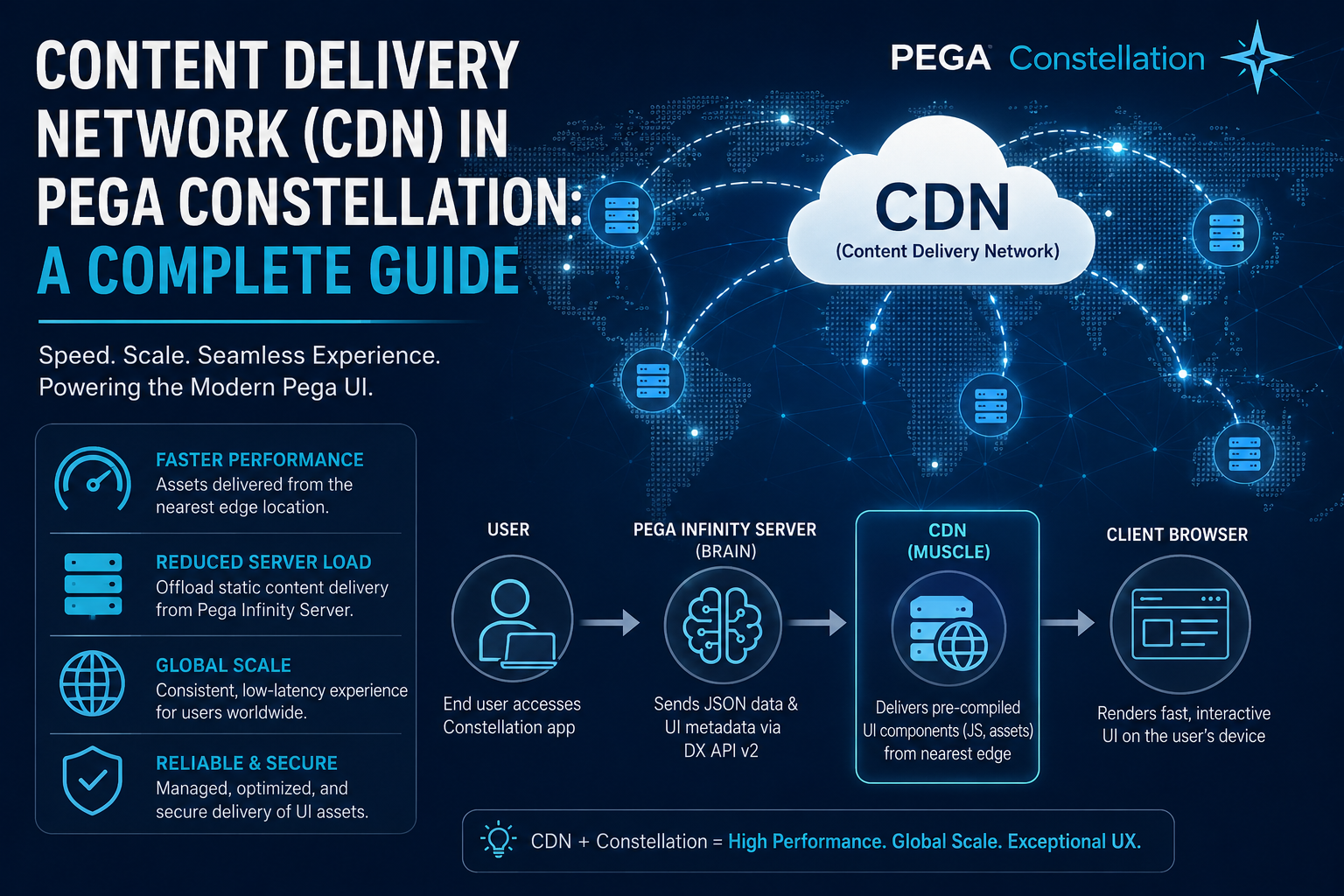
As organizations scale their enterprise applications, user experience and interface performance become non-negotiable. With the introduction of Pega Constellation—Pega’s modern, React-based UX architecture—the paradigm of UI rendering underwent a massive shift. Instead of the server generating heavy HTML markup, Constellation offloads the heavy lifting to the client’s browser.
At the absolute center of this high-performance client-side orchestration is the Content Delivery Network (CDN).
This comprehensive guide explores how CDNs function within Pega Constellation, why they are critical for performance, and how to configure them based on your deployment strategy.
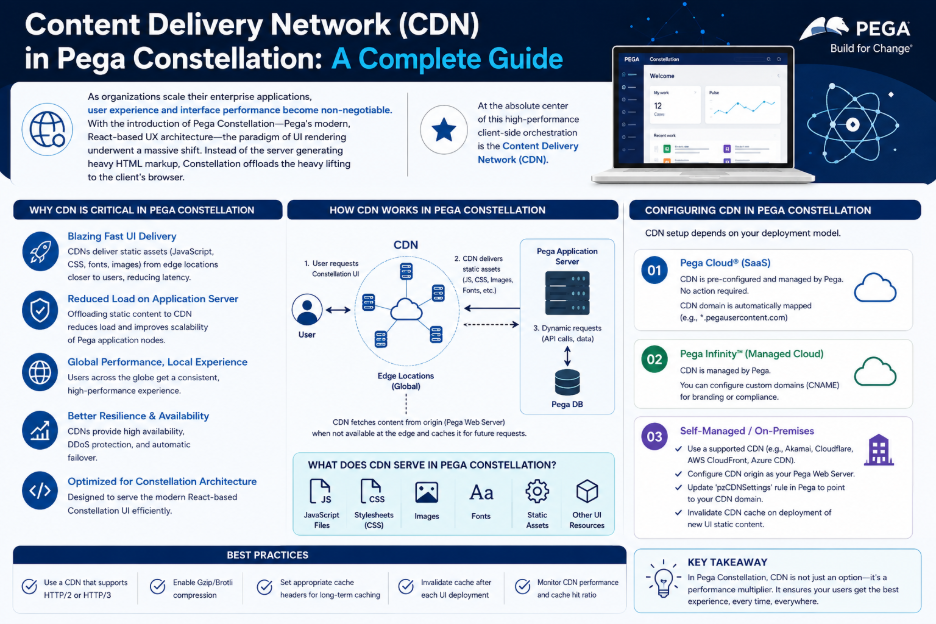
1. The Paradigm Shift: Why Pega Constellation Needs a CDN
In traditional Pega UI (Theme Cosmos or Section-based UI), the Pega Infinity server was responsible for both processing business logic and generating the UI HTML markup. This often resulted in heavy server loads and latency for global users.
Constellation splits this responsibility using a Center-Out™ approach:
- The Brain (Pega Infinity Server): Only handles data, case management, and business logic, serving raw JSON data via the Digital Experience (DX) API v2.
- The Muscle (Client Browser): Receives the JSON data and metadata, then orchestrates, renders, and hydrates the UI components directly on the user’s device.
For the browser to do this, it needs immediate access to standard, pre-compiled UI component definitions (buttons, tables, landing pages, portals). This is where the CDN comes in. Instead of clogging your core Pega Infinity server to deliver these static JavaScript bundles, they are hosted on a globally distributed network of edge servers.
2. Types of Constellation Static Services
To understand how CDNs fit into Pega, it helps to look at the architectural building blocks. Pega categorizes its front-end delivery into three services:
| Service Name | Description | Mandatory / Optional | Delivery Mechanism |
| Pega Static Service | Standard, Pega-engineered core JavaScript code, UI rules, and orchestration layers. It remains identical for all Pega customers worldwide. | Mandatory | Managed completely via Pega CDN |
| Application Static Content Service (App-Static) | Manages custom UI assets authored by your team (e.g., custom components, company logos, regional localizations). | Optional (But required for custom apps) | Customer-managed or Pega Cloud regional instance |
| Constellation Messaging Service | Facilitates real-time UI synchronization and pushes updates to the browser without manual page refreshes. | Optional (Recommended) | WebSockets / Persistent connection service |
3. How the CDN Works in Action
When an end-user interacts with a Pega Constellation application, the execution flow operates seamlessly between the browser, the CDN, and the Pega engine:
- The Request: The user navigates to a Constellation portal or channel.
- The Metadata Fetch: The browser sends a secure request via the DX API to the Pega Infinity Server. Pega returns JSON data containing the case values and UI metadata (a blueprint of what components should be on the screen).
- The CDN Pull: The browser looks at the blueprint, identifies the core components required, and pulls the pre-compiled, static JavaScript files directly from the nearest global Pega CDN edge server.
- The Render: The browser combines the UI assets from the CDN with the data from the Pega server, rendering a lightning-fast UI right on the user’s screen.
4. Architectural Benefits of Utilizing the CDN
By shifting static asset delivery to a CDN, enterprise applications unlock several core architectural advantages:
- Sub-Second Latency: Core UI assets are cached in worldwide regional edge points (PoPs). A user in Sydney and a user in New York receive identical, highly responsive UI performance because the data travels a drastically shorter physical distance.
- Drastically Reduced Origin Load: Your Pega Infinity server is completely insulated from serving heavy image or JavaScript asset requests. It can reserve 100% of its compute power for core database operations, workflows, and processing background logic.
- Seamless Hotfixes and Updates: Because Pega manages the Pega Static CDN, front-end updates, optimizations, and security patches can be applied to the CDN seamlessly, keeping pace with Pega Infinity release cycles without requiring massive system overhauls.
5. Deployment Configurations: Pega Cloud vs. On-Premise
Depending on your organization’s hosting strategy, the configuration of the CDN will vary.
Option A: Pega Cloud Deployments (Recommended)
If your applications run on Pega Cloud, everything is automated out of the box.
- During environment provisioning, Pega automatically wires your Infinity cluster to reference its global and regional CDN instances.
- This configuration inherently respects data residency compliance, ensuring UI requests remain within your specified cloud geography.
Option B: Client-Managed Cloud / On-Premise (Connected)
If you host Pega in your own private cloud (AWS, Azure, GCP) or on-premise data centers but have internet access:
- Navigate to your Dynamic System Settings (DSS) in the Pega Platform.
- Configure the setting named ConstellationPegaStaticURL.
- Set the value to Pega’s official static content delivery URL: https://release.constellation.pega.io.
- Security Note: If your company enforces strict Content Security Policies (CSP), ensure you whitelist the domain (*.pega.io) under your Connect-Source and Script-Source rules.
Option C: Air-Gapped / Highly Restricted Environments (Local Install)
For enterprise sectors (like defense, banking, or government) where servers are completely isolated from the open internet, fetching assets from an external CDN is not an option.
To solve this, Pega provides an alternative path:
- Pega packages the entire Constellation CDN static content into an Nginx-based Docker image (matching your specific Infinity major/minor version).
- Your DevOps team can host this Docker image or Kubernetes service locally within your internal private network.
- The Trade-off: While this mimics a CDN internally, it shifts the operational overhead to your IT team. You must manually maintain high availability, upgrade the container for patch updates, and manage the local SSL/TLS certificates (which must share the same parent domain as your Infinity server to avoid CORS errors).
Conclusion
The integration of a Content Delivery Network within Pega Constellation is more than just a performance tweak; it is a fundamental pillar of Pega’s modern, client-side UX architecture. By offloading static component delivery to global edge locations, Constellation ensures your enterprise apps scale smoothly, load instantly, and minimize heavy strain on your core application servers.
Unless you are operating under strict air-gapped security protocols, relying on Pega’s native Static CDN is the definitive best practice to unlock the full speed and fluid capability of your modern digital channels.
