
Introduction
A software feature may appear simple from a user’s perspective. It could be a new button, a form, a dashboard, an approval workflow, or a new search option. However, behind that single feature is a complete engineering process involving requirements, architecture, database design, backend APIs, frontend development, testing, deployment, and monitoring.
As a Full Stack Developer, understanding this complete lifecycle is important because a feature is not truly complete when the code works locally. It needs to be reliable, secure, maintainable, tested, and ready to operate in a real production environment.
This article explores how a Full Stack feature moves from an initial business requirement to a production release and how each stage connects with the next.
The Complete Feature Lifecycle
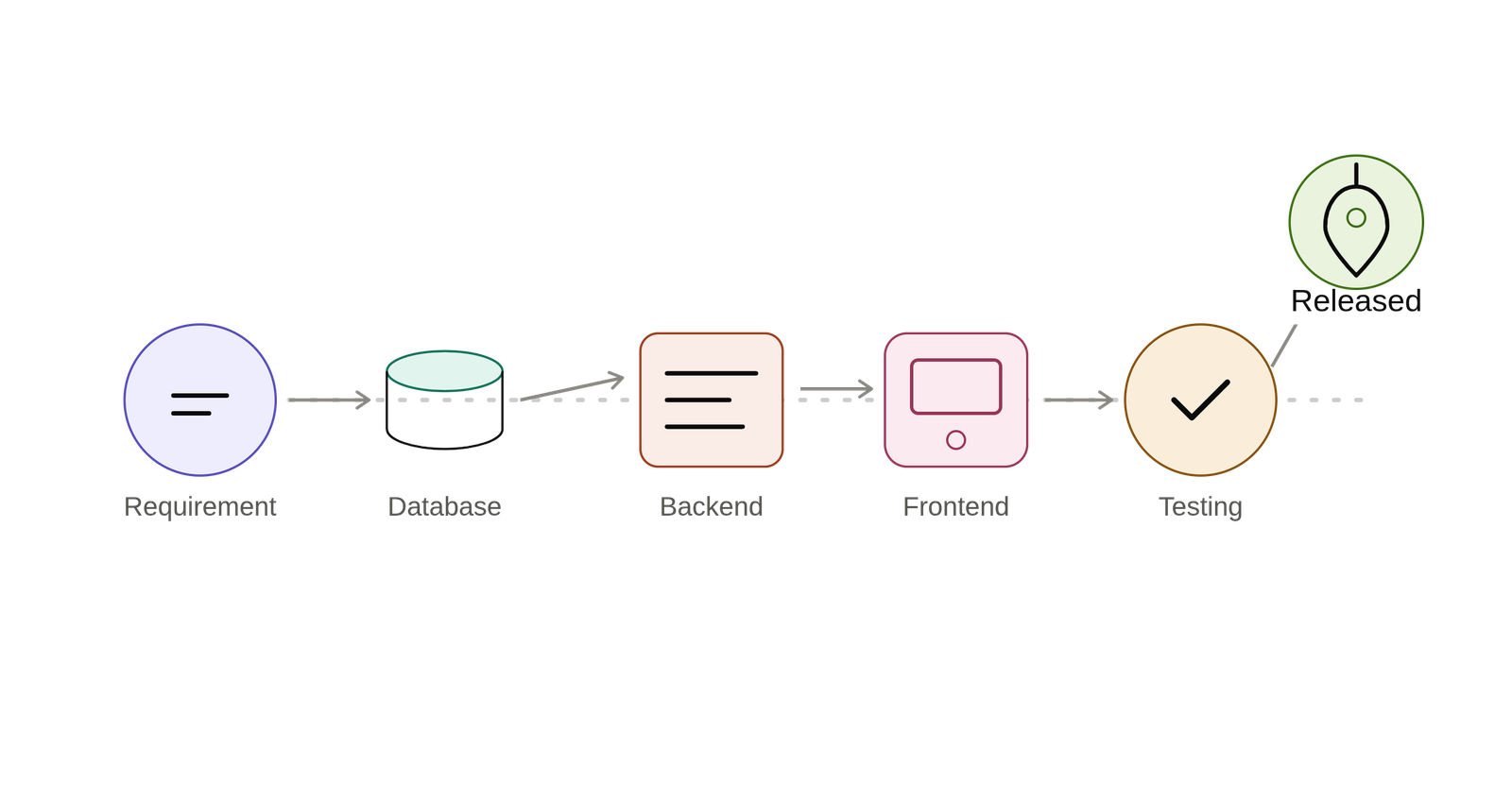
Business Requirement → Requirement Analysis → Technical Planning → Database Design → Backend Development → Frontend Development → Integration → Testing → Code Review → CI/CD → Deployment → Monitoring → Continuous Improvement
Each stage plays an important role, and decisions made in one stage can directly affect the others.
1. Understanding the Business Requirement
Every feature begins with a problem that needs to be solved.
Before writing code, developers need to understand what the business actually expects from the feature. Jumping directly into development without understanding the requirement can lead to incorrect implementations and unnecessary rework.
Important questions include:
- What problem are we solving?
- Who will use this feature?
- What should happen when the user performs an action?
- What are the business rules?
- What are the expected inputs and outputs?
- What happens when something goes wrong?
- What permissions are required?
- What are the possible edge cases?
A clear requirement provides a strong foundation for everything that follows.
The first step in development is not writing code. It is understanding the problem.
2. Technical Planning and Architecture
Once the requirement is clear, the next step is to determine how the feature should fit into the existing application.
A Full Stack Developer needs to identify which parts of the application will be affected.
This may include:
- Frontend components
- Backend controllers and services
- API endpoints
- Database tables
- Authentication and authorization
- Validation rules
- External integrations
- Existing modules and dependencies
At this stage, developers should also think about maintainability, performance, security, and scalability.
Good technical planning prevents developers from solving the right problem in the wrong way.
3. Database Design
If the feature requires storing or retrieving data, database design becomes an important part of the implementation.
Developers may need to:
- Create new tables
- Add or modify columns
- Define relationships
- Create migrations
- Add appropriate indexes
- Define constraints
- Consider transactions
- Maintain data integrity
For example, adding an approval workflow may require storing the request status, approver information, timestamps, comments, and audit details.
A database design should not only support the current requirement but also consider how the data may be used in the future.
A well-designed database provides a strong foundation for the backend and the entire application.
4. Backend Development
The backend is responsible for implementing the application’s business logic and exposing the functionality through APIs.
A typical backend flow looks like:
Request → Route → Controller → Validation → Service/Business Logic → Database → Response
The backend needs to handle:
- Request validation
- Authentication
- Authorization
- Business rules
- Database operations
- Error handling
- Transactions
- API responses
For example, if a user submits a request for approval, the backend should verify that the request is valid and that the user has permission to create it before storing the information.
Good backend architecture separates responsibilities so that business logic remains organized, testable, and maintainable.
5. Frontend Development
Once the backend contract and requirements are clear, the frontend implementation can begin.
The frontend is responsible for presenting the feature to users and providing an intuitive experience.
Typical frontend work includes:
- Creating UI components
- Designing forms
- Managing application state
- Integrating APIs
- Client-side validation
- Loading states
- Error messages
- Success notifications
- Navigation and permissions
For example, a form may display a loading indicator while an API request is being processed and show a meaningful error message if the request fails.
A good frontend doesn’t simply display data—it communicates the application’s state clearly to the user.
6. Frontend and Backend Integration
This is where the different layers of the application begin working together.
The communication typically looks like:
Frontend → HTTP Request → Backend API → Business Logic → Database → API Response → Frontend → UI Update
At this stage, developers verify that both sides agree on:
- API endpoints
- HTTP methods
- Request payloads
- Response structures
- Validation rules
- Authentication requirements
- Error responses
Many integration issues occur because the frontend and backend make different assumptions about the data.
A clearly defined API contract helps both teams work efficiently and reduces unnecessary debugging.
7. Testing and Debugging
A feature is not complete simply because the main scenario works.
Real applications need to handle unexpected situations.
Testing should consider:
- Valid inputs
- Invalid inputs
- Missing data
- Unauthorized users
- Duplicate requests
- Empty states
- Large datasets
- API failures
- Database failures
- Network problems
- Unexpected user behavior
Different types of testing can be used depending on the feature, including unit testing, integration testing, API testing, and end-to-end testing.
Debugging is equally important. When something fails, developers need to identify the root cause instead of simply fixing the visible symptom.
A good developer doesn’t just ask, “Why did it fail?” They ask, “Why was this failure possible in the first place?”
8. Code Review
Before a feature becomes part of the main codebase, it should go through code review.
Code review helps the team evaluate:
- Code quality
- Architecture
- Readability
- Security
- Performance
- Maintainability
- Test coverage
- Edge cases
Code review is not only about finding mistakes.
It is also an opportunity for:
- Knowledge sharing
- Maintaining coding standards
- Identifying better approaches
- Reducing technical debt
- Improving team collaboration
A feature that works correctly but introduces unnecessary complexity can create problems for future development.
9. CI/CD and Build Validation
After the code is reviewed and merged, automated pipelines can validate the changes.
A typical CI/CD flow may include:
Code Push → Build → Automated Tests → Quality Checks → Package → Deployment
Automation reduces manual errors and provides faster feedback when something goes wrong.
CI/CD also makes deployments more predictable because the same process can be repeated across different environments.
10. Deployment and Release
Deployment is the stage where the completed feature is made available in the target environment.
Before releasing a feature, teams may verify:
- Environment configuration
- Database migrations
- Required credentials and secrets
- API availability
- Application health
- Compatibility with existing features
- Monitoring configuration
- Rollback strategy
For higher-risk features, teams may use techniques such as feature flags, staged releases, or gradual rollouts.
The goal is not simply to deploy quickly, but to deploy safely.
11. Production Monitoring
Deployment does not mean the feature lifecycle is finished.
Once the feature reaches production, developers need to understand how it behaves with real users and real data.
Monitoring may include:
- Application logs
- Error tracking
- API response times
- Database performance
- Background jobs
- Infrastructure health
- User activity
- Business metrics
Production monitoring helps teams identify problems that may not have appeared during development or testing.
It also provides valuable information for future improvements.
12. Continuous Improvement
Software development is an ongoing process.
After a feature is released, users may provide feedback, new requirements may emerge, or production data may reveal opportunities for improvement.
The team may then:
- Fix bugs
- Improve performance
- Refactor code
- Improve the user experience
- Add additional functionality
- Strengthen security
- Optimize database queries
This creates a continuous cycle:
Build → Release → Monitor → Learn → Improve → Release Again
A good application evolves with its users and business requirements.
A Simple Example: Building an Approval Feature
Consider a business application where an employee submits a request and a manager approves or rejects it.
The lifecycle could look like this:
Requirement: Define who can submit, approve, or reject requests.
Database: Create the required request, status, user, and approval information.
Backend: Develop APIs for creating, viewing, approving, and rejecting requests.
Frontend: Build the request form, request list, status indicators, and approval actions.
Integration: Connect the frontend to the backend APIs.
Testing: Verify valid requests, invalid inputs, unauthorized access, duplicate actions, and failure scenarios.
Code Review: Review the implementation for quality, security, and maintainability.
Deployment: Release the feature through the CI/CD pipeline.
Monitoring: Observe errors, API performance, and user behavior after release.
What looks like a simple “Approve” button is actually the visible part of a much larger Full Stack engineering process.
Common Mistakes During the Feature Lifecycle
Several problems can occur when developers focus only on making the feature work.
Common mistakes include:
- Starting development without understanding the requirement
- Poor communication between frontend and backend teams
- Inconsistent API contracts
- Relying only on frontend validation
- Ignoring database performance
- Testing only the happy path
- Writing difficult-to-maintain code
- Skipping meaningful code reviews
- Treating deployment as a manual final step
- Releasing without proper monitoring
These mistakes may not cause immediate problems, but they can create technical debt and increase maintenance costs over time.
The Full Stack Developer’s Perspective
One of the most valuable skills of a Full Stack Developer is understanding how decisions in one layer affect the rest of the application.
For example:
A frontend requirement may require a new API.
That API may require changes to the database.
The database query may require a new index for better performance.
A permission requirement may affect both frontend visibility and backend authorization.
A large dataset may require backend pagination and corresponding frontend controls.
This is why Full Stack Development is not simply about knowing multiple technologies.
It is about understanding how the different layers work together.
Final Thoughts
A production-ready feature is the result of many connected engineering decisions.
What users see may be a single button, page, form, or workflow. Behind that interface are requirements, architecture, database design, APIs, business logic, frontend components, validation, testing, deployment, and monitoring.
