
Introduction
In enterprise application development, accessing and managing data efficiently is just as important as implementing business logic. Traditional application architectures often rely heavily on direct database interactions, which can create tight dependencies between business logic and database structures.
But what happens when the underlying database changes? Or when an application needs to retrieve information from multiple external systems?
This is where Pega’s Data Pages play an important role.
Pega provides a structured approach to data access through Data Pages, allowing developers to separate data retrieval from business logic. Instead of embedding database access logic throughout an application, developers can create reusable data access layers that retrieve information from different sources.
Let’s explore how this architecture works and how it helps build scalable, maintainable Pega applications.
1. Why Should We Avoid Unnecessary Direct Database Access?
Direct database interactions may appear convenient during development, but excessive dependence on database structures can introduce several challenges:
- Tight Coupling: Business logic becomes dependent on specific database tables and structures.
- Maintenance Complexity: Changes in database structures may require modifications across multiple application rules.
- Performance Issues: Repeated queries and unnecessary data retrieval can increase database load.
- Limited Reusability: The same data retrieval logic may be duplicated across different application components.
- Integration Challenges: Retrieving information from multiple systems becomes harder when data access logic is scattered throughout the application.
A better approach is to centralize data retrieval and make it reusable.
2. Understanding Data Pages in Pega
Data Pages are an important component of Pega’s data architecture.
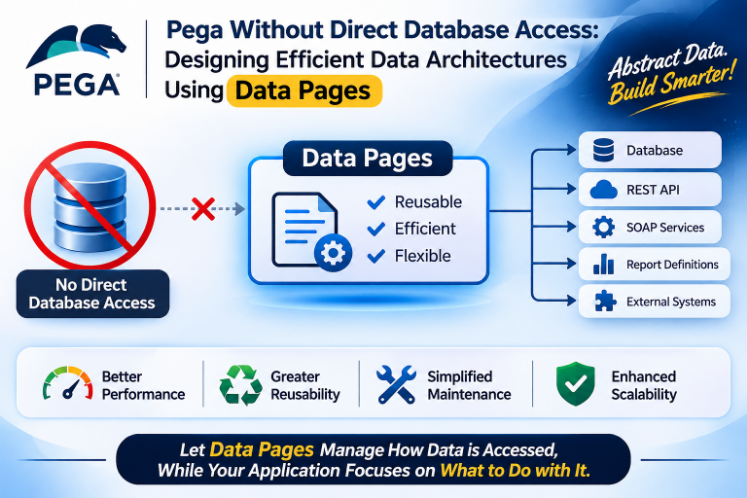
They act as an abstraction layer between the application and its data sources. They allow applications to retrieve, organize, and reuse information without requiring every application component to understand how the data is accessed.
For example, consider an insurance application that needs customer policy information.
Instead of implementing separate database retrieval logic in multiple activities, sections, and decision rules, we can create a Data Page called:
D_GetCustomerPolicies
This Data Page can retrieve policy information using a Customer ID parameter and make the results available wherever required.
The application focuses on consuming the data rather than managing the underlying retrieval mechanism.
3. Understanding Data Page Configuration
Pega provides different Data Page configurations depending on application requirements.
A. Data Page Structure
A Data Page can be configured with different structures:
- Page: Retrieves a single data object.
- List: Retrieves multiple data objects.
- Page List: Represents a collection of embedded page structures.
Choosing the appropriate structure depends on the type of information being retrieved.
B. Data Page Scope
Data Pages support three important scopes:
Thread Scope
The data is available within the current thread. It is useful when information is required only during a particular processing context.
Requestor Scope
The data is shared across threads belonging to the same requestor. It can help avoid repeated data retrieval within a user’s session.
Node Scope
The data is shared across requestors on the same server node. It is useful for relatively stable reference data that can be reused across multiple users.
Selecting the correct scope is important because it directly affects data availability, reuse, and freshness.
C. Read-Only and Editable Data Pages
Pega supports different data page modes:
- Read-Only: Used to retrieve and display information without modifying the data through the Data Page.
- Editable: Used when application logic needs to modify data before saving it.
- Savable: Supports saving changes from an editable Data Page to its configured system of record through a save plan.
Understanding these configurations helps developers choose the appropriate approach for different business scenarios.
4. Connecting Data Pages to Different Data Sources
One of the major advantages of Data Pages is their ability to retrieve information from different systems.
Depending on the implementation, a Data Page can use:
- Report Definitions.
- Data Transforms.
- Database data sources.
- REST connectors.
- SOAP connectors.
- Other supported data sources and services.
For example, an insurance application might retrieve customer information from an internal database, policy details from an external REST service, and agency information from another enterprise system.
These sources can be exposed through separate Data Pages, allowing the application to consume the information through a consistent data access approach.
This reduces dependency on individual integration implementations.
5. Designing Efficient Data Architectures Using Data Pages
Creating Data Pages alone does not guarantee good performance. Their configuration and usage determine how efficiently an application handles data.
Here are some important design considerations:
1. Reuse Existing Data Pages
Before creating a new Data Page, check whether an existing one already provides the required information. Reusing existing data access logic reduces duplication and simplifies maintenance.
2. Use Parameterized Data Pages
When retrieving customer-specific or policy-specific information, use parameters rather than creating separate Data Pages for every customer or policy.
For example:
D_GetCustomerPolicies[CustomerID]
This makes the Data Page reusable for different customers.
3. Choose the Correct Scope
Use Thread, Requestor, or Node scope based on how frequently the data changes and where it needs to be accessed.
Avoid using broader scopes without considering data freshness and sharing requirements.
4. Configure Refresh Strategies Carefully
Data Pages can retain loaded information to reduce unnecessary data retrieval.
However, outdated information can create business problems.
Configure refresh conditions, expiration settings, and other reload strategies according to the nature of the data.
5. Avoid Loading Unnecessary Data
Retrieving thousands of records when the application needs only a few can negatively affect performance.
Use appropriate filtering, pagination, and optimized data retrieval strategies.
6. Separate Data Access from Business Logic
Keep data retrieval responsibilities within Data Pages and their associated data source configurations.
This makes business rules easier to understand, test, and maintain.
6. Real-World Example: Insurance Policy Management
Consider an insurance application where a customer can have multiple active and expired policies.
The application needs to display policy information and determine whether the customer is eligible for a renewal offer.
A reusable architecture can be designed as follows:
Step 1: Create a Data Page
Create a Data Page named:
D_GetCustomerPolicies
Configure it as a List Data Page.
Step 2: Configure Parameters
Add a parameter:
CustomerID
This allows the Data Page to retrieve policies for different customers.
Step 3: Configure the Data Source
Connect the Data Page to the appropriate database source or REST service.
Apply the necessary filtering to retrieve only relevant policy records.
Step 4: Consume the Data Page
Use the Data Page in the application wherever policy information is required, such as:
- Customer policy overview.
- Policy renewal eligibility.
- Decision rules.
- Customer service interactions.
Step 5: Apply Business Logic
Use the retrieved policy information to determine active policies, expiration dates, and renewal eligibility.
Step 6: Configure Data Refresh
Ensure that policy information is refreshed when necessary, especially when policy status or renewal information changes.
With this approach, the application does not need to implement separate data retrieval logic in every component.
The same Data Page can serve multiple application requirements while keeping the architecture organized.
7. Common Mistakes Pega Developers Should Avoid
Even though Data Pages simplify data access, incorrect implementation can introduce performance and maintenance issues.
Some common mistakes include:
- Creating duplicate Data Pages for the same business entity.
- Choosing Node scope for frequently changing information without appropriate refresh controls.
- Loading complete datasets instead of applying filters.
- Ignoring Data Page parameters.
- Configuring unnecessary refresh conditions.
- Using Data Pages without understanding their underlying data sources.
- Assuming that Data Pages automatically optimize poorly designed database queries.
Remember, a well-designed Data Page cannot compensate for an inefficient underlying query or integration.
Developers must consider both Pega configuration and the performance of the actual data source.
8. The Bigger Picture: Data Pages as an Architectural Advantage
The real value of Data Pages goes beyond retrieving information.
They help establish a separation between the application layer and the data access layer.
This provides several architectural benefits:
- Reduced coupling between business logic and data sources.
- Improved reusability across application components.
- Easier integration with external enterprise systems.
- Better control over data loading and caching.
- Simplified maintenance and application evolution.
When applications grow in complexity, this separation becomes increasingly important.
Conclusion
Building efficient Pega applications is not simply about creating cases, designing flows, or implementing business rules. It also requires making thoughtful architectural decisions about how data is accessed, managed, and reused.
Pega Data Pages provide a powerful mechanism for achieving this separation.
By choosing appropriate scopes, using parameterized Data Pages, configuring refresh strategies, and optimizing data sources, developers can build applications that are more maintainable, reusable, and scalable.
The key takeaway is simple: Don’t let your business logic depend on how data is retrieved. Let your application focus on what to do with the data, while Data Pages manage how that data becomes available.
