
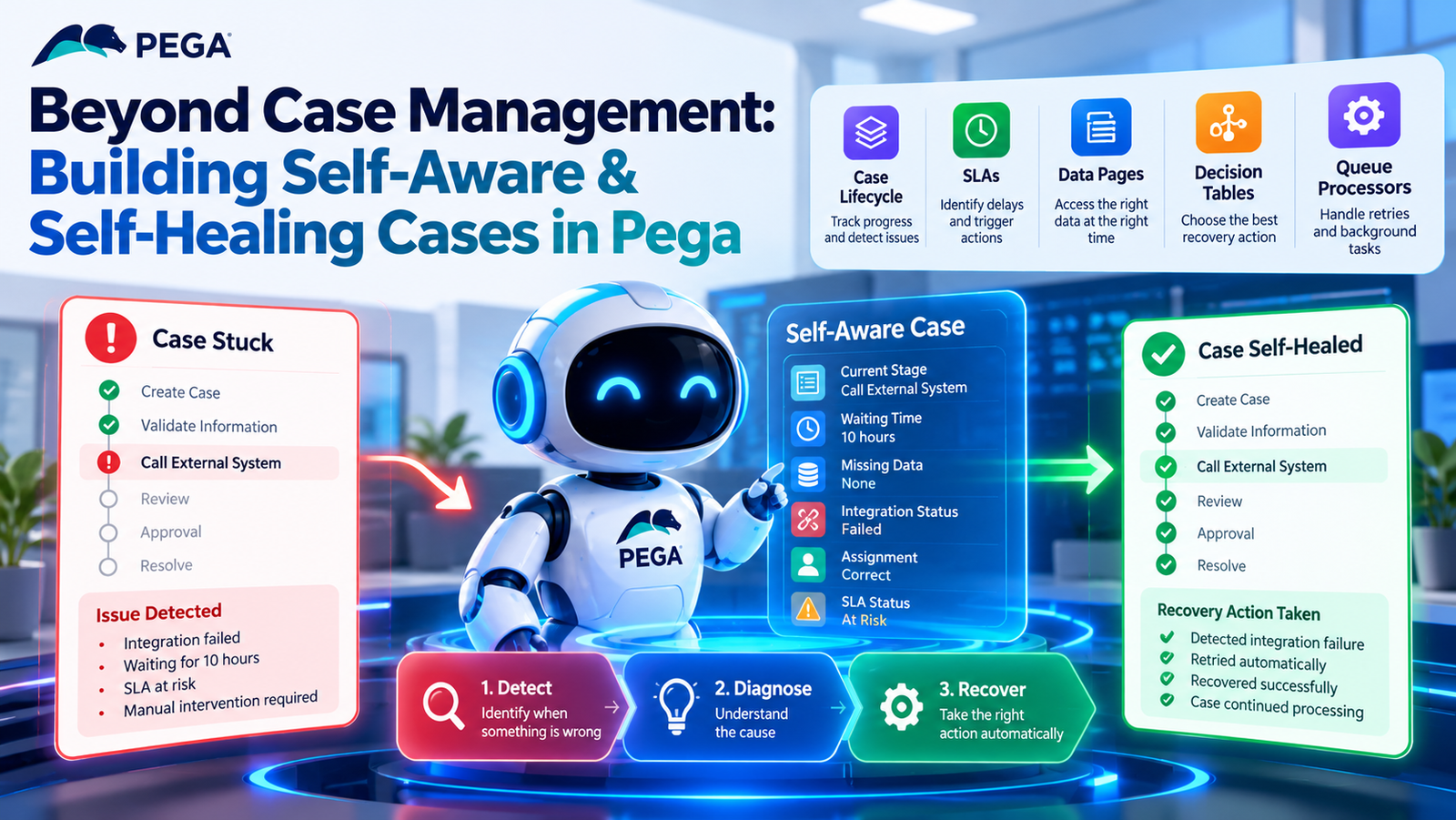
What if a Pega case could detect when it gets stuck, identify the cause, and take corrective action before a business user notices?
Traditional case management moves work through a defined process:
Create → Process → Approve → Resolve
However, real-world business processes are rarely that simple. Cases can experience delays, missing information, integration failures, and incorrect assignments.
These problems can slow down operations and increase manual work.
Self-aware and self-healing cases in Pega offer a way to make case management more reliable. By combining monitoring, business rules, and controlled automation, developers can build applications that detect problems, explain what went wrong, and respond appropriately.
The goal is not to automate every decision. Instead, it is to help cases recover from common problems while involving people when their judgment is needed.
What Is a Self-Aware Case in Pega?
A self-aware case can provide useful information about its current condition.
Instead of showing only that a case is In Progress, the application should help developers and business users understand what is happening.
For example, a case monitoring process could identify:
- Which stage is currently active.
- Which step is waiting for completion.
- How long the case has been waiting.
- Whether required information is missing.
- Whether an external integration has failed.
- Whether the case is assigned to the correct team.
- Whether the case has exceeded its expected processing time.
This does not mean that a Pega case can literally think.
Rather, developers design the application to track relevant information, identify unusual conditions, and make that information available for action.
As a result, teams can identify problems before they cause significant delays.
Why Traditional Case Management Is Not Always Enough
Consider an insurance claim that follows this process:
Create Claim → Validate Information → Call External System → Review → Approve → Resolve
Suppose the external policy system becomes unavailable during validation.
The case may remain open and appear to be in progress. However, the business process has stopped.
Eventually, a user may notice the delay and investigate the problem manually.
This can lead to:
- Processing delays
- Manual intervention
- SLA breaches
- Increased operational effort
- Poor customer experience
A more reliable approach asks a different question:
What should happen when a case cannot complete a step as expected?
This is where self-healing case management becomes useful.
The Three Layers of Self-Healing in Pega
A practical self-healing approach has three main stages: detect, diagnose, and recover.
1. Detect the Problem
First, the application must identify when something goes wrong.
For example, a case might:
- Exceed its service-level agreement (SLA).
- Wait too long for an assignment.
- Miss required information.
- Receive an error from an external API.
- Fail to complete a background process.
By monitoring these conditions, the application can identify cases that need attention.
2. Diagnose the Cause
Next, the application should identify why the case cannot continue.
For example, an integration failure could result from a timeout, an invalid response, an unavailable service, or missing input.
These problems require different responses.
A temporary timeout might allow a retry. Missing customer information may require a request for additional details.
Therefore, identifying the cause helps the application choose a more appropriate recovery action.
3. Recover Safely
Once the problem is understood, the application can take a suitable action.
Depending on the situation, it might:
- Retry an operation.
- Route work to another queue.
- Reassign a case.
- Request missing information.
- Create a follow-up assignment.
- Escalate the case.
- Notify an operator.
- Move the case to a recovery process.
The key principle is simple:
Detect → Diagnose → Recover
However, every recovery action should follow defined business rules and include checks to confirm whether the problem has been resolved.
How Pega Supports Self-Aware Case Management
Pega provides several capabilities that developers can use to build more resilient case management applications.
Case Lifecycle Monitoring
Pega case types use stages, processes, and assignments to define how work should progress.
This lifecycle provides a baseline for identifying delays and unexpected behavior.
For example, a case might be expected to complete document verification within two hours. If it remains in that stage for ten hours, the application can flag the delay for investigation.
By comparing expected progress with actual progress, teams can identify cases that need attention.
Service-Level Agreements (SLAs)
SLAs help teams track deadlines and identify delayed assignments.
Instead of waiting for a business user to notice a problem, developers can configure SLA actions to respond when work approaches or exceeds its deadline.
For example:
- Before the deadline: Notify the assigned user.
- After the deadline: Escalate the assignment.
- If the problem continues: Route the case to a designated recovery queue.
As a result, SLAs can support more than deadline tracking. They can also help teams manage exceptions and reduce processing delays.
The exact actions depend on the application’s business requirements and Pega configuration.
Using Queue Processors for Background Recovery
Not every recovery action needs to happen while a user is working on a case.
Background processing can handle tasks such as retrying failed operations, processing asynchronous integrations, and performing follow-up activities.
For example, imagine an external API fails during claim processing.
A recovery workflow could follow this sequence:
- The API request fails.
- The application records the failure details.
- A background process schedules a retry.
- The application calls the API again.
- If the request succeeds, case processing continues.
- If the request fails again, the application escalates the case.
Pega queue processors can support background work of this kind, depending on the implementation.
This approach reduces repetitive manual work and allows the application to handle recoverable failures more consistently.
However, retries should have defined limits to prevent repeated failures from creating additional problems.
Using Data Pages to Understand Case Conditions
Self-aware case processing also depends on having the right information available.
Pega Data Pages provide reusable access to data that a case may need during processing.
For example, a case might require:
- Customer information
- Insurance policy details
- Product information
- External service responses
- Configuration data
- Information used by business rules
Suppose a case cannot proceed because policy information is unavailable.
The application should distinguish between missing business data and a technical failure.
For example, the customer might not have supplied a policy number. Alternatively, the external policy service might be unavailable.
Although both situations prevent progress, they require different recovery actions.
Identifying the difference between missing information and system failure helps the application respond correctly.
Using Decision Tables to Choose Recovery Actions
Not every problem should trigger the same recovery action.
Pega Decision Tables can help developers define business conditions and determine the appropriate response.
For example, a recovery policy might follow these rules:
| Condition | Possible recovery action |
|---|---|
| Customer information is missing | Request the missing information |
| Temporary API failure | Retry the operation |
| Repeated API failures | Escalate the case |
| Incorrect assignment | Route the case to the correct queue |
| SLA exceeded | Escalate to a supervisor |
| Business rejection | Follow the rejection process |
This approach keeps recovery decisions organized and easier to maintain.
Instead of spreading complex conditions throughout the application, developers can centralize relevant decision logic in appropriate rules.
As a result, teams can update recovery behavior more consistently when business requirements change.
A Practical Example: Self-Healing Insurance Claims
Consider an insurance claim that needs information from an external policy system.
Normal Case Processing
The expected workflow is:
Create Claim → Validate Policy → Call External API → Retrieve Information → Continue Processing
When the API responds successfully, the case moves forward as expected.
However, problems can occur when the API times out or becomes temporarily unavailable.
Traditional Approach
In a traditional implementation, the workflow might look like this:
API Timeout → Case Remains in Progress → User Notices the Delay → User Investigates → Manual Retry
This approach depends on someone identifying the problem and taking action.
Consequently, the case may remain delayed until a user intervenes.
Self-Healing Approach
A more resilient workflow could follow these steps:
API Timeout → Record Failure → Check Whether Retry Is Appropriate → Retry the Request
If the retry succeeds, the case continues.
If the retry fails, the application follows a defined recovery path, such as escalating the case or routing it to a recovery queue.
This reduces unnecessary manual intervention and makes failure handling more predictable.
However, the retry decision must account for the type of failure. Repeating a request is not always safe, particularly when the operation could create duplicate transactions.
Why Every Failure Should Not Be Automated
Self-healing does not mean automating every problem.
Some situations require human judgment, especially when they involve business risk, conflicting information, or regulatory requirements.
Examples include:
- Suspicious customer information
- Conflicting records
- Regulatory decisions
- High-value transactions
- Repeated integration failures
- Unusual business exceptions
In these situations, the application should identify the problem and route it to the appropriate person.
A suitable workflow might be:
Detect → Analyze → Escalate to a Human
The goal is not to remove people from the process.
Instead, automation should handle predictable and recoverable problems while allowing people to focus on decisions that require experience and judgment.
Designing Explainable Recovery Actions
A reliable self-healing system should explain what it does and why.
If the application automatically retries an API request, users and support teams should be able to understand what happened.
For example, they may need to know:
- What caused the failure?
- Why was a retry attempted?
- How many attempts were made?
- Did the retry succeed?
- Why was the case escalated?
To support this visibility, recovery mechanisms should record useful details, including:
- Failure reason
- Timestamp
- Attempt count
- Previous case status
- Recovery action
- Recovery result
- Escalation reason
This information helps developers investigate recurring problems and allows business users to understand why a case followed a particular path.
Automation without visibility can create a new problem: the system takes action, but nobody understands why.
Self-Aware vs. Self-Healing Cases
Self-aware and self-healing cases are related, but they serve different purposes.
Self-aware case management focuses on identifying and explaining the current condition.
For example:
“This case has been waiting for six hours because the policy validation service has failed twice.”
Self-healing case management focuses on taking an appropriate corrective action.
For example:
“The service failure appears temporary, so the application will retry the request according to the configured recovery policy.”
A more resilient application combines both capabilities.
The overall process becomes:
Observe → Explain → Act → Verify
This approach helps developers create applications that can identify problems, take controlled action, and confirm whether recovery succeeded.
A Practical Architecture for Self-Healing Cases
A conceptual self-healing architecture in Pega could follow this sequence:
- Pega case: The case moves through its defined lifecycle.
- Lifecycle monitoring: The application tracks expected progress.
- Condition detection: The system identifies delays or failures.
- Failure classification: The application determines the type of problem.
- Decision logic: Business rules select an appropriate recovery action.
- Recovery action: The application retries, reroutes, requests information, or escalates.
- Verification: The application checks whether recovery succeeded.
- Next step: The case continues or follows an escalation path.
The verification step is particularly important.
For example, a successful retry should allow processing to continue only when the required operation has actually completed.
If the retry fails, the application should follow the next defined recovery step rather than assuming the problem is resolved.
This makes the recovery process more reliable and easier to monitor.
How to Prevent Infinite Retry Loops
One risk of automated recovery is repeatedly performing the same unsuccessful action.
For example:
API Failure → Retry → Failure → Retry → Failure → Retry
This can increase system load without resolving the underlying problem.
A better approach is to define a retry policy with clear limits.
For example:
- First failure: Retry the operation.
- Second failure: Retry again if appropriate.
- Third failure: Stop retrying and escalate the case.
The actual retry count should depend on the operation, failure type, and business requirements.
Teams should also consider retry delays, duplicate-operation risks, and whether the external service is likely to recover.
Controlled retries help prevent endless recovery loops and make failures easier to investigate.
Moving From Reactive to Proactive Case Management
Self-healing is not limited to responding after a failure occurs.
Applications can also identify patterns that suggest a case may experience problems.
For example, historical information might show that cases with missing documents and a particular assignment pattern frequently exceed their deadlines.
The application could flag similar cases earlier so that a user can address the problem before the deadline is missed.
This creates a progression from reactive to proactive case management.
- Reactive: Respond after a problem occurs.
- Proactive: Identify warning signs and act before the problem becomes serious.
- Predictive: Use suitable historical data and analytical methods to estimate which cases may experience future problems.
Predictive capabilities require appropriate data and reliable analysis. They should not be assumed to exist automatically in every Pega application.
Nevertheless, this approach offers an opportunity to improve operational visibility and reduce avoidable delays.
What Pega Developers Should Consider
Building resilient applications requires more than creating case types, stages, views, data objects, and integrations.
Developers must also plan for what happens when a process does not work as expected.
Before Development
Identify possible failure points.
Ask:
- What could go wrong?
- What information might be missing?
- Which integrations could fail?
- Where could the case become stuck?
During Development
Define how the application should respond.
Consider:
- How will failures be detected?
- What information should be recorded?
- Which failures can be retried safely?
- Which situations require human intervention?
- When should the application escalate a case?
After Development
Check whether the recovery process works as intended.
Ask:
- Can the team monitor case progress?
- Can developers identify recurring failures?
- Are recovery actions recorded clearly?
- Can the team improve the recovery rules over time?
By considering these questions throughout development, Pega developers can build applications that are easier to monitor, maintain, and improve.
The Future of Case Management in Pega
The future of case management is not simply about moving cases through stages faster.
It is also about building applications that can identify their current state, detect abnormal behavior, explain failures, and take controlled corrective action.
Automation, operational monitoring, AI, and process optimization may complement traditional case management in different ways.
However, reliable automation still depends on clear business rules, useful information, appropriate safeguards, and human oversight.
The objective is to make case processing more resilient without sacrificing transparency or control.
Conclusion
Pega provides capabilities for orchestrating complex business processes. However, reliable case management requires more than handling the expected workflow.
Real-world applications must also handle missing information, delayed assignments, failed integrations, and unexpected business conditions.
By combining case lifecycle monitoring, SLAs, Data Pages, Decision Tables, background processing, and controlled recovery rules, developers can design applications that identify problems and respond more effectively.
The most important principle is to build recovery into the process rather than relying entirely on users to notice and fix failures.
The next step in case management is not just to automate the happy path. It is to handle the unhappy paths intelligently, safely, and transparently.
