
Introduction
No software is completely free of bugs. Even the most well-designed applications occasionally encounter unexpected issues once they reach real users. What truly defines a successful engineering team isn’t avoiding bugs altogether—it’s how effectively they identify, analyze, resolve, and prevent them.
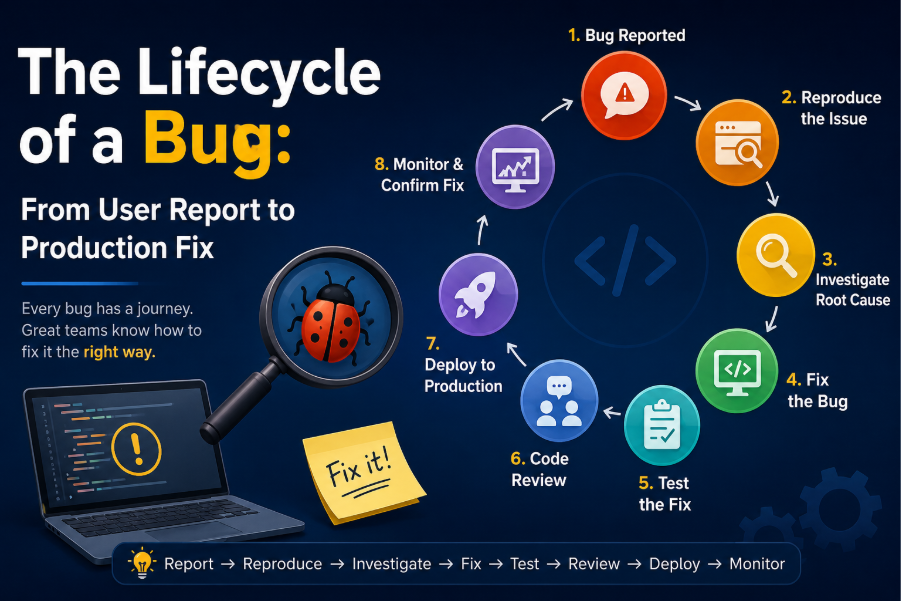
Every bug follows a journey. It starts with a user noticing that something isn’t working as expected and ends only when the fix has been deployed, verified, and monitored in production. Understanding this lifecycle helps developers build more reliable applications and respond to issues with confidence.
In this article, we’ll explore each stage of a bug’s lifecycle and discover how development teams transform a simple bug report into a production-ready solution.
1. A User Discovers the Bug
The lifecycle begins when someone notices unexpected behavior in an application.
Bug reports can originate from various sources, including:
- End users
- Quality Assurance (QA) engineers
- Customer support teams
- Automated monitoring systems
- Internal testing teams
A useful bug report typically contains:
- A clear description of the issue
- Steps to reproduce the problem
- Expected behavior
- Actual behavior
- Screenshots or recordings
- Browser, device, and operating system details
- Error messages or logs
Example
A company’s leave management system receives the following report:
Issue: Employees receive a negative leave balance after multiple leave requests are approved.
Although the report appears simple, identifying the underlying cause requires careful investigation.
2. Reproducing the Problem
Before attempting a fix, developers first verify that the issue can be reproduced.
They recreate the exact conditions under which the bug occurred by matching:
- Application version
- User role
- Database records
- Browser or device
- Input values
Reproducing the issue confirms that the reported behavior is genuine and provides a controlled environment for debugging.
If developers cannot reproduce the bug, they gather additional logs, screenshots, or information from users before proceeding.
3. Understanding the Severity
Not every bug requires immediate attention. Development teams evaluate each issue based on its impact.
Severity:
Critical: System outage or security breach
High: Users cannot complete essential tasks
Medium: Incorrect data displayed
Low: UI alignment or spelling mistakes
This prioritization ensures that the most impactful issues are resolved first while less critical improvements are scheduled appropriately.
4. Investigating the Root Cause
Finding the real cause of a bug often takes longer than fixing it.
Developers examine:
- Application logs
- Database records
- API requests
- Stack traces
- Recent deployments
- Version control history
- Server monitoring data
Instead of simply fixing the visible symptom, experienced developers ask deeper questions:
- Why did this happen?
- When did it start?
- Which recent change introduced the problem?
- Does it affect every user or only specific scenarios?
A temporary workaround may hide the issue, but identifying the root cause prevents it from recurring.
5. Developing the Solution
Once the root cause is identified, developers implement the fix.
A good solution should:
- Address the underlying problem
- Preserve existing functionality
- Follow coding standards
- Be easy for future developers to understand
- Avoid introducing unnecessary complexity
Clean, maintainable code is often more valuable than a quick patch that creates future maintenance challenges.
6. Testing the Fix
A bug isn’t considered resolved until it has been thoroughly tested.
Depending on the application, developers may perform:
- Unit testing
- Integration testing
- Feature testing
- Manual testing
- Regression testing
Regression testing is particularly important because it verifies that previously working features remain unaffected by the new changes.
Many organizations also automate these tests to reduce future risks.
7. Code Review
Before merging the fix into the main codebase, another developer reviews the changes.
A code review helps identify:
- Logic errors
- Performance concerns
- Security vulnerabilities
- Coding standard violations
- Potential side effects
This collaborative process improves overall code quality while encouraging knowledge sharing within the team.
8. Quality Assurance Verification
After the code passes review, it is deployed to a testing or staging environment where QA engineers validate the fix.
They confirm that:
- The original issue has been resolved.
- Related functionality continues to work correctly.
- No new bugs have been introduced.
If problems remain, the issue returns to development for further refinement.
9. Deploying to Production
Once testing is complete, the fix is deployed to the production environment.
Modern deployment pipelines typically include:
- Continuous Integration (CI)
- Automated testing
- Deployment approvals
- Continuous Deployment (CD)
- Health monitoring
Many organizations schedule deployments during periods of low user activity to minimize business impact.
10. Monitoring After Deployment
Deployment is not the final step.
Engineering teams continue monitoring:
- Application logs
- Error tracking tools
- Performance metrics
- User feedback
- Server health
If unexpected issues arise, teams can quickly investigate, apply hotfixes, or roll back the deployment if necessary.
Monitoring ensures that the fix performs as expected under real-world conditions.
A Real-World Example
Imagine an employee leave management application.
An HR manager reports that some employees receive negative leave balances after approving multiple leave requests simultaneously.
During investigation, developers discover that two approval requests are updating the leave balance at exactly the same time.
The root cause is a race condition.
To solve the problem, developers implement database transactions and row-level locking so that only one approval can update the leave balance at a time.
After writing automated tests that simulate concurrent approvals, the fix passes code review, QA validation, and production deployment.
The issue is permanently resolved.
Why Bugs Reach Production
Even experienced teams occasionally ship bugs.
Some common reasons include:
- Edge cases overlooked during testing
- Incomplete input validation
- Race conditions
- Third-party service failures
- Database inconsistencies
- Misconfigured environments
- Human error
- Changing business requirements
Recognizing these patterns helps teams strengthen their development practices over time.
Best Practices for Effective Bug Management
Successful engineering teams follow consistent practices to reduce bug resolution time:
- Encourage detailed bug reports.
- Always reproduce issues before fixing them.
- Focus on identifying the root cause instead of treating symptoms.
- Write automated regression tests for every significant fix.
- Conduct thorough peer code reviews.
- Monitor applications continuously after deployment.
- Document lessons learned from recurring issues.
These habits improve software quality and reduce the likelihood of similar problems in future releases.
Conclusion
Every bug tells a story.
What begins as a simple user complaint evolves into a structured engineering process involving investigation, collaboration, testing, deployment, and continuous monitoring.
The lifecycle of a bug demonstrates that software development is not just about writing code—it’s about maintaining reliability, ensuring quality, and continuously improving the user experience.
By following a disciplined workflow—Report → Reproduce → Investigate → Fix → Test → Review → Deploy → Monitor—development teams can transform unexpected problems into opportunities for building stronger, more resilient software.
After all, the goal isn’t to eliminate every bug—it’s to create a development process capable of handling them efficiently whenever they appear.
