
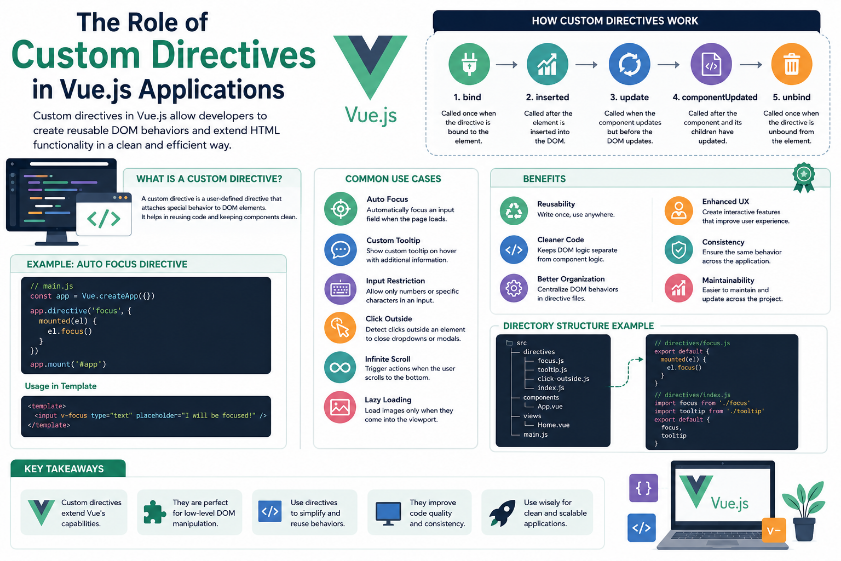
Modern web applications demand highly interactive, responsive, and user-friendly interfaces. As applications become more complex, developers often need to perform direct manipulation of HTML elements to implement specific behaviour’s such as automatic input focus, custom tooltips, infinite scrolling, or input restrictions. While Vue.js provides many built-in directives for handling common tasks, there are situations where custom functionality is required.
This is where Custom Directives become an important feature of Vue.js. Custom directives allow developers to create reusable DOM behaviour’s that can be applied across multiple components without repeating code. They provide a clean and efficient way to extend Vue.js functionality while improving code organization and maintainability.
Although many developers rely primarily on Vue components, experienced Vue.js developers recognize that custom directives are powerful tools for handling low-level DOM operations that components alone cannot efficiently manage.
Understanding Custom Directives
Custom directives are user-defined directives that extend the capabilities of Vue.js beyond its built-in directives such as v-if, v-for, v-model, and v-show.
A custom directive allows developers to attach specific behaviour directly to HTML elements. Instead of writing the same DOM manipulation code repeatedly, developers can create a directive once and reuse it throughout the application.
For example, a developer can create custom directives for:
- Automatically focusing an input field.
- Displaying custom tooltips.
- Restricting input to numbers only.
- Detecting clicks outside an element.
- Implementing infinite scrolling.
- Adding custom animations.
These reusable behaviour’s help simplify development and keep application code clean.
Improving Code Reusability
One of the biggest advantages of custom directives is code reusability. Without directives, developers often duplicate JavaScript logic across multiple components whenever similar DOM behaviour is needed.
Custom directives eliminate this repetition by allowing a single implementation to be reused throughout the application.
For example, if several forms require automatic focus on the first input field, a single custom autofocus directive can be created and applied wherever needed instead of rewriting the same code multiple times.
This approach reduces development time and improves consistency across the application.
Cleaner and More Maintainable Code
As Vue.js applications grow, maintaining clean code becomes increasingly important. Mixing DOM manipulation code directly inside multiple components can make the application difficult to understand and maintain.
Custom directives separate DOM-specific logic from component business logic. Components remain focused on displaying data and handling application functionality, while directives manage interactions with HTML elements.
This separation of concerns results in cleaner project structures and easier long-term maintenance.
Enhancing User Experience
User experience plays a significant role in the success of modern web applications. Custom directives allow developers to implement interactive features that make applications more intuitive and enjoyable.
For example, a custom tooltip directive can display additional information when users hover over buttons or icons. Similarly, an autofocus directive can automatically place the cursor inside a form field, reducing unnecessary user actions.
Input validation directives can immediately prevent invalid characters from being entered, providing instant feedback and improving usability.
These small enhancements contribute to a smoother and more professional user experience.
Simplifying DOM Manipulation
Vue.js encourages developers to avoid direct DOM manipulation whenever possible. However, certain situations require direct interaction with HTML elements.
Custom directives provide a structured and reusable way to perform these operations while remaining fully integrated with Vue’s lifecycle.
Instead of manually adding JavaScript event listeners inside every component, developers can encapsulate the behaviour within a directive and apply it wherever necessary.
This makes DOM-related code more organized and easier to manage.
Better Project Organization
Large Vue.js applications often contain hundreds of components. Without proper organization, repeated DOM manipulation logic can become scattered throughout the project.
Custom directives allow developers to centralize reusable behaviours in dedicated directive files.
This organized structure improves readability, simplifies debugging, and makes it easier for new developers to understand the application.
As projects continue to grow, this modular approach becomes increasingly valuable.
Supporting Consistent Application Behaviour
Consistency is an important aspect of modern user interface design. When the same behaviour is required across multiple pages or components, custom directives ensure that it is implemented uniformly.
For example, if every input field should automatically trim extra spaces or display the same tooltip behaviour, a single directive guarantees identical functionality everywhere it is used.
This consistency improves both the user experience and the maintainability of the application.
Common Use Cases of Custom Directives
Custom directives are commonly used in Vue.js applications for a variety of practical purposes.
Some common use cases include:
- Auto-focus input fields.
- Custom tooltips.
- Click outside detection.
- Infinite scrolling.
- Drag-and-drop functionality.
- Lazy loading images.
- Number-only input validation.
- Custom animations and transitions.
These features demonstrate how custom directives can simplify development while improving application functionality.
Challenges of Using Custom Directives
Although custom directives provide many advantages, they should be used carefully. They are intended primarily for low-level DOM manipulation and should not replace components or composables for general application logic.
Some common challenges include:
- Understanding the directive lifecycle hooks.
- Deciding when to use directives instead of components.
- Maintaining complex custom directive logic.
- Debugging DOM-related behaviour.
- Ensuring compatibility across different browsers.
When used appropriately, these challenges are relatively minor compared to the long-term benefits they provide.
Conclusion
Custom directives play an important role in Vue.js application development by providing reusable and efficient solutions for DOM manipulation. They allow developers to create consistent user interactions, improve code organization, and reduce duplication across the application.
By separating DOM behaviour from component logic, custom directives contribute to cleaner architecture, better maintainability, and enhanced user experiences. Although they require a good understanding of Vue.js lifecycle hooks and DOM interactions, they remain one of the most valuable features for building scalable and professional Vue.js applications.
As modern web applications continue to evolve, custom directives will remain an essential tool for developers who want to create clean, reusable, and highly interactive user interfaces.
