
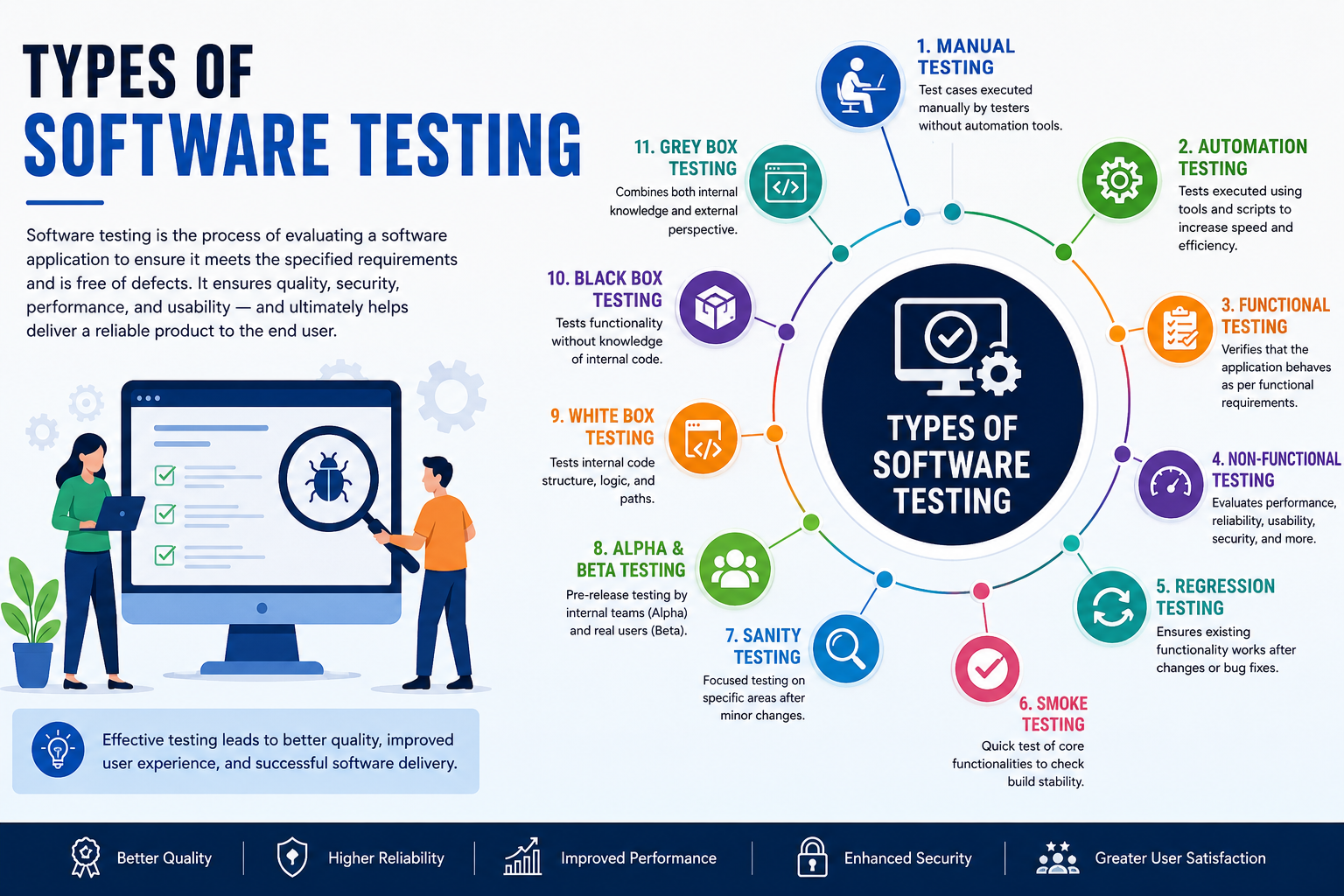
Software testing is the process of evaluating a software application to ensure it meets the specified requirements and is free of defects. It ensures quality, security, performance, and usability — and ultimately helps deliver a reliable product to the end user.
1. Manual Testing
Manual Testing is the process of executing test cases manually without the use of any automation tools. It requires a tester to think like an end-user, navigate through the application, and verify that all functionalities work as expected.
Key Points:
- Testers execute test cases based on requirement documents.
- Useful for exploratory, usability, and ad-hoc testing.
- Time-consuming but essential when automation isn’t feasible.
- No scripting or coding skills required.
2. Automation Testing
Automation Testing uses scripts and tools to perform tests automatically. It is especially useful for repetitive tasks such as regression testing and large-scale projects.
Key Points:
- Faster execution compared to manual testing.
- Reduces human error and increases coverage.
- Requires initial investment in tools and scripting.
- Common tools: Selenium, Cypress, Playwright, JUnit, TestNG.
3. Functional Testing
Functional Testing verifies that the application behaves as expected based on the functional requirements. It checks what the system does, rather than how it does it.
Includes:
a. Unit Testing
Unit Testing focuses on testing individual components or functions of the application in isolation.
- Usually written by developers.
- Ensures that each unit performs its intended functionality.
- Tools: JUnit (Java), NUnit (.NET), pytest (Python), Jasmine (JavaScript).
b. Integration Testing
Integration Testing checks how different modules or services interact with each other.
- Focuses on data flow between modules.
- Helps catch interface defects.
- Techniques: Big Bang, Top-down, Bottom-up.
- Tools: Postman (for APIs), JUnit (with mocks), REST-assured.
c. System Testing
System Testing validates the entire application as a whole in an environment similar to production.
- Covers end-to-end scenarios.
- Tests both functional and non-functional aspects.
- Performed by QA teams.
- Tools: Selenium, TestComplete.
d. User Acceptance Testing (UAT)
UAT is the final phase of functional testing, done to confirm that the system meets business needs and is ready for release.
- Performed by end-users or clients.
- Focuses on real-world use cases and workflows.
- Helps gain stakeholder approval.
4. Non-Functional Testing
Non-functional testing evaluates how well the system performs, rather than what it does. It focuses on performance, reliability, scalability, and usability.
a. Performance Testing
Assesses system responsiveness, stability, and speed under expected workloads.
- Helps identify bottlenecks before going live.
- Tools: Apache JMeter, LoadRunner, Gatling.
- Metrics: Response time, throughput, concurrency.
b. Load Testing
Simulates multiple users accessing the system simultaneously to evaluate performance under normal and peak conditions.
- Determines system behavior under expected user load.
- Helps with capacity planning.
c. Stress Testing
Pushes the system beyond its limits to identify breaking points and how the system recovers.
- Used to test robustness and error handling.
- Ensures graceful failure instead of crashes.
d. Security Testing
Ensures the application is protected against threats, vulnerabilities, and malicious attacks.
- Verifies authentication, authorization, data security, and session management.
- Types: Penetration testing, vulnerability scanning, ethical hacking.
- Tools: OWASP ZAP, Burp Suite, Nessus.
e. Usability Testing
Assesses how user-friendly and intuitive the application is from an end-user perspective.
- Evaluates layout, navigation, and design.
- Conducted with real users or UX professionals.
- Helps improve customer satisfaction and retention.
f. Compatibility Testing
Ensures the software runs consistently across different browsers, devices, OS, networks, and screen sizes.
- Important for web and mobile applications.
- Includes cross-browser and cross-device testing.
5. Regression Testing
Regression Testing is done to ensure that new code changes haven’t unintentionally broken existing functionality.
Key Points:
- Done after bug fixes, new features, or code refactoring.
- Frequently automated to save time.
- Tools: Selenium, TestNG, Cypress, Playwright.
6. Smoke Testing
Smoke Testing is a quick test of core functionalities to check if a build is stable enough for further testing.
Key Points:
- Also called “Build Verification Testing.”
- Executed on every new build.
- If smoke test fails, the build is rejected.
7. Sanity Testing
Sanity Testing is a focused check on a specific module or functionality after changes, to ensure it works correctly.
Key Points:
- Narrow and deep testing approach.
- Used when there isn’t time for full regression.
- Typically done after minor changes or bug fixes.
8. Alpha and Beta Testing
These are pre-release testing phases done before the software is officially launched.
a. Alpha Testing
- Conducted in-house by internal teams (QA, Dev).
- Focuses on identifying bugs before public release.
- May involve both white-box and black-box testing.
b. Beta Testing
- Performed by a limited set of real users in real environments.
- Provides feedback on usability, performance, and reliability.
- Helps detect issues that internal teams might miss.
9. White Box Testing
White Box Testing involves testing internal code logic, conditions, loops, and paths.
Key Points:
- Requires knowledge of the internal code structure.
- Conducted by developers or technical testers.
- Techniques: Statement coverage, branch coverage, path coverage.
- Focus on security, logic, and flow.
10. Black Box Testing
Black Box Testing tests the system without any knowledge of internal code.
Key Points:
- Based on input and output validation.
- Performed by QA or testers.
- Effective for functional and user-level testing.
11. Grey Box Testing
Grey Box Testing is a hybrid of white-box and black-box testing, where the tester has partial knowledge of the internal structure.
Key Points:
- Helps identify integration issues.
- Combines code-level and user-level test scenarios.
- Often used in security and integration testing.
Summary Table
| Type | Purpose | Who Performs It | Tool Examples |
| Unit Testing | Verify individual components | Developers | JUnit, pytest, Jasmine |
| Integration Testing | Test data flow between modules | Developers/QA | Postman, JUnit |
| System Testing | Validate complete system functionality | QA Team | Selenium, TestComplete |
| UAT | Verify business requirements | End Users/Clients | Manual |
| Performance Testing | Assess responsiveness under load | Performance Testers | JMeter, LoadRunner |
| Security Testing | Protect from attacks and threats | Security Analysts | OWASP ZAP, Burp Suite |
| Usability Testing | Ensure intuitive user experience | UX Researchers | Lookback, Maze |
| Regression Testing | Check existing features after changes | QA Team | Selenium, Cypress |
| Smoke Testing | Basic build-level validation | QA Team | Manual/Automated |
| Sanity Testing | Narrow testing of recent changes | QA Team | Manual |
| Alpha Testing | Detect early-stage issues | Internal QA | Manual/Automated |
| Beta Testing | Collect user feedback before release | Real Users | Feedback Tools |
| White Box Testing | Test internal logic and code paths | Developers | Unit Test Frameworks |
| Black Box Testing | Validate input/output behavior | QA/Testers | Manual/Automated |
| Grey Box Testing | Test with partial internal knowledge | QA/Dev/Hybrid Teams | Depends on need |
