
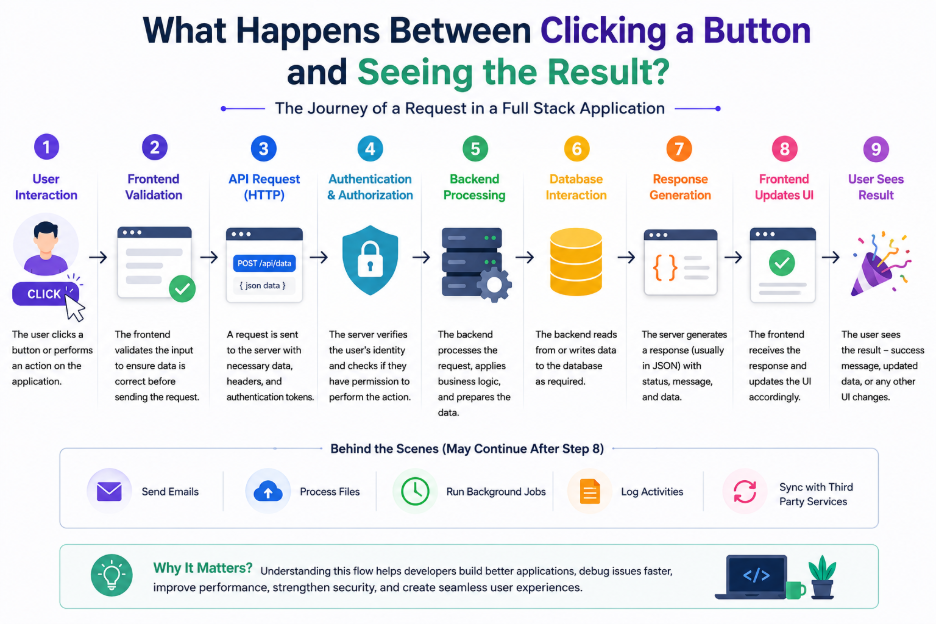
Understanding the Hidden Journey of a Full Stack Application
Every day, millions of users interact with web applications by clicking buttons—whether it’s logging in, submitting a form, placing an order, or updating a profile. To the user, the result appears almost instantly. However, behind that single click lies a sophisticated sequence of processes working together seamlessly.
As a Full Stack Developer, understanding this complete journey is essential. Let’s explore what actually happens between the moment a user clicks a button and the moment the application responds.
Step 1: User Interaction
Everything begins with a user’s action.
Examples include:
- Clicking a Login button
- Saving a profile
- Uploading a file
- Searching for products
- Placing an order
The browser captures this event and triggers the corresponding JavaScript or frontend framework logic (React, Vue, Angular, etc.).
Key Responsibility
- Capture user actions
- Validate input
- Prepare data for transmission
Step 2: Frontend Validation
Before contacting the server, the frontend performs basic validation to improve user experience.
Typical checks include:
- Required fields
- Email format
- Password length
- Empty inputs
- File size restrictions
This prevents unnecessary server requests and provides immediate feedback to users.
Step 3: API Request
Once validation succeeds, the frontend sends an HTTP request to the backend.
Common request types include:
- GET
- POST
- PUT
- PATCH
- DELETE
The request usually contains:
- Endpoint URL
- Request body
- Authentication token
- Headers
- Query parameters
Example:
POST /api/login
This request travels across the internet to the application server.
Step 4: Authentication & Authorization
Before processing the request, the backend verifies:
- Is the user authenticated?
- Does the token exist?
- Is the token valid?
- Does the user have permission?
Without proper authorization, sensitive operations are rejected immediately.
Security begins here.
Step 5: Backend Processing
Once authenticated, the request reaches the application’s business logic.
Depending on the operation, the backend may:
- Validate incoming data
- Execute business rules
- Perform calculations
- Call external APIs
- Upload files
- Generate reports
- Trigger notifications
- Queue background jobs
This is where the application transforms user requests into meaningful operations.
Step 6: Database Interaction
Most applications need to read or store data.
The backend communicates with the database to:
- Fetch records
- Insert new data
- Update existing records
- Delete information
- Execute transactions
Database performance plays a significant role in the application’s overall speed.
Step 7: Response Generation
After processing is complete, the backend prepares a response.
Typical responses include:
{
“success”: true,
“message”: “Profile updated successfully”,
“data”: { … }
}
Or, in case of an error:
{
“success”: false,
“message”: “Invalid credentials”
}
Consistent API responses make frontend development much simpler and improve maintainability.
Step 8: Frontend Updates the UI
The frontend receives the response and updates the user interface.
Examples include:
- Showing success messages
- Displaying validation errors
- Refreshing tables
- Updating dashboards
- Redirecting users
- Closing dialogs
- Displaying notifications
This is the moment users finally “see the result.”
Step 9: Background Processes (Optional)
Some operations continue even after the user receives a response.
Examples include:
- Sending emails
- Processing uploaded files
- Generating invoices
- Logging activities
- Synchronizing third-party services
- Running scheduled jobs
These tasks improve performance by avoiding unnecessary waiting for the user.
Why Understanding the Entire Flow Matters
Many developers focus only on the frontend or backend. However, understanding the complete request lifecycle helps you:
- Build better user experiences
- Debug issues more efficiently
- Improve application performance
- Design scalable APIs
- Strengthen application security
- Collaborate effectively across teams
A Full Stack Developer doesn’t just write code—they understand how every layer of the application works together.
Final Thoughts
A simple button click might seem effortless to users, but behind the scenes it involves browsers, frontend frameworks, APIs, authentication, business logic, databases, servers, and UI rendering—all working together within milliseconds.
The next time you click a button in an application, remember: you’re triggering an entire ecosystem of technologies designed to deliver a seamless experience.
That’s the beauty of Full Stack Development.
What’s the most interesting part of this request lifecycle for you—Frontend, Backend, APIs, Databases, or Performance Optimization? Let’s discuss in the comments!
