
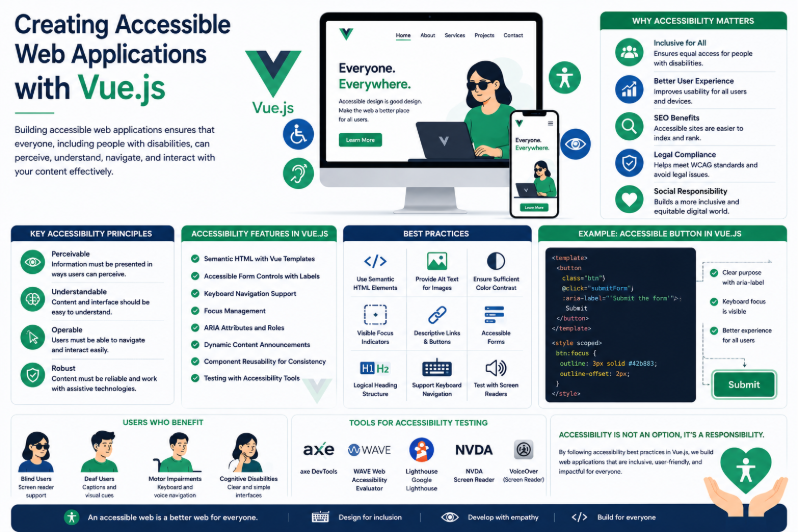
In today’s digital era, web applications have become an integral part of everyday life. People use web applications for education, banking, healthcare, shopping, entertainment, and communication. As the number of users continues to grow, developers must ensure that these applications can be used by everyone, regardless of their physical abilities or limitations. This is where accessibility becomes one of the most important aspects of modern frontend development.
Creating accessible web applications means designing and developing interfaces that can be easily understood, navigated, and operated by all users, including people with visual, hearing, motor, and cognitive disabilities. Accessibility is no longer considered an optional feature—it has become a fundamental requirement for building inclusive and user-friendly digital experiences.
Vue.js, one of the most popular frontend JavaScript frameworks, provides developers with powerful tools for building dynamic and interactive user interfaces. When combined with accessibility best practices, Vue.js enables developers to create applications that are not only visually appealing but also usable by a much wider audience. By following accessibility principles during development, organizations can improve user satisfaction, meet accessibility standards, and create applications that serve everyone equally.
Understanding Accessibility in Web Applications
Accessibility refers to the practice of designing web applications so that people with different abilities can successfully access and interact with digital content. This includes users who rely on assistive technologies such as screen readers, keyboard navigation, voice recognition software, and alternative input devices.
Accessible applications are designed to remove barriers that may prevent users from completing tasks or understanding information. They provide clear navigation, readable content, sufficient colour contrast, descriptive labels, and meaningful interactions that work for all users.
Rather than creating separate experiences for different users, accessibility ensures that one application can serve everyone effectively.
Why Vue.js Supports Accessibility
Vue.js offers a flexible component-based architecture that makes implementing accessibility features easier and more organised. Developers can build reusable components that already include accessible labels, keyboard navigation, proper focus management, and semantic HTML elements.
Because Vue.js separates application logic from presentation, developers can consistently apply accessibility improvements throughout the application. Features such as reactive updates, dynamic rendering, and component reusability allow accessibility enhancements to be maintained without duplicating code.
By integrating accessibility into reusable components from the beginning, developers ensure that every part of the application follows the same accessibility standards.
Improving User Experience for Everyone
One of the greatest benefits of accessibility is that it improves the overall user experience—not only for people with disabilities but for every visitor.
Features such as clear navigation menus, readable typography, descriptive buttons, consistent layouts, and responsive interfaces make applications easier for everyone to use. Keyboard shortcuts benefit power users, captions assist users in noisy environments, and larger clickable areas improve usability on mobile devices.
An accessible application provides a smoother and more comfortable experience regardless of the user’s device, environment, or abilities.
Supporting Assistive Technologies
Many users depend on assistive technologies to interact with websites and applications. Screen readers convert text into speech; keyboard navigation helps users who cannot use a mouse, and voice control software allows users to operate applications through spoken commands.
Vue.js applications can fully support these technologies by using semantic HTML, accessible form controls, ARIA attributes where appropriate, and logical document structures.
When accessibility is considered during development, assistive technologies can accurately interpret application content and provide users with meaningful interactions.
Building Accessible Forms
Forms are among the most frequently used components in modern web applications. Login pages, registration forms, contact forms, and payment systems all rely on user input.
Vue.js makes it easier to create accessible forms by combining reactive data binding with proper HTML labels, validation messages, focus management, and error handling.
Accessible forms clearly identify required fields, provide descriptive validation messages, and guide users through the completion process without creating confusion. This results in higher completion rates and a better overall experience.
Enhancing Navigation and Keyboard Accessibility
Many users cannot operate a mouse and rely entirely on keyboard navigation. Accessible applications ensure that every interactive element can be reached and operated using only the keyboard.
Vue.js developers can implement proper tab order, visible focus indicators, skip navigation links, and keyboard event handling to support these users.
When navigation flows naturally through the application, users can complete tasks efficiently without unnecessary obstacles.
Improving Application Maintainability
Accessibility is not only beneficial for users but also for developers. Applications built with semantic HTML, reusable accessible components, and organised structures are generally easier to maintain and expand.
Vue.js encourages component-based development, allowing accessibility improvements to be implemented once and reused throughout the application.
This reduces repetitive work, improves consistency, and simplifies future maintenance as the application grows.
Common Accessibility Practices in Vue.js
Developers can significantly improve accessibility by following established best practices throughout the development process.
Some commonly used accessibility practices include:
- Using semantic HTML elements.
- Providing alternative text for images.
- Creating keyboard-accessible navigation.
- Maintaining sufficient colour contrast.
- Using descriptive button and link text.
- Managing keyboard focus correctly.
- Providing accessible form labels and validation messages.
- Supporting screen readers.
- Ensuring responsive layouts across devices.
- Testing applications using accessibility evaluation tools.
These practices help create applications that are both inclusive and user-friendly.
Challenges of Building Accessible Applications
Although accessibility offers numerous benefits, implementing it effectively requires planning and continuous testing.
Some common challenges include:
- Understanding accessibility standards such as WCAG.
- Testing applications with screen readers and assistive technologies.
- Managing accessibility in complex dynamic interfaces.
- Maintaining accessibility as applications continue to evolve.
- Educating development teams about inclusive design principles.
Despite these challenges, accessibility becomes much easier when it is considered from the beginning of the development process rather than added later.
Conclusion
Creating accessible web applications with Vue.js is an essential practice for modern frontend development. Accessibility ensures that applications can be used by everyone, regardless of physical ability or the technology they rely on. By combining Vue.js’s component-based architecture with accessibility best practices, developers can build applications that are inclusive, maintainable, and user-friendly.
Accessible Vue.js applications not only improve usability for people with disabilities but also create better experiences for all users. They support assistive technologies, enhance navigation, simplify maintenance, and help organisations meet modern accessibility standards. As digital experiences continue to become a central part of everyday life, accessibility will remain one of the most important responsibilities of frontend developers, making it a key element in building high-quality and future-ready web applications.
