
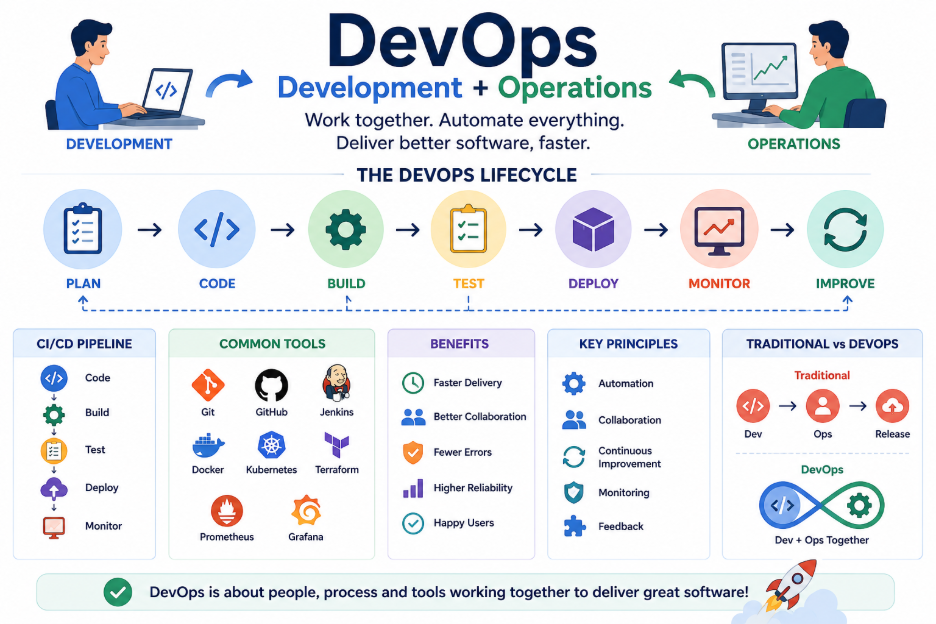
Building software is not only about writing code. After an application is developed, it needs to be tested, deployed, monitored, and maintained. DevOps brings development and operations teams together to make this process faster, more reliable, and more efficient.
What is DevOps?
DevOps is a software development approach that combines Development (Dev) and Operations (Ops).
Traditionally, developers focused on writing application code, while operations teams were responsible for deploying and maintaining that application.
This separation could sometimes lead to delays, communication problems, and deployment issues.
DevOps encourages both teams to work together throughout the software development lifecycle.
The basic idea is:
Develop → Test → Deploy → Monitor → Improve
How Does DevOps Work?
DevOps uses a continuous process where teams develop, test, deploy, and monitor applications regularly.
A typical DevOps workflow looks like this:
Code → Build → Test → Deploy → Monitor → Feedback
When developers make a change, automated tools can build and test the application. If everything works correctly, the application can be deployed to the required environment.
After deployment, monitoring tools help teams identify errors or performance problems.
What is CI/CD?
CI/CD is one of the most important concepts in DevOps.
CI (Continuous Integration) means developers frequently integrate their code changes into a shared repository. Automated tests can then check whether the new changes work correctly.
CD (Continuous Delivery or Continuous Deployment) focuses on automatically preparing or releasing tested code to the required environment.
For example:
Developer pushes code → Automated build → Automated tests → Deployment
This reduces manual work and helps teams release software more frequently.
Why is Automation Important in DevOps?
Automation is a major part of DevOps.
Instead of manually performing repetitive tasks, teams can automate activities such as:
- Building applications
- Running tests
- Creating Docker images
- Deploying applications
- Running database migrations
- Monitoring applications
- Sending notifications
Automation reduces human errors and allows teams to spend more time improving the application.
Common DevOps Tools
DevOps is not a single tool or technology. It is a combination of practices, processes, and tools.
Some commonly used tools include:
- Git — Source code management
- GitHub / GitLab — Code hosting and collaboration
- Docker — Containerizing applications
- Jenkins / GitHub Actions — CI/CD automation
- Kubernetes — Managing containerized applications
- Terraform — Infrastructure automation
- Prometheus / Grafana — Monitoring and visualization
Different teams may use different tools depending on their requirements.
Benefits of DevOps
DevOps provides several benefits for software development teams.
- Faster Releases — Automation helps teams deliver features and fixes more quickly.
- Better Collaboration — Development and operations teams work toward the same goals.
- Fewer Errors — Automated testing and deployment reduce manual mistakes.
- Improved Reliability — Continuous monitoring helps identify problems early.
- Faster Recovery — Teams can quickly identify and fix issues when something goes wrong.
- Consistent Deployments — Automated processes help applications behave consistently across environments.
DevOps and Cloud
DevOps and cloud platforms are often used together.
Cloud platforms provide resources such as servers, databases, storage, and networking. DevOps practices can automate how these resources are created, configured, and deployed.
For example, a team can use a CI/CD pipeline to automatically build an application, create a Docker image, deploy it to cloud infrastructure, and monitor its performance.
This allows teams to manage applications efficiently even as they grow.
DevOps is More Than Tools
It is important to understand that DevOps is not simply a collection of tools.
Tools help automate the process, but DevOps also involves:
Collaboration + Automation + Continuous Improvement
Developers, operations teams, testers, and other team members work together to improve the entire software delivery process.
DevOps vs. Traditional Software Delivery
In a traditional workflow, development and operations may work separately.
Traditional Approach:
Development → Handover → Operations → Deployment
This can create delays and communication problems.
With DevOps, the teams work together throughout the process:
Development ↔ Testing ↔ Operations ↔ Monitoring
This creates a more continuous and collaborative workflow.
Conclusion
DevOps helps organizations build, test, deploy, and maintain applications more efficiently by bringing development and operations closer together.
The DevOps process can be remembered as:
Plan → Code → Build → Test → Release → Deploy → Monitor → Improve
With automation, continuous feedback, and better collaboration, DevOps helps teams deliver reliable software faster and respond quickly when changes or problems occur.
