
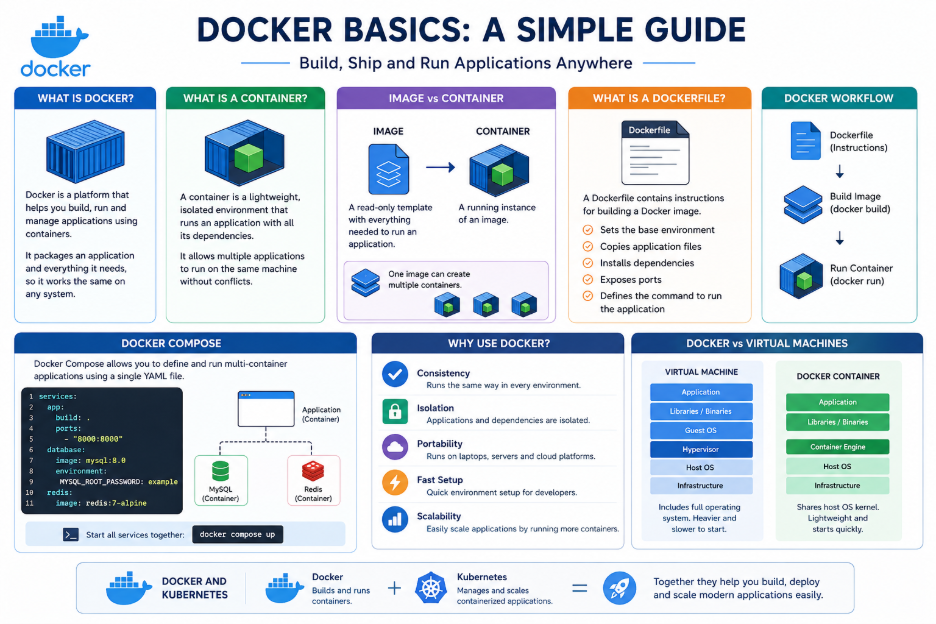
Modern applications need to work consistently across development, testing, and production environments. Differences in software versions, dependencies, and system configurations can create unexpected issues. Docker solves these challenges by packaging an application and everything it needs into a container. As a result, developers can build, run, and deploy applications more efficiently.
What is Docker?
Docker is a platform used to create and run applications inside containers. Each container includes the application code, required libraries, dependencies, and configuration files. This approach ensures that applications run consistently across different machines and servers, regardless of the underlying environment.
What is a Container?
A container is a lightweight and isolated environment where an application runs. For example, a Laravel application may require PHP, Composer, MySQL, and specific extensions. Rather than installing all of these dependencies manually on every machine, Docker provides the required environment through containers. Consequently, project setup becomes faster while environment-related issues are significantly reduced.
Docker Image vs. Container
A Docker image is a package that contains the application and everything required to run it. By comparison, a container is a running instance of that image.
Think of it like this:
Docker Image → Blueprint
Docker Container → Running Application
Additionally, the same Docker image can be used to create multiple containers.
What is a Dockerfile?
A Dockerfile is a text file that contains instructions for building a Docker image. It defines the base environment, application files, dependencies, ports, and startup commands needed for the application.
For example:
FROM php:8.4

WORKDIR /app

COPY . .

EXPOSE 8000
After reading these instructions, Docker builds an image that can later be used to create containers.
The basic workflow is:
Dockerfile → Docker Image → Docker Container
What is Docker Compose?
Most modern applications depend on multiple services. For example, a web application may require an application container, MySQL, and Redis. Instead of creating and managing each container separately, Docker Compose allows developers to define all services in a single configuration file.
The complete environment can then be started with:
docker compose upThis process simplifies the setup and management of applications that rely on multiple services.
Why Use Docker?
Docker offers several advantages for developers and development teams:
- Consistency – Applications run in similar environments across different machines.
- Portability – Containers can run on local systems, servers, and cloud platforms.
- Isolation – Each application uses its own dependencies without affecting other projects.
- Easy Setup – New developers can start working without manually installing every dependency.
- Scalability – Multiple containers can be created when an application needs additional resources.
Docker and Kubernetes
Docker and Kubernetes are both important technologies in container-based development, but they serve different purposes.
- Docker → Builds and runs containers.
- Kubernetes → Manages and scales containerized applications.
While Docker focuses on creating and running containers, Kubernetes is designed to manage large numbers of containers across multiple servers.
Conclusion
Docker simplifies application development and deployment by providing consistent and portable environments through containers. The overall workflow is straightforward:
Dockerfile → Build Image → Run Container
When an application requires multiple services, Docker Compose helps manage and run all containers together from a single configuration file. Learning these core concepts provides a solid foundation for modern software development, DevOps, and Kubernetes.
