
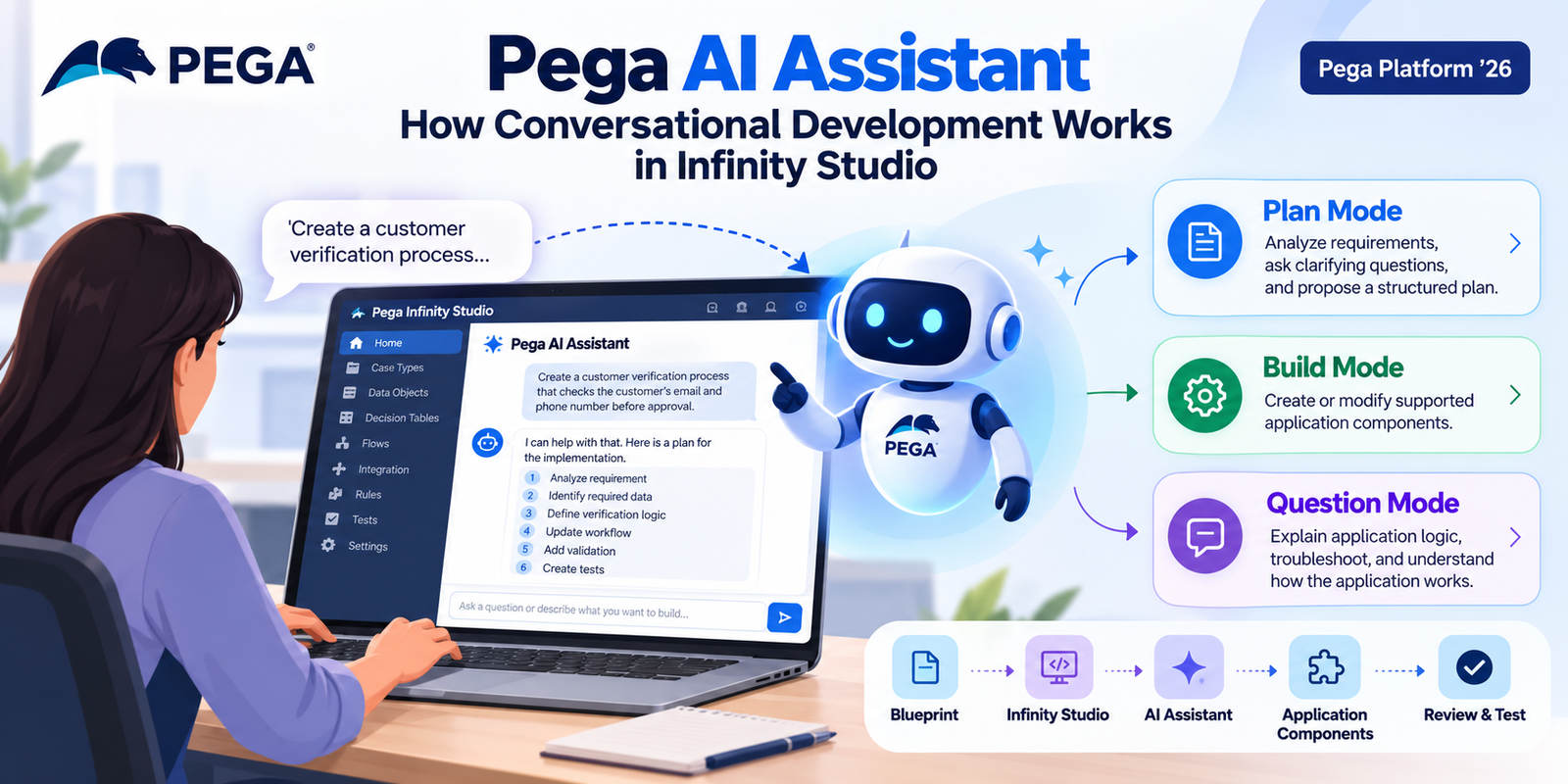
Pega application development has traditionally involved rules, case types, data objects, workflows, expressions, and configuration screens. With Pega Platform ’26, that development experience is becoming more conversational.
Pega AI Assistant brings natural-language interaction into Pega Infinity Studio. Developers and solution builders can describe what they want to achieve instead of manually navigating every configuration step.
You can use AI Assistant to analyze requirements, create development plans, modify supported application components, explain existing logic, and investigate how an application works.
However, AI Assistant is more than a chatbot beside the development environment. It works with application context and supports structured, reviewable changes.
What Is Pega AI Assistant?
Pega AI Assistant is a conversational development tool available in Infinity Studio with Pega Platform ’26.
Instead of relying only on traditional configuration forms, developers can interact with the platform using natural language.
For example, a developer might ask:
“Create a customer verification process that checks the customer’s email and phone number before allowing the case to proceed.”
AI Assistant can analyze the request and help translate it into application configuration.
Depending on the selected mode, the assistant can plan the work, implement supported changes, or answer questions about the application.
The Three Modes of Pega AI Assistant
One of the most important concepts to understand is that AI Assistant has three modes:
- Plan Mode
- Build Mode
- Question Mode
Each mode serves a different purpose.
This separation helps developers decide whether they want to understand a requirement, make a change, or explore existing application logic.
1. Plan Mode: Think Before You Build
Plan Mode helps developers analyze a requirement before making application changes.
Instead of immediately changing the application, AI Assistant can examine the available context, ask clarifying questions, and suggest a structured approach.
For example, a developer might say:
“I need to add a customer verification step before approval.”
The assistant can then break the requirement into smaller development tasks.
A simplified plan could look like this:
Requirement
    ↓
Understand existing Case Type
    ↓
Identify required data
    ↓
Define verification logic
    ↓
Update workflow
    ↓
Add validation
    ↓
Create tests
This approach is useful when a requirement is still being refined.
Rather than asking AI to change several parts of an application immediately, developers can first understand what needs to change and why.
Plan Mode is therefore useful for requirement analysis, application-context review, clarification, and structured planning.
2. Build Mode: Turn the Plan Into Configuration
Once the development approach is clear, developers can use Build Mode to implement supported changes.
This is where conversational development becomes especially useful.
Instead of opening several configuration areas manually, a developer can describe the required change. AI Assistant can then create or modify supported application components.
Depending on the requirement, supported components can include:
- Case Types
- Flows
- Data Pages
- Data Transforms
- Decision Tables
- Properties
- Views
- When Rules
- Service Level Agreements
- Queue Processors
- Job Schedulers
- Report Definitions
- Connect REST rules
- Activities
- Correspondence
- Notifications
- Pega Unit Test Cases
This means AI Assistant can support more than simple UI configuration. It can participate in several areas of application development.
A Simple Build Mode Example
Imagine that an application has this requirement:
“Create a Decision Table that determines whether a customer qualifies for expedited processing based on customer type and request value.”
Traditionally, a developer might create the rule and configure each field manually.
With AI Assistant, the developer can describe the requirement in natural language.
The assistant can then help create the corresponding configuration.
However, the developer still needs to review the result.
The generated logic must match the actual business requirement.
This distinction is important:
AI Assistant can accelerate configuration, but it does not remove the need for application knowledge and review.
3. Question Mode: Understand Your Application
Sometimes developers do not want AI to change anything.
They simply want an explanation.
That is where Question Mode becomes useful.
For example, you could ask:
“How does this case move from verification to approval?”
You could also ask:
“Which decision controls this part of the workflow?”
Or:
“Explain how this Data Page is being used.”
AI Assistant can use application context to explain flows, decisions, and other application logic.
It can also provide visual summaries of application logic. As a result, Question Mode can help with troubleshooting and learning an unfamiliar application.
This can be especially useful when a developer joins an existing Pega project.
Instead of manually tracing years of configuration, the developer can ask questions and build an understanding of how the application works.
How AI Assistant Fits Into Infinity Studio
Pega Platform ’26 introduces Infinity Studio as a unified workspace for application design, configuration, and debugging.
This creates a more continuous development experience. Developers can move from application design to configuration and debugging without switching between the previously separate development environments.
AI Assistant fits directly into this workflow.
A simplified development process looks like this:
Business Requirement
        ↓
Pega Blueprint
        ↓
Infinity Studio
        ↓
Pega AI Assistant
        ↓
Plan
        ↓
Build
        ↓
Review
        ↓
Test
        ↓
Refine
This creates a more connected path from an initial idea to a working application.
What Happens to AI-Generated Changes?
This is one of the most important parts of AI-assisted development.
AI-generated changes are not simply mixed into the existing application without control.
Pega AI Assistant isolates its changes in a dedicated branch. Developers can review the generated work before merging it into the project.
The process can be viewed like this:
Existing Application
        │
        ├───────────────┐
        │               │
        │         AI Assistant
        │               │
        │          AI Changes
        │               │
        │        Dedicated Branch
        │               │
        └─────── Review ┘
                    │
              Accept / Refine
                    │
                  Merge
This review step is important for enterprise development.
Developers remain responsible for checking whether the generated configuration meets the actual requirement.
From Blueprint to Build
Pega Platform ’26 also connects Pega Blueprint with Infinity Studio.
A Blueprint can provide the initial application structure and intent. That information can then continue into the development process within Infinity Studio.
Pega’s current material describes AI Assistant as a way to help transform an initial Blueprint into a functional application through conversation.
The overall process can be represented as:
Idea
 ↓
Blueprint
 ↓
Application Structure
 ↓
Infinity Studio
 ↓
AI-Assisted Development
 ↓
Review & Testing
 ↓
Working Application
This approach helps reduce the gap between early application design and actual implementation.
Where Can Developers Use AI Assistant?
There are several practical situations where conversational development can help.
Understanding an Existing Application
A developer joining an existing project can ask questions about flows, decisions, and configuration.
This can reduce the need to manually trace every rule before understanding the application.
Creating Repetitive Configuration
When several rules follow similar patterns, AI Assistant can help accelerate the initial configuration.
Developers can then review and adjust the generated work.
Exploring Requirements
Large requirements can be difficult to break down.
Plan Mode can help divide them into smaller and more manageable development tasks.
Troubleshooting
Question Mode can help explain application behavior.
It can also help developers understand where specific logic is being used.
Testing
AI Assistant also supports the creation of Pega Unit Test Cases among its supported rule types.
How to Write Better Prompts
The quality of the request matters.
A vague prompt may not provide enough context.
For example:
“Create customer validation.”
A more useful prompt would be:
“For the Customer Onboarding case, validate that Email and Mobile Number are populated before the case moves from Verification to Approval. Explain the proposed changes first.”
The second prompt provides important details, including:
- The Case Type
- The business purpose
- The required fields
- The workflow stage
- The expected behavior
- A request to plan before implementation
Specific prompts give AI Assistant more useful context and make the expected outcome clearer.
What Developers Still Need to Do
AI-assisted development does not mean developers can stop understanding Pega.
Every generated configuration should still be reviewed.
Developers should check:
- Business logic
- Rule applicability
- Class structure
- Security requirements
- Data access
- Integration behavior
- Performance implications
- Error handling
- Test coverage
- Naming and project standards
For example, if AI Assistant creates a Decision Table, the developer should verify every condition and outcome against the actual business requirement.
Therefore, the best approach is not:
“Let AI build everything.”
A better approach is:
“Let AI accelerate the work while the developer remains in control.”
Pega AI Assistant vs. Traditional Development
| Traditional Development | AI-Assisted Development |
|---|---|
| Navigate configuration screens | Describe requirements conversationally |
| Manually investigate application logic | Ask questions about application context |
| Create rules step by step | Request supported rule configuration |
| Analyze requirements manually | Use Plan Mode to structure the work |
| Review changes after development | Review AI-generated changes before merging |
| Learn unfamiliar logic by tracing rules | Ask for explanations and summaries |
The goal is not necessarily to replace traditional Pega development.
Instead, AI Assistant provides another way to interact with the platform.
Developers can combine conversational assistance with their existing development knowledge and processes.
Final Thoughts
Pega AI Assistant represents an important shift in how Pega applications can be developed.
Instead of every task starting with a configuration screen, developers can start with a conversation:
Explain → Plan → Build → Review → Test → Refine
The three modes—Plan, Build, and Question—give developers different ways to work with application context.
At the same time, dedicated-branch isolation and human review help keep AI-generated changes within a controlled development process.
For experienced Pega developers, the benefit is not simply fewer clicks.
It is the ability to spend more time thinking about business behavior, architecture, quality, and validation while AI assists with parts of implementation and investigation.
For developers who are new to Pega, conversational assistance can also provide another way to understand how application components work together.
As Pega continues expanding its AI-assisted development capabilities, the developer’s role is increasingly focused on guiding, validating, and governing the application rather than manually configuring every part of it.
Frequently Asked Questions
What is Pega AI Assistant?
Pega AI Assistant is a conversational development tool in Infinity Studio. It allows users to interact with Pega Platform using natural language.
What are the three AI Assistant modes?
The three modes are Plan, Build, and Question.
Plan Mode helps structure development work. Build Mode implements supported changes. Question Mode helps users understand applications and Pega concepts.
Can Pega AI Assistant modify Pega Rules?
Yes. AI Assistant supports creating and modifying several Rule Types, including Flows, Data Pages, Data Transforms, Decision Tables, Views, Queue Processors, Job Schedulers, and others.
Are AI-generated changes immediately merged into the application?
No. AI Assistant isolates its changes in a dedicated branch. Developers can review the changes before merging them into the project.
Is Pega AI Assistant available in Pega Platform ’26?
Yes. The source material identifies AI Assistant as a Pega Platform ’26 capability within Infinity Studio.
Official Pega References
- Pega Academy — AI Assistant
- Pega Academy — Accelerated development with Pega AI Assistant
- Pega Community — AI Assistant in Infinity Studio
- Pega Community — What’s New in Pega Infinity ’26
