
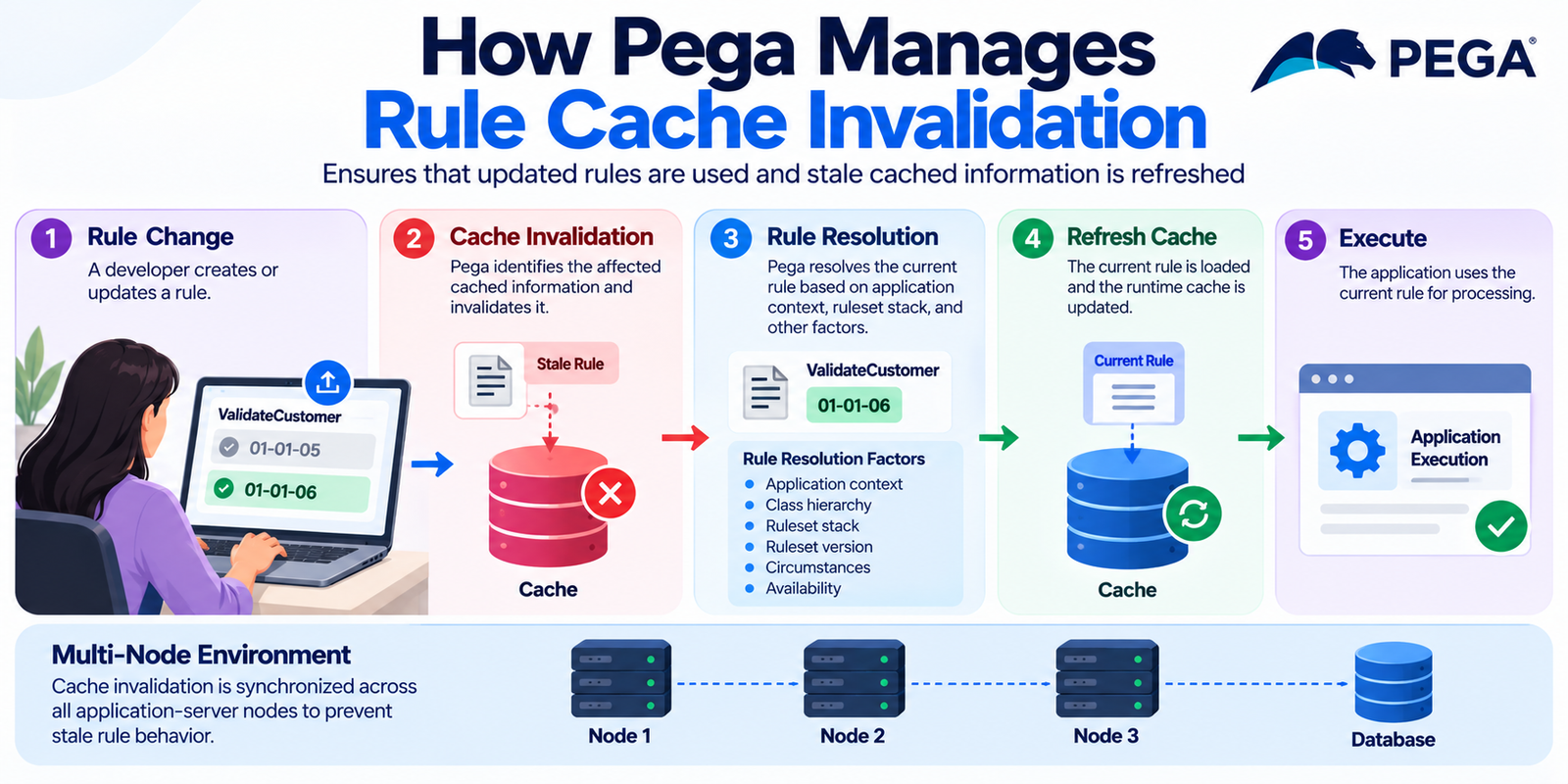
Pega applications rely heavily on caching to improve performance. Instead of repeatedly loading rules, metadata, and configuration from the database, Pega can keep frequently used information in memory.
This reduces database access and can make rule resolution and application execution faster.
However, caching also creates an important question:
What happens when a rule changes?
If an application continues using an older cached version, users may see inconsistent behavior. Pega therefore uses rule cache invalidation mechanisms to ensure that outdated rule information does not remain in use when it should be refreshed.
Understanding rule cache invalidation is especially useful when troubleshooting stale rules, inconsistent behavior between nodes, deployments, and application performance.
What Is Rule Caching in Pega?
When Pega needs to execute or evaluate a rule, it does not necessarily retrieve the rule definition from the database every time.
Instead, Pega can cache frequently used rule information in memory.
Depending on the rule type and execution path, cached information can include:
- Rule definitions
- Rule metadata
- Rule resolution results
- Class information
- Application and ruleset information
- Declarative rule information
- Data-related metadata
- Other runtime objects derived from rules
A simplified execution flow looks like this:
Request
   ↓
Rule Resolution
   ↓
Cache Lookup
   ↓
Cached Rule / Database
   ↓
Execution
If the required information is already available in an appropriate cache, Pega can avoid repeating the complete retrieval process.
As a result, caching can reduce repeated work and improve runtime performance.
Why Does Cache Invalidation Matter?
Consider a rule named ValidateCustomer.
Initially, the application loads version 01-01-05 of the rule.
Relevant information about that rule may then remain in memory.
Later, a developer updates the rule and creates version 01-01-06.
The database now contains the newer version. However, an application server may still have information associated with the previous version in memory.
Without an invalidation mechanism, the application could continue using stale information.
Therefore, Pega needs to determine two things:
- Has something relevant changed?
- Which cached information needs to be discarded or refreshed?
This is the purpose of cache invalidation.
Rule Resolution and Cache Interaction
Rule resolution determines which rule version should be used for a particular request.
Several factors can influence that result, including:
- Application context
- Class hierarchy
- Ruleset stack
- Ruleset version
- Circumstances
- Availability
- Rule status
- User context
Once Pega determines the appropriate rule, runtime caching can make later accesses more efficient.
A simplified flow looks like this:
Application Request
        |
        v
  Rule Resolution
        |
        v
   Cache Lookup
      /     \
    Hit     Miss
    |         |
    v         v
Use Cache  Retrieve Rule
              |
              v
            Cache
              |
              v
           Execute
The key point is that rule resolution and caching are related, but they are not the same thing.
Rule resolution determines which rule should be used.
Caching helps Pega avoid repeating expensive work.
What Causes Rule Cache Invalidation?
Several types of system activity can make cached information outdated.
Rule Changes
When a rule is created or updated, cached information related to that rule may need to be invalidated.
For example:
Before:
Rule Version = 01-01-05

        ↓
Developer updates rule

        ↓

After:
Rule Version = 01-01-06
The runtime must recognize that the previously cached information may no longer represent the current state.
Ruleset Changes
Changes to rulesets and ruleset versions can also affect rule resolution.
For example:
Application
   |
   +-- Ruleset A
   |      |
   |      +-- Version 01-01-05
   |
   +-- Ruleset B
If the ruleset stack or available versions change, previously resolved rules may no longer be the correct candidates.
Therefore, related cached resolution information may need to be invalidated.
Application Changes
Application configuration can also affect which rules are available during rule resolution.
For example, changes to the following can affect previously cached resolution information:
- Application rulesets
- Application inheritance
- Version configuration
- Application settings
These changes can make previously cached information outdated.
Deployment Activities
Deployments are another important scenario.
A deployment can introduce:
- New rule versions
- Updated rules
- Deleted rules
- Changed application configuration
- Updated dependencies
Pega must ensure that runtime nodes do not continue relying on obsolete cached information after these changes.
Local Cache vs. Cluster-Wide Behavior
One of the most important concepts in cache troubleshooting is understanding that Pega environments can have multiple application-server nodes.
For example:
              Load Balancer
                    |
          +---------+---------+
          |                   |
          v                   v
       Node 1              Node 2
       Cache               Cache
          |                   |
          +---------+---------+
                    |
                 Database
Each node can maintain runtime information in memory.
Now suppose a rule changes while both Node 1 and Node 2 are running.
If only one node becomes aware of the change, the environment could temporarily show different behavior between the nodes.
Therefore, clustered environments need mechanisms that allow relevant runtime information to be refreshed across participating nodes.
This is why cache synchronization and invalidation are important operational concerns in distributed Pega environments.
Cache Invalidation Does Not Mean Clearing Everything
A common misconception is that Pega must completely clear all caches whenever a rule changes.
That would be unnecessarily expensive.
Imagine an environment with thousands of cached rules.
If changing one rule caused every cached object to be discarded, the application could experience:
- Increased database traffic
- More rule-resolution work
- Higher CPU usage
- Increased response times
- Cache repopulation overhead
Instead, cache invalidation is generally concerned with identifying information that may have become stale and refreshing it when necessary.
Conceptually:
Rule A Changes
      |
      v
Identify affected cached information
      |
      v
Invalidate affected entries
      |
      v
Keep unrelated cache entries
      |
      v
Reload when required
This approach helps Pega maintain the performance benefits of caching without continuing to serve outdated rule information.
What Happens After Invalidation?
Cache invalidation does not necessarily mean that Pega immediately reloads every affected rule.
Instead, the process can work as a lifecycle:
Cached Rule
    |
    | Rule changes
    v
Cache Entry Invalidated
    |
    | Next request
    v
Rule Resolution
    |
    v
Retrieve Current Rule
    |
    v
Rebuild / Refresh Runtime Cache
    |
    v
Execute Current Rule
This is an important performance concept.
Rather than rebuilding everything immediately, the system can invalidate stale information and rebuild the required objects when they are needed.
This avoids unnecessary work and helps maintain application performance.
Why Do Developers Sometimes See “Stale Rule” Behavior?
A developer may change a rule and still see the previous behavior.
When this happens, several areas should be investigated.
1. Rule Version
First, verify that the expected rule version exists.
Also check whether the application can access that version.
2. Ruleset Stack
Check whether the application is resolving against the ruleset version that contains the change.
A different ruleset stack can produce a different rule-resolution result.
3. Application Context
Application context also matters.
A different application, access group, or runtime context can produce different rule-resolution results.
4. Multiple Nodes
If the environment is clustered, check whether the behavior occurs on one node or across multiple nodes.
Different results between nodes may point to a synchronization or runtime-state issue.
5. Deployment State
Confirm that the expected rule changes have actually reached the environment being tested.
6. Runtime Cache State
If the rule definition and deployment are correct, runtime cache state can become an area of investigation.
However, cache should not be the first assumption.
It is important to rule out configuration, application-context, and deployment issues first.
Rule Cache and Performance
Caching is one reason Pega can efficiently execute applications containing large numbers of rules.
Without effective caching, a simplified request could involve repeated database and rule-resolution operations:
Request
   ↓
Database
   ↓
Rule Lookup
   ↓
Rule Resolution
   ↓
Database
   ↓
Execution
Repeated database access can become expensive.
With caching, the flow can look more like this:
First Request
     ↓
Rule Resolution
     ↓
Database
     ↓
Cache

Subsequent Requests
     ↓
Cache
     ↓
Execution
The second path can significantly reduce repeated work.
The challenge is therefore to find the right balance:
Cache enough information to improve performance, but invalidate stale information when the underlying rules change.
Rule Cache Invalidation During Development
Developers frequently modify rules during development.
A simplified lifecycle looks like this:
Developer
    |
    v
Modify Rule
    |
    v
Save / Check In
    |
    v
Rule Becomes Available
    |
    v
Relevant Runtime Information Updated
    |
    v
Next Execution Uses Current Rule
Understanding this lifecycle helps developers avoid assuming that every rule change requires manually clearing all caches.
Manual cache operations should generally be treated as troubleshooting or administrative actions.
They should not become the normal solution for every rule modification.
How to Troubleshoot a Suspected Cache Problem
When investigating a possible stale-rule issue, follow a structured process.
Step 1: Confirm the Rule
Verify the following:
- Rule type
- Rule name
- Rule class
- Ruleset
- Ruleset version
- Availability
Step 2: Check Rule Resolution
Determine which rule version Pega should resolve for the current application context.
This helps confirm whether the expected rule is actually being selected.
Step 3: Check the Application
Verify:
- Application definition
- Ruleset stack
- Access group
- Operator context
- Relevant configuration
Step 4: Check the Environment
If the issue occurs intermittently, determine whether different application-server nodes are producing different results.
This is especially important in clustered environments.
Step 5: Check Deployment
Confirm that the expected rule version has been deployed to the target environment.
Step 6: Investigate Cache State
Only after completing the previous checks should cache behavior become a primary troubleshooting hypothesis.
This approach helps prevent developers from using cache clearing as a workaround for an underlying configuration or deployment problem.
Cache Invalidation and Distributed Systems
Modern Pega deployments can operate across distributed environments.
A typical architecture may contain several application-server nodes:
                  Load Balancer
                       |
          +------------+------------+
          |            |            |
          v            v            v
       Node 1        Node 2       Node 3
       Cache         Cache        Cache
          \            |            /
           \           |           /
                    Database
This creates an important architectural challenge.
When a rule changes, the relevant runtime state must eventually reflect that change across the participating nodes.
The system therefore needs mechanisms for propagating or recognizing changes.
Otherwise, a node could continue relying on outdated information.
This becomes particularly important in:
- Horizontal scaling
- Cloud deployments
- Containerized environments
- Rolling deployments
- High-availability architectures
Cache Invalidation vs. Rule Deployment
These concepts are related, but they are not the same.
Deployment moves or introduces application artifacts into an environment.
Rule resolution determines which rule should be selected.
Caching stores runtime information to improve performance.
Cache invalidation ensures that cached information does not remain valid after the underlying state has changed.
A simplified relationship looks like this:
Deployment
    ↓
New / Updated Rules
    ↓
Rule Resolution State Changes
    ↓
Affected Cache Information Invalidated
    ↓
Current Rules Loaded When Required
Understanding these differences makes cache-related troubleshooting much easier.
Common Misconceptions About Rule Cache
“Every rule change clears the entire cache.”
Not necessarily.
Broad cache clearing would reduce the performance benefits of caching.
The system needs to focus on information that may have become stale.
“If I see old behavior, it must be a cache issue.”
Not necessarily.
Incorrect rule resolution, ruleset configuration, deployment problems, application context, or differences between nodes can produce similar symptoms.
“Restarting the server is the normal solution.”
A restart can remove in-memory runtime state.
However, it should not be the first explanation or solution for every rule-resolution problem.
The underlying configuration and deployment should be checked first.
“Rule resolution and caching are the same thing.”
They are related, but they serve different purposes.
Rule resolution selects the applicable rule.
Caching reduces repeated work.
Keeping this distinction clear is important when troubleshooting Pega applications.
Best Practices for Pega Rule Cache Troubleshooting
When working with Pega rule caches, follow a structured approach.
- Understand rule resolution before troubleshooting cache behavior.
- Verify the ruleset stack and application context.
- Confirm the deployed rule version.
- Consider clustered-node behavior when issues occur intermittently.
- Avoid unnecessary broad cache clearing.
- Use performance and diagnostic tools when investigating runtime behavior.
- Treat cache invalidation as part of runtime consistency, not only as a performance feature.
- Validate application behavior after deployments across the relevant nodes.
These practices can help reduce unnecessary troubleshooting and make it easier to identify the real source of inconsistent behavior.
Conclusion
Pega’s rule caching architecture helps reduce repeated database access and expensive rule-resolution work.
At the same time, cached information must not remain stale when rules, rulesets, applications, or deployment state change.
Rule cache invalidation helps maintain this balance.
The overall concept can be summarized as:
Rule Change
    ↓
Detect Affected Runtime Information
    ↓
Invalidate Stale Cache
    ↓
Resolve Current Rule
    ↓
Rebuild Required Cache Information
For developers and administrators, understanding this lifecycle is valuable when diagnosing inconsistent rule behavior, analyzing application performance, and troubleshooting multi-node Pega environments.
The key lesson is simple:
Cache invalidation should be understood together with rule resolution, deployment, and distributed-node behavior.
It should not be treated as simply a cache-clearing operation.
