
Introduction
Saving a case in Pega may look like a simple user action: a developer or application user changes a field and clicks Save.
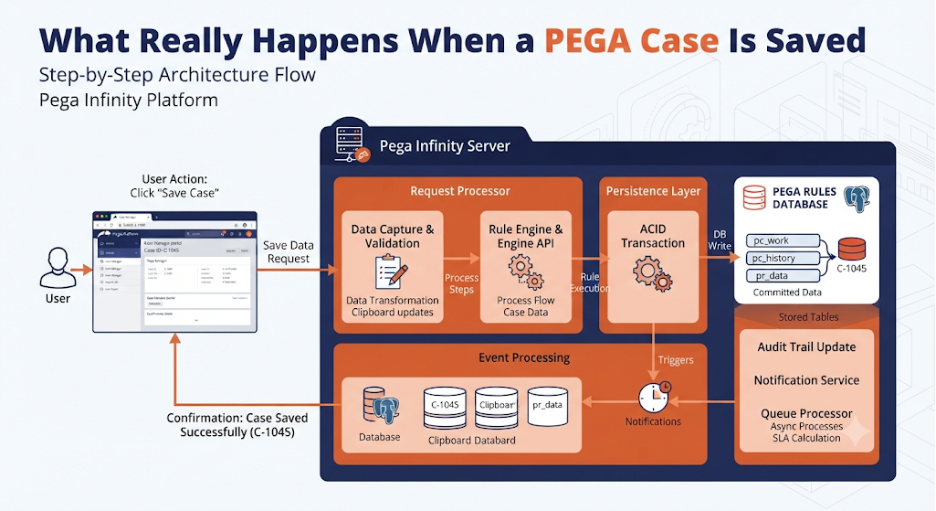
Behind that single action, however, Pega can perform a sequence of operations involving the UI layer, requestor context, Clipboard, validation, business rules, persistence, database transactions, locking, history, indexes, and integrations.
Understanding this lifecycle is valuable when investigating issues such as:
- Why a property value was not saved
- Why a case takes too long to save
- Why database records are not updated immediately
- Why validation prevents saving
- Why locks occur
- Why additional rules execute during a save
- Why a case appears updated in the UI but not in the database
The simplified lifecycle is:
User Action → Request → Clipboard Update → Validation → Business Processing → Persistence → Transaction Commit → Response
What Does “Save” Actually Mean?
A Pega case is not simply written directly from the browser into a database.
Instead, the user’s changes are first transferred into the Pega runtime environment.
Conceptually:
User Interface
↓
Request
↓
Requestor
↓
Clipboard
↓
Validation & Business Rules
↓
Persistence Layer
↓
Database
↓
Transaction Commit
↓
Response to User
This layered process allows Pega to apply business rules, security, validation, and transaction management before persistent data is changed.
Step 1: The User Changes Case Data
Suppose a user changes:
Customer Name = John Smith
Phone Number = 9876543210
The values initially exist in the client-side application and are submitted to Pega as part of the interaction.
At this point, changing the field does not necessarily mean that the database has already been updated.
Step 2: The Request Reaches Pega
When the user performs the save or submit action, the frontend sends a request to the Pega Platform.
Depending on the application architecture, this communication can occur through the APIs used by the modern UI architecture or through traditional Pega UI processing.
The request contains the information required to process the user action.
Step 3: The Requestor Provides Runtime Context
Pega processes the request within a Requestor context.
The Requestor provides information such as:
- User context
- Application context
- Access Group
- Security context
- Session information
- Clipboard
This allows Pega to determine who is performing the operation and under which application and security context it should execute.
Step 4: Case Data Is Available on the Clipboard
The case being processed is represented in the Pega runtime environment.
The Clipboard provides an in-memory representation of the case and other runtime information.
Conceptually:
Requestor
|
└── Clipboard
|
├── Case Data
├── Parameters
├── Data Pages
└── Temporary Processing Data
When the user changes a property, the runtime case representation can be updated before the information is persisted.
Step 5: Security Is Evaluated
Before allowing the operation to proceed, Pega applies the relevant security controls.
These can include:
- Authentication
- Authorization
- Roles
- Privileges
- Access Control Policies
- Case-level access
- Property-level security
This prevents users from modifying information they are not authorized to change.
Step 6: Validation Executes
Pega evaluates applicable validation logic.
Validation can occur at different levels depending on the application design.
Examples include:
- Required fields
- Property validation
- Field validation
- Business validation
- Cross-field validation
- Case-level validation
For example:
Phone Number = Empty
↓
Validation
↓
Required Field Error
↓
Save Cannot Complete
If validation fails, the transaction does not proceed normally to successful persistence.
Step 7: Data Transforms and Business Logic May Execute
Saving or submitting a case can cause additional processing.
Depending on the implementation, Pega may execute:
- Data Transforms
- Activities
- When conditions
- Decision logic
- Validation rules
- Workflow processing
- Automation
- Integration logic
Therefore, a save operation can be significantly more expensive than simply updating one database column.
Step 8: Case State May Change
A save operation can also be associated with workflow progression.
For example, when a user submits an assignment:
Current Assignment
↓
Validation
↓
Business Processing
↓
Flow Action
↓
Next Workflow Step
The case may therefore change not only in terms of property values but also in terms of:
- Assignment
- Stage
- Status
- Workflow state
- Routing
Step 9: Persistence Processing Begins
Once processing has successfully completed, Pega prepares the case changes for persistence.
The persistence layer determines which information needs to be written to the database.
This is an important distinction:
Clipboard state ≠ Database state
The Clipboard represents the current runtime state, while the database contains persisted state.
Step 10: Database Interaction
Pega’s persistence mechanisms interact with the database.
Depending on what changed, persistence can involve:
- Case data
- Assignment information
- Work metadata
- History
- Related records
- Index information
The exact database operations depend on the case structure, configuration, and processing performed during the transaction.
Step 11: Database Transaction
Case persistence occurs within transaction management.
Conceptually:
Start Transaction
↓
Process Case Changes
↓
Validate
↓
Persist Data
↓
Persist Related Changes
↓
Commit
If processing succeeds, the transaction can be committed.
If an error occurs, transaction rollback mechanisms can prevent incomplete changes from being persisted.
What Happens If the Save Fails?
Consider:
User Changes Case
↓
Save
↓
Validation
↓
Error
↓
Transaction Does Not Complete
The user may see an error message while the database remains unchanged for the failed operation.
This is why developers should distinguish between:
- UI value
- Clipboard value
- Persisted database value
Step 12: History and Audit Processing
Depending on the operation and application configuration, case processing may also generate history or audit information.
This can provide information about:
- Case changes
- User actions
- Workflow transitions
- Status changes
History is particularly useful when investigating why a case changed or when a business process requires traceability.
Step 13: Index Updates
Case processing may also involve index-related updates.
Indexes can support efficient searching and reporting.
When relevant case information changes, associated index information may need to be updated.
This is one reason why seemingly small case changes can sometimes involve more backend processing than expected.
Step 14: Integrations May Be Triggered
A save or submit operation can also cause integration activity if the application is designed that way.
For example:
Case Save
↓
Business Rule
↓
REST Integration
↓
External System
↓
Response
↓
Continue Processing
If the external system is slow, the case save operation may also become slow when the integration is synchronous.
Step 15: Commit
After successful processing, the database transaction is committed.
This is the point at which the changes become durable in the database.
Conceptually:
Clipboard
↓
Persistence
↓
Database Transaction
↓
COMMIT
↓
Persisted Case
A successful commit is a critical boundary in the save lifecycle.
Step 16: Response Is Returned
After processing completes, Pega returns a response to the client.
The UI can then reflect:
- Updated property values
- Validation results
- New assignment
- Updated case status
- Messages
- Next available actions
The user sees the result of the transaction.
Save vs Submit
An important distinction is that saving case data and submitting a workflow assignment are not always equivalent operations.
A simple save may persist changes without advancing the workflow.
A submit operation can perform additional processing such as:
Save Data
↓
Validation
↓
Flow Action
↓
Workflow Transition
↓
Next Assignment
Therefore, developers should understand exactly which UI action and backend operation are being invoked.
Why a Case Save Can Be Slow
A case save may become slow for several reasons.
Large Clipboard
Excessive data loaded into memory can increase processing time.
Complex Validation
Many validation rules can increase request processing time.
Heavy Business Logic
Activities or complex decision logic can make saves expensive.
Database Performance
Slow SQL queries, missing indexes, locking, or database contention can affect persistence.
External Integrations
Synchronous REST or SOAP calls can add significant latency.
Large Case Structures
Large Page Lists or deeply nested case data can increase processing and serialization overhead.
Excessive Automation
Multiple rules and downstream operations can increase the total transaction duration.
What Developers Should Trace
When a case save is unexpectedly slow, developers should investigate the complete request lifecycle.
Useful areas include:
- UI request
- DX API request
- Requestor
- Clipboard
- Rule execution
- Data Pages
- Database queries
- External integrations
- Transaction processing
A useful investigation flow is:
Save Button
↓
API / Request
↓
Requestor
↓
Clipboard
↓
Rules
↓
Database
↓
External Systems
↓
Commit
↓
Response
Using Tracer to Understand the Save
Tracer can help developers understand what happens during case processing.
Depending on the application and operation, Tracer can help identify:
- Rules executed
- Activities called
- Data Transforms executed
- Database operations
- Events
- Exceptions
- Processing time
Instead of asking only:
“Why is Save slow?”
the developer can break the problem down into:
“Which part of the save lifecycle is consuming the time?”
Database Perspective
From a database perspective, a case save can involve significantly more than a single SQL update.
Conceptually:
Application Request
↓
Case Persistence
↓
Work Table
↓
Related Persistence
↓
Index / History Processing
↓
Transaction Commit
The exact SQL statements and tables depend on the application’s data model and Pega configuration.
This is why database monitoring can be useful when investigating persistence performance.
Locking During Case Processing
Case locking is another important consideration.
When multiple users attempt to work with the same case, Pega needs to protect the consistency of case updates.
A locking problem can result in:
- Unable to acquire lock
- Case already being worked
- Waiting
- Save failure
- Concurrency conflicts
Understanding locking becomes especially important in high-volume applications.
What Happens to Data Pages?
Data Pages may participate in the save process when business logic requires additional information.
For example:
Case Save
↓
Data Page
↓
Customer Information
↓
Business Validation
↓
Persistence
Data Page configuration and caching behavior can influence performance.
Developers should avoid unnecessary data retrieval during frequently executed case operations.
What Happens to the Clipboard After Save?
The Clipboard represents runtime state, not permanent storage.
After successful persistence, the Requestor can continue processing additional requests.
For an interactive session:
Save Case
↓
Commit
↓
Response
↓
Requestor Remains Active
↓
Next User Interaction
The exact lifecycle depends on the type of Requestor and session behavior.
A Complete Case Save Lifecycle
The complete conceptual flow can be represented as:
USER CHANGES CASE
|
v
SAVE / SUBMIT
|
v
API REQUEST
|
v
REQUESTOR
|
v
AUTHENTICATION /
AUTHORIZATION
|
v
CLIPBOARD
|
v
VALIDATION
|
v
BUSINESS RULE PROCESSING
|
+———–+———–+
| |
v v
DATA ACCESS INTEGRATIONS
| |
+———–+———–+
|
v
PERSISTENCE
|
v
DATABASE TRANSACTION
|
v
COMMIT
|
+———-+———-+
| |
v v
HISTORY / INDEX /
RELATED DATA SEARCH DATA
| |
+———-+———-+
|
v
RESPONSE
|
v
UPDATED UI
This is a conceptual representation; the exact processing path varies based on application configuration and the type of case operation.
Common Misconceptions
“Changing a field immediately updates the database.”
Not necessarily. The value may exist in the client or runtime Clipboard before persistence occurs.
“Save only performs one database update.”
Not necessarily. Business logic, related persistence, history, indexing, and integrations can add additional processing.
“If the UI shows the value, it is already committed.”
The UI state and database state should not be assumed to be identical until the persistence transaction successfully completes.
“Submit and Save are the same.”
They can involve different processing depending on the application architecture and workflow configuration.
Best Practices for Faster Case Saves
Keep Case Data Focused
Avoid unnecessarily loading large structures.
Optimize Validation
Do not execute expensive validation logic unnecessarily.
Optimize Data Pages
Use appropriate caching and avoid repeated external calls.
Minimize Synchronous Integrations
Move long-running operations to asynchronous processing where business requirements allow it.
Optimize Database Queries
Review query execution time and indexing.
Avoid Excessive Automation
Every additional rule or integration adds processing overhead.
Monitor Real Transactions
Use tracing and performance monitoring to identify actual bottlenecks rather than optimizing based on assumptions.
Why Understanding the Save Lifecycle Matters
A simple Save button can initiate a surprisingly complex processing chain.
Understanding that chain helps developers answer important questions:
- Where did the value change?
- When did validation execute?
- Which rules executed?
- When did persistence begin?
- Was the database transaction committed?
- Did an integration delay the request?
- Was a lock involved?
- Why is the UI different from the database?
These questions become much easier to answer when the save operation is viewed as a complete lifecycle rather than a single database update.
Conclusion
When a Pega case is saved, the platform performs much more than simply writing a value to a database. The request passes through the runtime context, security checks, Clipboard processing, validation, business rules, persistence, transaction management, and potentially integrations, history, and indexing before the final response reaches the user.
The most useful mental model is:
Client → Requestor → Clipboard → Validation → Business Logic → Persistence → Transaction → Database → Response
Understanding this lifecycle is especially valuable for Pega developers working on performance optimization, database troubleshooting, integrations, case locking, validation issues, and complex workflow processing.
Once the save operation is understood at this level, many seemingly mysterious Pega behaviors become easier to trace, explain, and optimize.
