
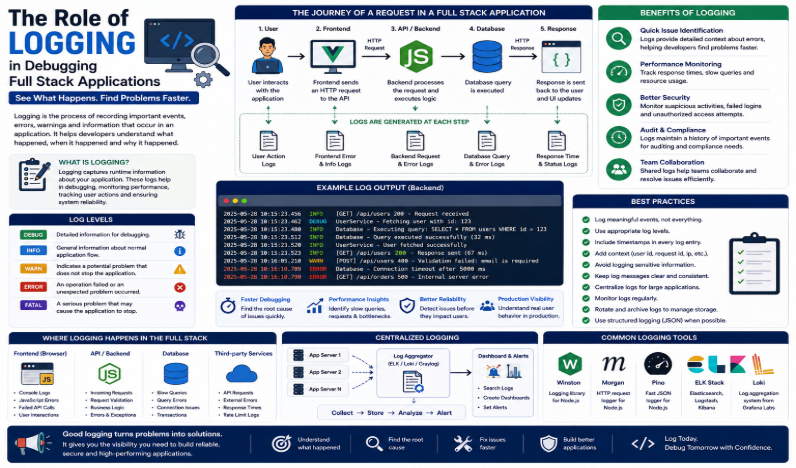
Modern full stack applications contain many connected layers. These include frontend interfaces, backend services, APIs, databases, authentication systems, and third-party services.
When something goes wrong, finding the exact cause can be difficult. An issue in one layer can also affect other parts of the application.
Developers therefore need reliable ways to understand what happens inside an application. Logging provides that visibility.
Logging records important events, errors, warnings, requests, and system activities. These records help developers understand what happened before, during, and after an issue.
Instead of reproducing every problem manually, developers can examine logs and investigate the cause. This makes debugging faster and more efficient.
For full stack developers, logging is especially useful. Problems can occur at any layer. For example, a frontend request may fail, an API may return an unexpected response, or a database query may cause an error.
With proper logging, developers can follow the path of a request and identify where the problem occurred.
Understanding Logging in Full Stack Applications
Logging means recording useful information about an application’s activity. These records can include API calls, user requests, authentication events, database operations, warnings, errors, and performance data.
Both frontend and backend applications can generate logs.
Frontend logs can reveal browser errors and failed requests. In contrast, backend logs can show server operations, API processing, and database activity.
When teams collect these logs properly, they gain a clearer view of application behavior. As a result, developers can investigate issues with greater accuracy.
Faster Identification of Errors
One major benefit of logging is faster error identification.
Without logs, developers may need to reproduce an issue manually. They may also need to investigate several parts of the application before finding the cause.
A useful log can provide important details. These may include:
- The time an error occurred
- The affected service
- The operation being performed
- The type of error
- Relevant technical information
For example, suppose a user reports that a page is not loading. Logs can help determine whether the problem comes from the frontend, API, authentication system, backend, or database.
Therefore, developers can focus on the actual source of the problem instead of investigating every layer manually.
Understanding the Request Journey
A full stack request often passes through several layers.
For example, a request may travel from the browser to the frontend. The frontend then communicates with an API. The backend processes the request and may query a database. Finally, the response returns to the frontend.
Logging makes this journey easier to follow.
Developers can record important events at each stage. They can then examine the logs to see where the request succeeded, slowed down, or failed.
This approach is particularly useful in complex applications. It can also help when a system depends on multiple backend services or external APIs.
Detecting Performance Problems
Logging is not only useful for errors. It can also help developers find performance problems.
Applications can record important performance information, such as:
- Request processing time
- API response time
- Database query duration
- Service response time
- Failed operations
For example, an API may normally respond within a few hundred milliseconds. If it suddenly takes several seconds, logs can help developers investigate the change.
They can identify when the slowdown started and which operation caused it.
As a result, performance logs can help teams improve application speed, stability, and reliability.
Improving Production Debugging
Debugging is often easier in a development environment. Developers have direct access to the application and its development tools.
Production environments are different. Real users interact with the system, and issues may occur under conditions that developers cannot easily reproduce.
This is where logging becomes valuable.
Production logs give developers visibility into the running application. When an unexpected problem occurs, teams can review the logs and investigate the issue without directly interrupting users.
Therefore, logging is an important part of maintaining applications after deployment.
Different Levels of Logging
Not every event has the same level of importance. For this reason, logging systems commonly use different severity levels.
Common logging levels include:
- Debug: Detailed information used during development and troubleshooting.
- Info: General information about normal application activity.
- Warning: A potential problem that does not necessarily stop the application.
- Error: An operation failed or an unexpected problem occurred.
- Critical/Fatal: A serious problem that may affect application availability.
Using the right level makes logs easier to understand. It also helps teams identify which events require immediate attention.
For example, developers may use debug logs while investigating an issue. However, production monitoring may focus more heavily on warnings and errors.
Logging Across the Full Stack
Full stack applications benefit from logging at multiple levels.
Frontend Logging
Frontend logging can capture browser errors, failed API requests, and important user interface events.
These logs can help developers identify problems that occur directly in the user’s browser.
Backend Logging
Backend logging can record incoming requests, authentication activity, business logic, and server errors.
It can also help developers understand how backend services process requests.
Database Logging
Database-related logs can provide information about failed queries, slow operations, connection problems, and other database events.
When teams combine frontend, backend, and database logs, they get a more complete picture of application behavior.
This becomes especially useful in large systems. A single user action may involve several services before the application returns a response.
Centralized Logging
Large applications can generate thousands or even millions of log messages.
Searching separate log files across individual servers can therefore become difficult. It can also slow down the debugging process.
Centralized logging solves this problem by collecting logs from multiple applications and services in one location.
Developers and operations teams can then search, filter, and analyze logs more efficiently.
Centralized logging is especially useful for applications that run across:
- Multiple servers
- Containers
- Cloud environments
- Microservices
- Distributed systems
With a centralized approach, teams can investigate problems without checking every system separately.
Logging and Security
Logging also supports application security.
Teams can record security-related events such as:
- Failed login attempts
- Suspicious requests
- Permission changes
- Unusual user activity
- Authentication failures
These records can help teams monitor systems and investigate security incidents.
However, developers must carefully control what they record.
Sensitive information should not be unnecessarily stored in logs. This includes passwords, authentication secrets, payment details, and private user information.
Therefore, secure logging should provide useful information without creating additional security risks.
Common Logging Practices
Developers can improve their logging strategy by following a few simple practices.
Record Meaningful Events
Avoid logging every minor activity. Instead, focus on events that help with debugging, monitoring, and security.
Use Appropriate Log Levels
Choose the right severity level for each message. This makes important events easier to identify.
Include Timestamps
Every log entry should include a timestamp. This helps developers understand when an event occurred.
Add Useful Context
Include useful information such as request IDs, transaction IDs, service names, or operation names when appropriate.
Protect Sensitive Information
Never expose passwords, secrets, payment information, or private data unnecessarily.
Centralize Logs
For large applications, collect logs in a centralized system. This makes searching and monitoring easier.
Use Structured Logging
Structured logs make it easier for tools to search, filter, and analyze application data.
Monitor Logs Regularly
Logging is most useful when teams actively monitor the information they collect.
Manage Log Retention
Rotate and retain logs according to operational, security, and storage requirements.
These practices make logs easier to search and understand. They also improve the overall debugging process.
Challenges of Logging
Although logging provides many benefits, poor logging can create new problems.
Common challenges include:
- Generating too many unnecessary messages
- Making logs difficult to search
- Increasing storage requirements
- Exposing sensitive information
- Managing logs across multiple services
- Finding important events in large volumes of data
For this reason, developers need a balanced logging strategy.
Too little logging can make debugging difficult. On the other hand, excessive logging can increase storage costs and make important information harder to find.
The goal is to record enough information to understand application behavior without creating unnecessary overhead.
Conclusion
Logging is one of the most valuable tools for debugging and maintaining full stack applications.
It gives developers visibility into application activity, errors, warnings, requests, and performance. More importantly, it helps teams understand problems across different layers of the application.
A well-designed logging strategy can help developers trace requests, identify errors faster, investigate production issues, and detect performance problems.
However, effective logging requires careful planning. Teams should use appropriate log levels, record meaningful events, protect sensitive information, and centralize logs when necessary.
In modern full stack development, logging is more than a debugging technique. It is an essential part of building reliable, secure, maintainable, and high-performing software.
