
Introduction
Push notifications allow applications to send timely updates to users even when they are not actively using the application. They are commonly used for chat messages, order updates, reminders, system alerts, and social media activity.
Unlike traditional notifications that require users to open an application and check for updates, push notifications can deliver information directly to a user’s device or browser. Building this feature requires coordination between the frontend, backend, and a push notification service.
1. How Push Notifications Work
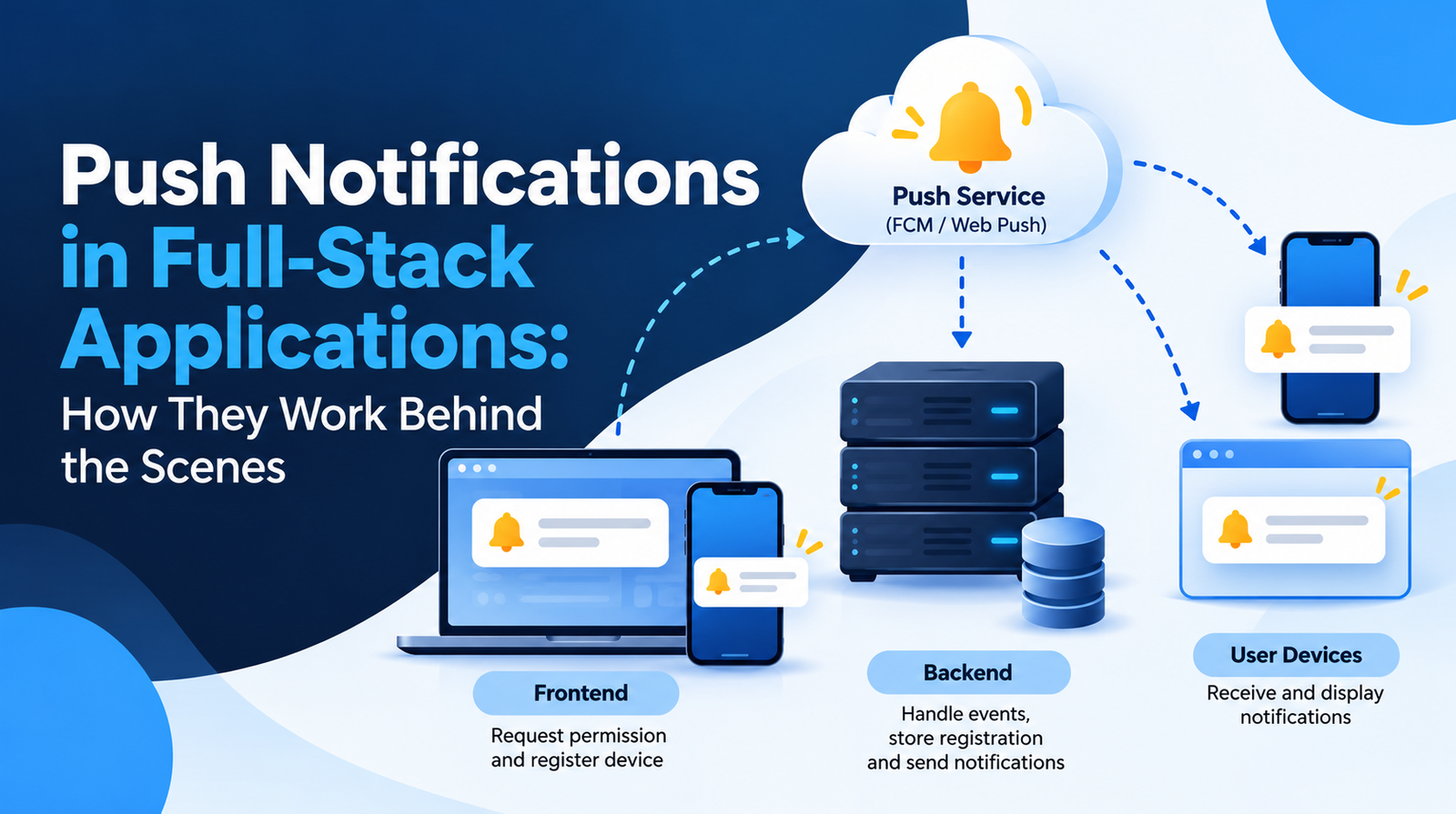
A typical push notification system consists of three main components:
- Frontend: Requests permission from the user and registers the browser or device to receive notifications.
- Backend: Determines when a notification should be sent and manages notification data and delivery requests.
- Push service: Delivers messages to the registered device or browser. Examples include Firebase Cloud Messaging (FCM) and the Web Push ecosystem.
When a user enables notifications, the device or browser obtains a registration token or push subscription. The frontend sends this information to the backend, which stores it for future use.
When an event occurs, such as a new message or an order status change, the backend sends a request to the appropriate push service. The service then attempts to deliver the notification to the target device.
2. The Complete Notification Flow
The process generally follows these steps:
- The user grants notification permission.
- The application registers the device or browser for push notifications.
- The frontend sends the device token or subscription details to the backend.
- The backend stores the registration against the relevant user.
- An event occurs, triggering a notification.
- The backend sends the notification through the push service.
- The device or browser displays the notification, when delivery and display conditions allow it.
- When the user taps the notification, the application can open the relevant screen or page.
This architecture separates business logic from message delivery, making notifications easier to manage across multiple devices.
3. Push Notifications vs In-App Notifications
Although they are often used together, these notification types serve different purposes.
Push notifications appear at the operating-system or browser level, potentially when the application is not open. They depend on permissions, device capabilities, and the delivery platform.
In-app notifications appear inside the application itself, such as in a notification panel or a header bell icon. They are typically retrieved from the backend when the application loads or requests updated data.
For example, a community application might store a new notification in its database, display it in the application’s notification panel, and also send a push notification to the user’s mobile device.
4. The Role of the Backend
The backend is responsible for deciding what should be sent, to whom, and when.
A well-designed notification system should:
- Store device registrations or push subscriptions securely.
- Associate registrations with users and support multiple devices.
- Trigger notifications from relevant application events.
- Track notification status where appropriate.
- Handle expired tokens, delivery failures, retries, and duplicate events.
- Respect user preferences and notification permissions.
For larger applications, background queues are useful because they allow notification delivery to happen outside the main user request. This prevents sending notifications from unnecessarily slowing down API responses.
5. Common Challenges in Push Notifications
Permission management
Users may deny permission or revoke it later. The application must handle these situations gracefully instead of repeatedly requesting permission.
Multiple devices
A single user may access the application from multiple phones, browsers, or tablets. The backend must manage separate registrations and remove registrations that are no longer valid.
Duplicate notifications
Retries, repeated events, or concurrent background jobs can result in duplicate messages. Idempotency and event tracking can help prevent unnecessary notifications.
Delivery is not guaranteed
A successful request to a push service does not necessarily mean that the notification appeared on the user’s screen. Devices may be offline, permissions may be disabled, or platform restrictions may delay delivery.
Security and privacy
Push payloads should avoid exposing passwords, authentication tokens, or sensitive personal information. Often, it is safer to send a short message with a resource identifier and retrieve the detailed information after the user opens the application.
6. How to Design a Reliable Notification System
A scalable implementation usually combines a notification database, event-driven processing, a queue, and an external push service.
The application first records the notification or relevant event. A background worker processes the delivery request, communicates with the push provider, and records the outcome. Failed deliveries can be retried according to a defined policy.
The system should also distinguish between a notification being created, accepted by the push provider, delivered where delivery information is available, and opened by the user. These are different events and should not be treated as equivalent.
Conclusion
Push notifications are more than messages displayed on a device. They are a full-stack feature involving frontend permissions, device registration, backend event handling, external delivery services, and failure management.
Understanding these components helps developers build notification systems that are reliable, secure, and scalable across web and mobile applications.
