
Introduction
Database performance plays an important role in building scalable Pega applications. However, performance depends on more than the number of records stored. It also depends on how application data is stored, retrieved, filtered, and processed.
One important architectural decision is choosing between exposed properties and BLOB-based property retrieval.
Pega stores case and data-object information in database tables. Some properties are available in dedicated database columns. Others remain within a serialized data structure stored in a BLOB column.
Both approaches serve different purposes. Exposed properties make selected values accessible to database operations. In contrast, BLOB storage allows Pega to persist application data without creating a separate database column for every property.
However, neither approach is always better.
The right choice depends on your application’s query patterns, reporting requirements, data volume, and performance goals.
In this article, we explore how exposed properties and BLOB retrieval work in Pega. We also examine their performance trade-offs, practical use cases, indexing strategies, and optimization techniques.
1. Understanding BLOB Storage in Pega
BLOB stands for Binary Large Object. In Pega, application properties can be serialized and stored in a BLOB column.
In many standard Pega-managed tables, this column is commonly named pzPVStream.
This column can contain serialized property values and other persisted page information associated with an application object.
For example, consider a customer service case containing these properties:
- Customer ID
- Customer Name
- Email Address
- Phone Number
- Request Type
- Request Description
- Resolution Details
Depending on the class mapping and persistence configuration, some properties may be available in dedicated database columns. Other properties may remain inside the BLOB.
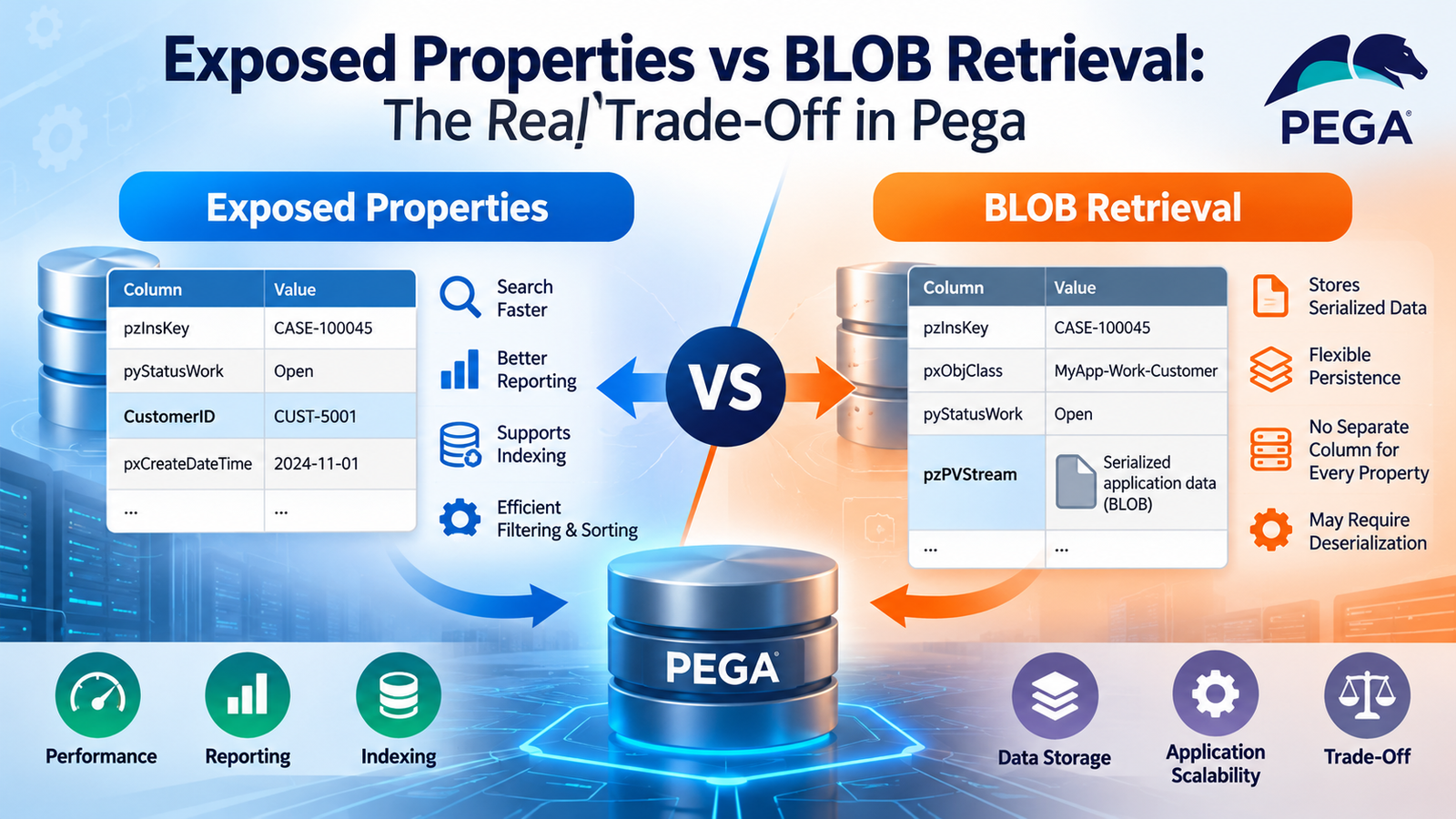
Example of a Pega Database Table
A simplified table structure might contain the following columns:
| Column | Purpose |
|---|---|
pzInsKey | Identifies the persisted record |
pxObjClass | Identifies the object’s class |
pyStatusWork | Represents an exposed work-status property |
pzPVStream | Stores serialized application data |
The actual table structure varies by Pega version, class mapping, and application configuration.
How Does BLOB Retrieval Work?
When an application retrieves a case, Pega follows a processing path determined by the operation and the properties required.
A simplified flow looks like this:
Application Request → Database Query → Retrieve Record → Read BLOB Data → Deserialize Properties → Populate Runtime Pages → Execute Business Logic
When the application needs properties stored only inside the BLOB, it may need to retrieve and deserialize the serialized data.
This process introduces additional work. The overhead can become significant when the application handles large objects or processes many records.
However, BLOB storage does not automatically cause a full-table scan.
A database can use an index to locate a record even when that record contains a BLOB column. The actual performance impact depends on the query, execution plan, and amount of data retrieved.
Therefore, developers should evaluate the complete retrieval process rather than assume that BLOB storage is inherently slow.
2. What Are Exposed Properties in Pega?
An exposed property is a Pega property that is available through a dedicated database column instead of being accessible only through its serialized BLOB representation.
Consider an application that frequently searches cases using a customer identifier.
If the customer identifier is exposed, the database can evaluate that property directly through SQL.
For example:
| Column | Example Value |
|---|---|
pzInsKey | CASE-100045 |
pyStatusWork | Open |
CustomerID | CUST-5001 |
pzPVStream | Serialized application data |
In this example, CustomerID represents an illustrative exposed property.
A conceptual SQL query might look like this:
SELECT pzInsKey, pyStatusWork
FROM YourCaseTable
WHERE CustomerID = ?;
Because the customer identifier is available in a dedicated column, the database can evaluate the condition without first deserializing the BLOB for every candidate record.
Whether the database uses an index depends on the available indexes, query conditions, and execution plan.
Why Should You Expose a Property?
Exposing a property can be useful when an application frequently needs to:
- Filter records using specific values.
- Join tables using selected properties.
- Sort records efficiently.
- Group records for reporting.
- Perform database-side aggregations.
- Create indexes for important query patterns.
- Retrieve selected values without relying on BLOB deserialization.
However, exposing a property does not automatically create a database index.
Exposure makes the property available as a database column. Indexing is a separate design decision that should be based on actual query requirements.
3. Exposed Properties vs BLOB Retrieval: Key Differences
The main difference between these approaches is how the database accesses property values.
BLOB-Based Storage
In BLOB-based storage, application properties are serialized and persisted within the BLOB column.
The database can retrieve the persisted record. However, properties stored only inside the serialized structure may need additional processing before the application can use them.
This approach supports flexible data persistence without requiring a separate column for every property.
Exposed-Property Storage
With exposed properties, selected values are available through dedicated database columns.
The database can use these columns in supported queries. It can also use suitable indexes to filter or sort records.
This approach is particularly useful when properties are frequently used in reports, joins, and search conditions.
Comparison Table
| Feature | BLOB-Based Storage | Exposed Properties |
|---|---|---|
| Data storage | Serialized application data | Dedicated database columns |
| Database filtering | Limited when the property is accessible only through the BLOB | Can filter directly on the column |
| Database sorting | May require application-side processing | Can sort using the column |
| Indexing | Cannot directly index a property that exists only inside the serialized structure using an ordinary column index | Supports indexing of the exposed column |
| Reporting | May require alternative data-access mechanisms | Supports database operations on exposed values |
| Schema complexity | Avoids a separate column for every property | Requires additional columns for exposed properties |
| Maintenance | Depends on application persistence and retrieval requirements | Includes column and any associated index maintenance |
| Best use case | Flexible persistence of application data | Frequently queried properties |
In practice, Pega applications commonly use both approaches within the same table.
The goal is not to eliminate BLOB storage. Instead, developers should expose selected properties when doing so improves important database operations.
4. The Real Performance Trade-Off
It is easy to assume that exposed properties are always faster than BLOB-based storage. However, this assumption overlooks how different operations work.
Performance depends on whether the database needs to evaluate a property before returning the results.
Consider these common scenarios.
| Operation | BLOB-Based Property | Exposed Property |
|---|---|---|
| Retrieve one record by its primary key | Can be efficient, although required BLOB data may need deserialization | Can also be efficient; other properties may still require BLOB retrieval |
| Filter records | May require additional processing if the property is unavailable to the database | Allows direct filtering on the column |
| Sort records | May require application-side processing | Allows database-side sorting |
| Generate reports | May require alternative data-access mechanisms | Supports database-side filtering and aggregation |
| Retrieve a large object | May require deserializing substantial data | Exposing a few properties does not eliminate the need to retrieve the remaining object data |
For example, searching millions of records using a property stored only inside a BLOB can become expensive if the search implementation requires substantial record retrieval and application-side processing.
However, retrieving a single record through an indexed primary key may not create the same bottleneck.
Therefore, the real trade-off involves database access, application-side processing, storage, indexing, and maintenance.
The best approach is to optimize the data-access pattern rather than focus on storage format alone.
5. Scenario One: Searching 100 Million Customer Records
Consider a customer application containing 100 million records.
Users frequently search for customers using a unique customer identifier.
Suppose this identifier is stored only inside serialized property data and is not otherwise available through an appropriate database column or supported query mechanism.
In this situation, the search may need to retrieve candidate records and inspect their property data, depending on the implementation.
At this scale, unnecessary retrieval and processing can significantly affect performance.
Without an Exposed Search Property
A simplified search process might look like this:
Customer Search → Database Retrieval → Read Candidate Records → Deserialize Required Data → Evaluate Customer ID → Return Matches
If the implementation retrieves a large number of records before evaluating the identifier, it can consume additional CPU, memory, and network resources.
The exact impact depends on the query and the application’s data-access design.
With an Exposed Search Property
When the customer identifier is available as a database column, the database can evaluate the search condition directly.
The process becomes:
Customer Search → Database Query → Filter by Customer ID → Use a Suitable Index → Return Matching Records
If an appropriate index exists, the database may locate matching records without examining the entire dataset.
As a result, high-volume searches can become significantly more efficient.
However, exposure alone does not guarantee better performance. The query must also be designed correctly, and the database must have an appropriate execution plan.
6. Scenario Two: Filtering a Pega Worklist
Consider a customer service application that manages millions of cases.
The worklist displays cases based on several conditions, including:
- Case status
- Assigned operator
- Customer identifier
- Creation date
- Priority
If the relevant properties are available to the database, Pega can delegate appropriate filtering and sorting to the database.
For example, a conceptual query might look like this:
SELECT pzInsKey, pyStatusWork
FROM YourCaseTable
WHERE pyStatusWork = ?
ORDER BY pxCreateDateTime DESC;
This query illustrates database-side filtering and sorting. It is not a recommendation to query Pega-managed tables directly in production.
For more complex worklists, suitable indexes may improve performance when their structure matches the query patterns.
In contrast, retrieving a large collection of cases and filtering them in application memory can create unnecessary overhead.
This approach may increase:
- Database-to-application network traffic
- Application-server memory consumption
- CPU utilization
- Response time
- Clipboard size
To avoid these problems, use supported Pega reporting and data-access mechanisms to apply appropriate filters, sorting, and pagination at the database level.
As a result, the application can retrieve only the records required for the current operation.
7. Scenario Three: Reporting on Historical Data
Historical reporting presents another important use case for exposed properties.
Suppose an application stores 100 million transaction-history records. The business needs a report showing transaction totals by month and status.
If the required transaction properties are available to the database, the database can perform filtering and aggregation without requiring Pega to load every transaction into application memory.
A conceptual SQL query might look like this:
SELECT
    TransactionMonth,
    TransactionStatus,
    COUNT(*) AS TransactionCount,
    SUM(Amount) AS TotalAmount
FROM TransactionHistory
WHERE TransactionDate >= ?
  AND TransactionDate < ?
GROUP BY
    TransactionMonth,
    TransactionStatus;
This example illustrates database-side aggregation. It is not a direct template for querying Pega-managed tables.
However, if the required properties are available only inside serialized BLOB data, implementing the same reporting operation may be more difficult or expensive.
For reporting-intensive applications, developers should model frequently queried reporting attributes so that supported database operations can access them efficiently.
Depending on the requirements, a separate reporting model, summary table, data mart, or analytics platform may provide a better solution.
The key is to design reporting around the workload instead of repeatedly processing large volumes of operational data.
8. Why Exposing Every Property Is Not the Answer
If exposed properties improve database access, why not expose every property?
The answer is simple: exposure introduces additional design and maintenance considerations.
Database Schema Growth
Every exposed property requires a corresponding database column in the relevant table.
Consequently, exposing too many properties can complicate schema management and increase row-width or storage overhead, depending on the database and data types.
Index Maintenance
Exposure does not automatically create an index.
However, when indexes are added, the database must maintain them as relevant records change.
Too many indexes can increase storage consumption and reduce write performance.
Therefore, developers should create indexes only when they support important query patterns.
Schema Changes
Adding or changing exposed properties may require database schema changes and appropriate deployment procedures.
The exact process depends on the Pega version and deployment environment.
For this reason, developers should follow supported Pega administration and deployment practices.
Data Consistency
Exposed columns must contain the correct values when application data is persisted.
Incorrectly managed exposure or schema changes can lead to missing or inconsistent database values.
Developers should use supported Pega mechanisms to maintain persistence consistency.
Limited Benefits for Rarely Queried Properties
Not every property needs to be exposed.
For example, a long request description may be used only after a case has been retrieved. Exposing it may provide little benefit if the database never filters, joins, sorts, or aggregates using that property.
Therefore, selective exposure based on actual application requirements is generally more effective than exposing every property.
9. How to Index Exposed Properties Correctly
After exposing a property, the next question is whether it needs an index.
An index can improve retrieval when the query conditions match the index structure and the indexed values are sufficiently selective.
Consider a transaction-history table containing these exposed properties:
- CustomerID
- TransactionDate
- TransactionStatus
- Region
Suppose the application frequently executes queries like this:
SELECT TransactionID, TransactionDate
FROM TransactionHistory
WHERE CustomerID = ?
  AND TransactionDate >= ?
  AND TransactionDate < ?;
For this query pattern, a composite index beginning with CustomerID and followed by TransactionDate may be appropriate.
However, the correct index depends on the database platform, workload, selectivity, ordering requirements, and execution plan.
Database Indexing Best Practices
Follow these practices when optimizing exposed properties:
- Identify frequent queries. Focus on operations that run often or consume significant resources.
- Review execution plans. Determine how the database accesses and processes records.
- Prioritize important columns. Evaluate properties used in selective filters and joins.
- Assess composite indexes. Match index column order to actual query patterns.
- Measure write performance. Check whether additional indexes affect insert and update operations.
- Monitor index usage. Review whether indexes provide measurable benefits.
- Avoid redundant indexes. Remove them only after careful validation.
Most importantly, do not create an index on every exposed property.
The objective is to improve important queries while controlling storage requirements and index-maintenance costs.
10. Exposed Properties and Pega Reporting
Pega reporting often relies on properties that the database can evaluate.
Exposed properties are particularly useful when reports need to filter, sort, join, or aggregate data.
For example, a report might retrieve cases where:
- Status is Open.
- Priority is High.
- Creation date falls within a specified range.
When these properties are available to the database, the database can evaluate the conditions directly.
However, if a required property exists only inside the BLOB, the report may need an alternative supported mechanism or a different data model.
Reporting Optimization Tips
To improve report performance:
- Expose properties that support important reporting requirements.
- Use selective filters to reduce the number of matching records.
- Return only the columns required by the report.
- Avoid unnecessary joins across large tables.
- Apply pagination to large result sets.
- Evaluate expensive counts and sorting operations.
- Review SQL execution plans when available.
In addition, avoid retrieving an entire dataset simply because the application can filter it after retrieval.
Instead, design reports to retrieve the minimum data needed for each operation.
11. Exposed Properties, BLOBs, and Clipboard Performance
Database performance is only one part of Pega application performance.
After retrieving persisted data, Pega may need to populate runtime pages and make properties available to business logic.
When the application loads a large object, it may need to deserialize the relevant BLOB content.
If that object contains many properties or nested pages, the process can increase execution time and memory consumption.
A simplified processing flow is:
Database → Retrieve Persisted Object → Deserialize Required Data → Populate Clipboard → Execute Business Logic
However, exposing a property does not automatically eliminate BLOB deserialization.
If the application needs the complete object, it may still need to retrieve and process the remaining persisted data.
The main benefit of exposure occurs when the database can use selected properties to filter records before returning them to the application.
Practical Clipboard Optimization
For large Pega applications, consider the following practices:
- Avoid loading complete work objects when only a few fields are required.
- Use suitable report definitions and data-access patterns.
- Avoid unnecessary page-list expansion.
- Retrieve bounded result sets.
- Investigate clipboard size and processing time.
- Measure whether BLOB deserialization contributes to the bottleneck.
Ultimately, the goal is to reduce unnecessary data retrieval and object reconstruction rather than eliminate BLOB usage.
12. What Happens When an Exposed Property Changes?
Exposed properties must remain consistent with the application’s persisted data.
Suppose a customer identifier exists both in serialized application data and in a dedicated database column.
When the property changes, the persistence mechanism must maintain the correct value in the exposed column.
Conceptually, the process involves:
Application Property Updated → Pega Persistence Processing → Update Persisted Data → Maintain Consistent Values
The exact persistence behavior depends on the Pega implementation and configuration.
Therefore, developers should use supported Pega mechanisms to expose properties and manage schema changes.
Avoid manually updating physical database columns without following the application’s expected persistence behavior. Such changes can introduce inconsistencies between application data and database values.
13. Troubleshooting Slow BLOB-Related Queries
When a Pega application performs poorly, the first step is to identify the actual bottleneck.
A slow report does not automatically mean that a property must be exposed.
Other possible causes include:
- Missing or ineffective indexes
- Nonselective filters
- Expensive joins
- Sorting large result sets
- Excessive row retrieval
- Database locking
- Slow disk input/output
- Network latency
- Large clipboard pages
- External service delays
A structured troubleshooting process helps developers identify the underlying problem before changing the data model.
Step 1: Identify the Slow Operation
Determine where the delay occurs.
For example, it may happen during report execution, case opening, Data Page loading, integration processing, or another operation.
Step 2: Inspect the Database Query
Use appropriate Pega diagnostics and database monitoring to identify the query responsible for the delay.
This step helps distinguish database-related issues from application processing or external service delays.
Step 3: Review the Execution Plan
Examine how the database executes the query.
Check whether it scans too many rows, uses an ineffective index, or performs expensive joins and sorts.
Step 4: Identify Properties Used in Queries
Review the properties used for filtering, joining, grouping, and sorting.
Determine whether those properties are available to the database through supported mechanisms.
Step 5: Evaluate Selective Exposure
If an important property is unavailable to the database and the query processes large volumes of data, consider exposing it through a supported approach.
However, confirm that exposure addresses the actual problem before making schema changes.
Step 6: Review Indexing
Determine whether a suitable index exists and whether the database optimizer uses it effectively.
If necessary, evaluate alternative index structures against the actual query workload.
Step 7: Measure the Results
After implementing a change, compare performance before and after the optimization.
Measure:
- Query execution time
- Number of rows processed
- Database resource consumption
- Application response time
- Impact on write operations
This structured approach helps prevent unnecessary changes and ensures that optimization efforts address measurable performance problems.
14. Decision Framework: When Should You Expose a Property?
The decision to expose a property should depend on how the application uses it.
Use the following framework as a starting point.
| Requirement | Recommended Approach |
|---|---|
| Property is frequently used in database filters | Consider exposure |
| Property is frequently used in joins | Consider exposure and appropriate indexing |
| Property is frequently used for database sorting | Consider exposure and query-aligned indexing |
| Property supports frequent grouping or aggregation | Consider exposure or a dedicated reporting model |
| Property is rarely queried | BLOB storage may be sufficient |
| Property is used only after retrieving a record | Exposure may provide limited benefits |
| Property belongs to a large historical dataset | Evaluate the access pattern and reporting architecture |
| Property is used in high-volume transactional writes | Balance query benefits against maintenance costs |
| Application retrieves the entire object regardless | Exposure alone may not significantly reduce retrieval costs |
This framework is not a universal rule.
The final decision should consider query frequency, data volume, update patterns, database capabilities, and application requirements.
For example, a frequently searched customer identifier may benefit from exposure. In contrast, a rarely accessed description field may not justify an additional database column.
15. Recommended Architecture for High-Volume Pega Applications
Applications that process millions of records need a data-access strategy that supports both operational workloads and reporting requirements.
Exposing every property is rarely the best starting point.
Instead, consider an architecture that separates operational queries from large analytical workloads.
Operational Queries
Operational queries support everyday application activities, such as opening cases, searching customers, and filtering worklists.
For these operations, selectively exposed properties and suitable indexes can improve database access.
Reporting Queries
Reporting queries may involve large datasets, historical records, and complex aggregations.
Depending on the requirements, these workloads may benefit from a dedicated reporting model, summary structures, supported database views, or an external analytics platform.
A simplified architecture looks like this:
Pega Application → Data Access Layer
From the data-access layer:
- Operational Queries → Pega Operational Data → Selective Exposed Properties → Suitable Indexes
- Reporting Queries → Reporting Model → Optimized Queries and Aggregations
This approach helps align each workload with an appropriate data-access strategy.
It also reduces the need to run every analytical query against operational records.
The best implementation depends on the application’s requirements and the capabilities supported by its Pega environment.
16. Best Practices for Pega Developers
When optimizing exposed properties and BLOB retrieval, follow these practical guidelines.
Understand the Query First
Identify the expensive operation before changing the data model.
Review the query, execution plan, and amount of data processed.
Expose Properties Selectively
Prioritize properties used frequently in database filtering, joins, sorting, and aggregation.
Avoid exposing properties that provide little measurable benefit.
Evaluate Indexing Separately
Remember that exposure and indexing solve different problems.
Determine whether an index is necessary based on actual query patterns.
Minimize Unnecessary Retrieval
Use selective filters, pagination, and bounded result sets.
Retrieve only the data required for the current operation whenever supported.
Monitor BLOB-Related Overhead
Confirm whether serialization, retrieval, or deserialization contributes significantly to response time.
Do not assume that every slow operation is caused by BLOB storage.
Consider Write Performance
Additional indexes and exposed columns can introduce maintenance overhead.
Test both read and write workloads before adopting a change.
Follow Supported Pega Mechanisms
Use supported Pega tools and procedures to expose properties and manage database schema changes.
Avoid direct database modifications that bypass expected persistence behavior.
Separate Operational and Analytical Workloads
When appropriate, use a reporting architecture designed for large aggregations and historical analysis.
Test With Realistic Data Volumes
Validate optimizations against representative workloads.
Measure query performance, resource consumption, and write throughput before and after each change.
Conclusion
Exposed properties and BLOB storage serve different purposes in Pega’s data-persistence architecture.
BLOB-based storage supports flexible application-data persistence. Meanwhile, exposed properties make selected values directly available to database operations.
For applications handling millions of records, exposed properties can improve filtering, sorting, joining, and reporting when combined with suitable indexes and efficient query design.
However, exposing every property is not a scalable strategy. It can increase schema complexity, storage requirements, and maintenance costs without delivering meaningful performance improvements.
The real trade-off is between flexible object persistence and efficient relational data access.
Therefore, developers should expose properties according to actual access patterns, use BLOB storage where appropriate, and minimize unnecessary data retrieval.
They should also validate performance improvements through execution plans and realistic workload testing.
Ultimately, high-performance Pega applications are not built by eliminating BLOBs. They are built by choosing the right data-access strategy for each application requirement.
