
Introduction
Code deployment is the process of moving an application or a new version of an application from a development environment to a server where users can access it. It is an important part of the software development lifecycle because even well-written code is useful only when it can be delivered reliably to users.
Modern development teams use deployment practices such as CI/CD, Docker, automated testing, version control, and cloud platforms to make deployments faster, safer, and more consistent.
What Is Code Deployment?
Code deployment means taking code that has been developed and tested and making it available in a target environment.
A typical application may have several environments:
- Development — Developers write and test new features.
- Testing/Staging — The application is tested in an environment similar to production.
- Production — The application is available to real users.
For example, when a developer completes a new feature in a Laravel or Vue application, the code may first be tested locally. After successful testing, it can be deployed to a staging server and finally to production.
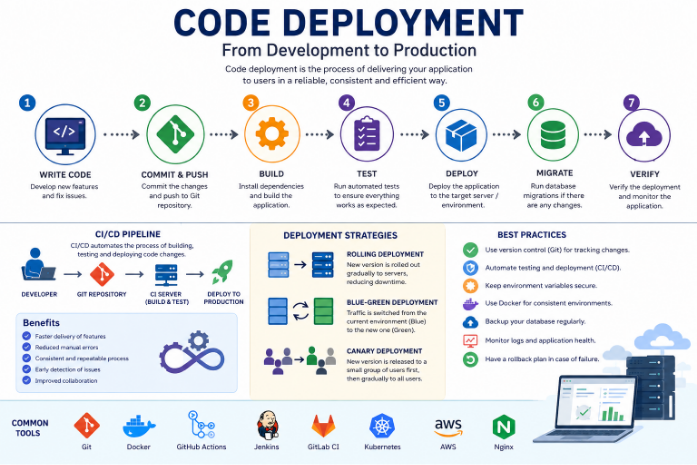
The Code Deployment Process
A basic deployment process usually follows these steps:
1. Write and Commit the Code
Developers make changes to the application and commit them to a version-control system such as Git.
git add .
git commit -m “Add user authentication”
git push origin main
Using Git makes it possible to track changes and return to an earlier version if necessary.
2. Build the Application
The application is prepared for deployment.
For a frontend application, this might involve:
npm install
npm run build
For a Laravel application, dependencies may be installed using Composer:
composer install –no-dev –optimize-autoloader
3. Run Tests
Before deploying, automated tests should verify that the new code works correctly.
For example:
php artisan test
If the tests fail, the deployment should normally stop until the issue is fixed.
4. Deploy to the Server
Once the application passes the required checks, the new version is transferred to the target server.
Depending on the project, deployment can be performed using:
- SSH
- Docker
- Kubernetes
- Cloud platforms
- CI/CD pipelines
- Deployment tools
5. Run Database Migrations
If the application contains database changes, migrations may need to be executed.
For Laravel:
php artisan migrate –force
Database migrations should be handled carefully because incorrect changes can affect production data.
6. Restart or Reload Services
After deploying new code, application services may need to be restarted or reloaded.
For example, a Docker-based application might use:
docker compose up -d
The exact command depends on the application’s architecture.
7. Verify the Deployment
After deployment, developers should check whether the application is working correctly.
Common checks include:
- Application availability
- API responses
- Database connectivity
- Logs
- Authentication
- Background jobs
- Error rates
- Important user workflows
What Is CI/CD?
CI/CD stands for Continuous Integration and Continuous Delivery/Deployment.
It automates many parts of the deployment process.
A typical pipeline can look like this:
Developer → Git → Build → Test → Deploy → Production
For example, when a developer pushes code to GitHub, a CI/CD pipeline can automatically:
- Install dependencies
- Build the application
- Run tests
- Check code quality
- Build a Docker image
- Deploy the application
- Perform health checks
This reduces manual work and helps prevent deployment mistakes.
Deployment Using Docker
Docker is commonly used to make deployments more consistent.
Instead of installing every dependency manually on a server, an application and its required environment can be packaged into containers.
For example:
docker build -t my-application .
docker compose up -d
The same Docker configuration can then be used across development, testing, and production with environment-specific settings.
This helps solve the common problem of:
“It works on my machine.”
Deployment Strategies
Different applications can use different deployment strategies.
Rolling Deployment
The new version is gradually deployed to servers while the existing version continues serving users.
This helps reduce downtime.
Blue-Green Deployment
Two environments are maintained:
- Blue — Current production version
- Green — New version
Once the green environment is tested successfully, traffic is switched from blue to green.
Canary Deployment
The new version is initially released to a small percentage of users. If everything works correctly, the deployment is gradually expanded to more users.
This reduces the risk of releasing a faulty version to everyone at once.
Common Deployment Problems
Deployments can fail for several reasons.
Dependency Issues
The production server may use a different PHP, Node.js, or library version than the development environment.
Environment Variables
Applications often depend on configuration values such as:
APP_ENV=production
DB_HOST=localhost
DB_DATABASE=my_database
DB_USERNAME=my_user
Incorrect environment variables can prevent the application from connecting to databases or external services.
Database Migration Errors
A deployment can fail if a migration is incompatible with the existing database structure or data.
Port Conflicts
Services such as MySQL, Redis, Nginx, or application servers may fail to start if another process is already using the required port.
Missing Dependencies
If required packages or PHP extensions are missing from the production environment, the application may fail after deployment.
Best Practices for Code Deployment
To make deployments safer and more reliable:
- Use Git to track every code change.
- Automate testing before deployment.
- Use CI/CD pipelines whenever possible.
- Keep environment variables separate from source code.
- Use Docker when consistent environments are important.
- Back up production databases before risky changes.
- Monitor logs and application health after deployment.
- Use staging environments before production.
- Have a rollback strategy in case the deployment fails.
- Deploy small changes frequently instead of making large, risky releases.
Conclusion
Code deployment is more than simply copying files to a server. A reliable deployment process involves version control, testing, building, configuration, database management, deployment, and monitoring.
With tools such as Git, Docker, CI/CD pipelines, and cloud platforms, teams can automate much of this process and deliver new features faster while reducing the risk of production failures.
A well-designed deployment process ultimately helps development teams release software quickly, consistently, and safely.
