
Modern full stack applications often depend on multiple technologies working together, such as frontend frameworks, backend servers, databases, APIs, and supporting services. Setting up all these technologies consistently across different development environments can be challenging. A project that works perfectly on one developer’s computer may fail on another machine because of differences in operating systems, software versions, dependencies, or configuration.
Docker provides a practical solution to this problem by allowing developers to package an application and its dependencies into isolated environments called containers. For full stack developers, Docker makes it easier to create consistent development environments, run multiple services together, and move applications from development to testing and production with fewer configuration problems.
Docker has become an important part of modern software development because it simplifies application deployment and improves collaboration between developers and operations teams. Instead of manually installing every dependency, developers can define the required environment and reproduce it whenever necessary.
Understanding Docker
Docker is a platform used to build, package, and run applications inside containers. A container includes an application and the dependencies required for it to run, while sharing the host operating system’s underlying kernel.
Unlike traditional virtual machines, containers are lightweight and can start quickly. This makes them particularly useful for modern web applications that require multiple independent services.
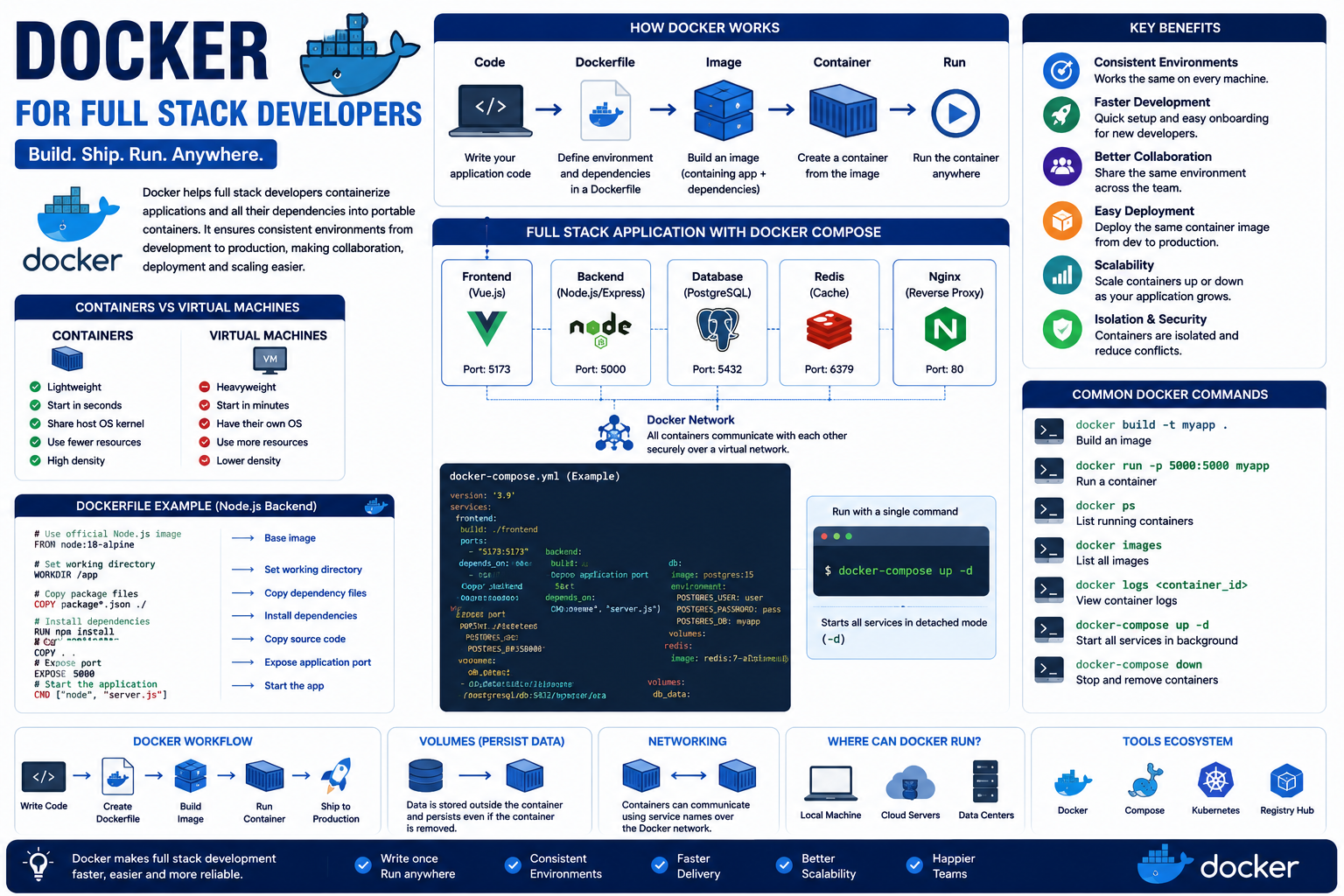
For example, a full stack project may contain a Vue.js frontend, a Node.js backend, a PostgreSQL database, and a Redis caching service. Each service can run inside its own container while communicating with the other containers through a Docker network.
Why Docker is Important for Full Stack Developers
Full stack developers frequently work with multiple technologies simultaneously. Managing different versions of Node.js, databases, package managers, and development tools can create configuration problems.
Docker allows developers to define the required environment in configuration files and reproduce it consistently across different machines.
This reduces the common problem of “it works on my machine” and allows team members to work with the same application environment regardless of their operating system.
Containers and Images
Two of the most important concepts in Docker are images and containers.
A Docker image is a packaged blueprint containing an application’s code, runtime, libraries, dependencies, and configuration required to run the application.
A container is a running instance of that image.
For example, a developer can create a Node.js image containing the required Node.js version and application dependencies. Multiple containers can then be created from that image whenever the application needs to run.
This separation makes application environments predictable and reproducible.
Using Docker for a Full Stack Application
A typical full stack application can contain multiple services. Docker allows each service to run independently while still communicating with the others.
For example, a project might contain:
- Frontend container for the Vue.js application.
- Backend container for the Node.js or Java application.
- Database container for PostgreSQL or MySQL.
- Redis container for caching.
- Nginx container for reverse proxy and web traffic.
Each container has a specific responsibility, making the overall application easier to organize and manage.
Docker file and Application Configuration
A Docker file contains instructions that describe how a Docker image should be created. Developers can specify the base image, application files, dependencies, environment variables, and commands required to start the application.
For a frontend or backend project, a Docker file can define the exact runtime environment required by the application.
This provides a repeatable way to create application environments and reduces the need for developers to manually configure their systems.
Docker Compose for Multiple Services
Full stack applications often require several services to run simultaneously. Starting each service manually can become inconvenient and error prone.
Docker Compose provides a way to define multiple containers and their configuration in a single file. Developers can specify services, ports, networks, environment variables, volumes, and dependencies.
For example, a Docker Compose configuration can start a frontend application, backend API, and database together.
This makes local development easier and allows the entire application stack to be started with a single command.
Consistent Development Environments
One of Docker’s biggest advantages is environment consistency. Developers working on the same project may use different operating systems or have different software versions installed.
Without containers, these differences can lead to dependency conflicts and unexpected errors.
Docker allows the development environment to be defined as code. Every developer can use the same container configuration, reducing environment-related problems and making collaboration easier.
Simplifying Deployment
Deploying applications manually can require installing runtimes, configuring dependencies, setting environment variables, and preparing servers.
Docker simplifies this process by allowing the same container image used during development or testing to be deployed to a production environment.
This consistency reduces the possibility of deployment-specific problems and makes the transition from development to production more predictable.
Improving Scalability
Docker containers can be started, stopped, and replicated quickly. This makes them useful when applications need to handle increasing traffic.
For example, if a backend service receives a large number of requests, multiple instances of the backend container can be deployed behind a load balancer.
Container-based deployment therefore provides a strong foundation for building applications that can scale as demand increases.
Better Team Collaboration
Docker also improves collaboration between frontend developers, backend developers, database administrators, and DevOps teams.
Instead of providing lengthy installation instructions, a team can share Docker files and Docker Compose configurations that describe the complete development environment.
New developers can set up the project more quickly and work with the same dependencies and services as the rest of the team.
This improves productivity and reduces time spent solving environment configuration issues.
Common Docker Tools and Concepts
Full stack developers commonly work with several Docker concepts and tools.
Some important ones include:
- Docker Images for packaging applications.
- Docker Containers for running applications.
- Docker files for defining image creation.
- Docker Compose for managing multiple services.
- Docker Networks for communication between containers.
- Docker Volumes for persistent data storage.
- Docker Registry for storing and sharing images.
- Environment Variables for application configuration.
Understanding these concepts provides a strong foundation for using Docker in full stack projects.
Challenges of Using Docker
Although Docker simplifies many development and deployment tasks, it also introduces new concepts that developers need to understand.
Some common challenges include:
- Learning Docker commands and container concepts.
- Managing container networking.
- Understanding persistent storage and volumes.
- Handling environment variables securely.
- Managing large Docker images.
- Debugging applications running inside containers.
- Understanding differences between development and production configurations.
These challenges can be reduced through proper documentation, consistent configuration, and regular practice.
Best Practices for Full Stack Developers
Developers should follow good practices when using Docker to maintain efficient and secure applications.
Some recommended practices include:
- Keep Docker images as small as possible.
- Use appropriate official base images.
- Avoid storing sensitive credentials directly in images.
- Use environment variables for configuration.
- Keep services separated according to their responsibilities.
- Use .docker ignore to exclude unnecessary files.
- Regularly update dependencies and base images.
- Use multi-stage builds when appropriate.
- Avoid running unnecessary processes inside containers.
- Monitor and clean unused images and containers.
Following these practices helps create efficient, secure, and maintainable containerized applications.
Conclusion
Docker has become an important technology for full stack developers because it simplifies application development, testing, deployment, and collaboration. By packaging applications and their dependencies into containers, Docker creates consistent environments and reduces configuration-related problems across different machines.
For full stack applications, Docker can bring together frontend applications, backend services, databases, caching systems, and other supporting services into an organized and reproducible environment. Tools such as Dockerfiles and Docker Compose make it easier to define and manage these services.
Although Docker requires developers to learn new concepts such as images, containers, networks, and volumes, its long-term benefits make the investment worthwhile. By adopting Docker and following containerization best practices, full stack developers can build applications that are easier to develop, deploy, scale, and maintain in modern software environments.
