
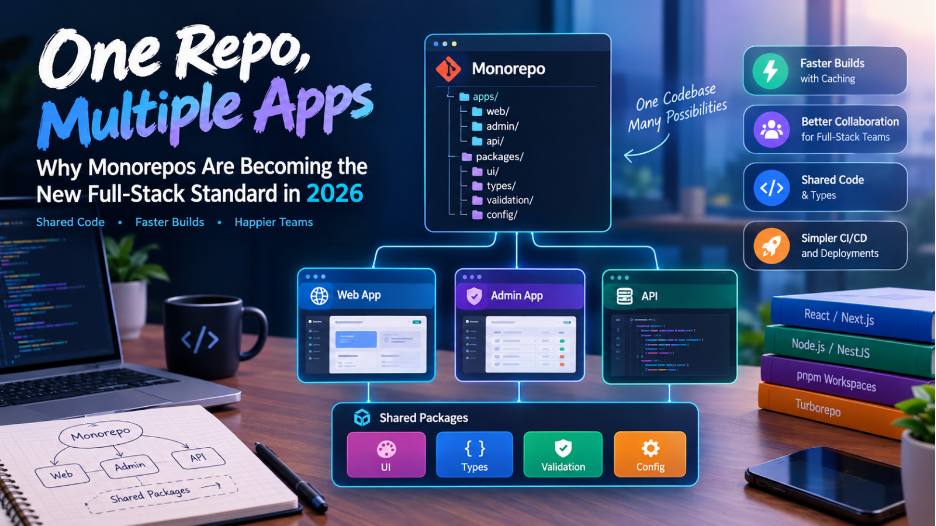
Modern web applications are rarely just one application anymore.
A typical product might have:
- A customer-facing frontend
- An admin dashboard
- A backend API
- A shared component library
- Authentication utilities
- Database packages
- Shared TypeScript types
- Testing utilities
- Configuration packages
Traditionally, teams put these projects into separate repositories.
Today, more full-stack teams are considering a different approach:
Put related applications and shared packages into one repository.
This architecture is called a monorepo.
Monorepos aren’t a new concept, but their use in modern full-stack development continues to grow. Current 2026 guidance from Vercel specifically focuses on monorepos for full-stack teams, multi-app development, shared packages, build orchestration, and caching.
The idea sounds simple:
One repository. Multiple applications. Shared code.
But the real value goes much deeper than simply keeping everything in one Git repository.
What Is a Monorepo?
A monorepo is a single Git repository containing multiple applications, services, libraries, or packages that are developed together.
For example:
company-platform/
│
├── apps/
│ ├── web/
│ ├── admin/
│ └── api/
│
├── packages/
│ ├── ui/
│ ├── types/
│ ├── validation/
│ └── config/
│
├── package.json
├── pnpm-workspace.yaml
└── turbo.json
Here we have three applications:
web
admin
api
and several shared packages:
ui
types
validation
config
Everything lives inside the same repository.
However, each application can still be developed and deployed independently.
Monorepo vs Polyrepo
The opposite of a monorepo is commonly called a polyrepo approach.
Imagine a company has:
frontend-repo
backend-repo
admin-repo
ui-library-repo
shared-types-repo
Each project has its own repository.
That’s a polyrepo structure.
With a monorepo:
platform-repo/
├── apps/
│ ├── frontend/
│ ├── backend/
│ └── admin/
│
└── packages/
├── ui/
└── types/
The difference isn’t simply organizational.
It changes how teams manage dependencies, releases, shared code, testing, and CI/CD.
Why Are Full-Stack Teams Interested in Monorepos?
The biggest advantage appears when multiple applications share code.
Imagine your company has:
Customer App
Admin App
Employee App
All three use the same:
Button
Modal
Form
Table
Authentication
Validation
Types
API contracts
In a polyrepo setup, you might publish a shared package.
The workflow could become:
Change UI component
↓
Update UI repository
↓
Create release
↓
Publish package
↓
Update Customer App
↓
Update Admin App
↓
Update Employee App
A small change can turn into multiple pull requests and releases.
With a monorepo:
Change shared component
↓
Update package
↓
Update affected applications
↓
One pull request
The change can be reviewed as one atomic change.
Vercel’s current guidance highlights this as one of the major reasons monorepos work well for full-stack teams that share UI, application code, utilities, or types.
A Practical Full-Stack Monorepo
Consider an application with:
- Customer frontend
- Admin dashboard
- Backend API
- Shared UI
- Shared validation
- Shared TypeScript types
The structure could be:
my-platform/
├── apps/
│ ├── web/
│ ├── admin/
│ └── api/
│
├── packages/
│ ├── ui/
│ ├── types/
│ ├── validation/
│ └── config/
│
├── package.json
├── pnpm-lock.yaml
├── pnpm-workspace.yaml
└── turbo.json
The apps directory contains deployable applications.
The packages directory contains reusable code.
This creates a clear separation between:
Applications and Shared packages.
Why pnpm Is Popular for Monorepos
One of the tools commonly used for JavaScript and TypeScript monorepos is pnpm.
pnpm provides first-class workspace support, including local package linking, filtering commands, and a shared lockfile. It also uses a content-addressable package store to avoid unnecessary duplication on disk.
A basic workspace configuration might look like:
packages:
– “apps/*”
– “packages/*”
Now pnpm understands that:
apps/web
apps/admin
apps/api
packages/ui
packages/types
belong to the same workspace.
Sharing Packages Becomes Easy
Suppose your UI package contains:
packages/ui/
Button
Modal
Input
Dropdown
Table
Your frontend can use it:
apps/web
and your admin dashboard can use exactly the same components:
apps/admin
You don’t need to publish the UI package to an external registry every time you change it.
The applications can consume the local workspace package directly.
This is one of the biggest practical benefits of a monorepo.
Sharing TypeScript Types
One particularly useful full-stack pattern is sharing types.
Imagine your backend returns:
{
“id”: 101,
“name”: “John”,
“email”: “john@example.com”
}
Instead of defining the structure separately in frontend and backend, a shared package can contain:
export interface User {
id: number;
name: string;
email: string;
}
Then:
Backend
↓
Shared Types
↓
Frontend
Now both sides can use the same definition.
When the contract changes, the compiler can help identify applications that need updates.
Shared Validation
The same concept can be used for validation.
For example:
packages/
└── validation/
├── user.ts
├── order.ts
└── payment.ts
The frontend can validate form input.
The backend can validate incoming data.
Both can use the same rules where the technology stack allows it.
This reduces the chance of having slightly different validation logic in different applications.
Monorepos Are More Than Shared Code
It’s tempting to think:
“A monorepo is just a repository containing multiple projects.”
That’s technically true, but it misses the bigger idea.
A good monorepo creates a shared development environment.
It can provide:
- Common linting
- Common TypeScript configuration
- Shared testing tools
- Shared UI
- Shared types
- Shared configuration
- Central dependency management
- Consistent CI/CD
- Common development commands
Instead of every project inventing its own conventions, the repository can provide a common foundation.
Where Turborepo Comes In
Once a repository contains many applications and packages, another problem appears.
Imagine:
apps/
├── web
├── admin
├── mobile-web
└── api
packages/
├── ui
├── types
├── validation
├── database
└── config
You don’t want every change to rebuild everything.
That’s where a build orchestration tool such as Turborepo becomes useful.
Turborepo understands relationships between packages and applications and can execute tasks based on those dependencies.
It also provides caching and task orchestration. Current Vercel documentation demonstrates selective rebuilding and caching as core monorepo workflows.
What Does Selective Building Mean?
Suppose you change:
apps/web/
You probably don’t need to rebuild:
apps/admin
apps/mobile
if they aren’t affected.
A task graph can determine which packages actually need work.
Conceptually:
Change
↓
apps/web
↓
packages/ui
↓
Affected tasks
Everything unrelated can be skipped.
This becomes increasingly important as the repository grows.
Caching Can Make Builds Faster
Consider running:
turbo build
The first build might take several seconds or minutes.
Then you run it again without changing anything.
Instead of rebuilding everything:
Previous result
↓
Cache
↓
Reuse output
The result can be restored from cache.
Turborepo’s current documentation describes this as one of its core capabilities, with unchanged builds being replayed from cache rather than executed again.
Remote Caching
Local caching helps one developer.
Remote caching can help an entire team.
Imagine Developer A builds the application.
The result is cached remotely.
Developer B pulls the same code and runs:
turbo build
If the required output already exists in the shared cache, Developer B may be able to reuse it instead of rebuilding from scratch.
The same concept can apply to CI.
This means:
Developer A
↓
Remote Cache
↓
Developer B
CI Pipeline
↓
Remote Cache
Vercel’s 2026 monorepo guidance emphasizes remote caching as an important part of keeping larger monorepos efficient.
Monorepos and CI/CD
CI can become one of the biggest challenges in a large monorepo.
Suppose you have 30 packages.
A developer changes one frontend component.
A poorly configured pipeline might run:
30 builds
30 test suites
30 lint jobs
30 type checks
even though most packages weren’t affected.
That’s inefficient.
A properly configured monorepo can instead determine:
Changed:
packages/ui
Affected:
apps/web
apps/admin
Unaffected:
apps/api
packages/database
packages/config
Then CI can focus on relevant work.
The build graph becomes extremely important as the repository grows.
Multiple Applications, One Repository
A monorepo is especially useful when a product has multiple applications.
For example:
apps/
├── customer-web/
├── admin-dashboard/
├── partner-portal/
└── api/
All applications can share:
packages/
├── ui/
├── auth/
├── types/
├── validation/
└── config/
This is a natural architecture for many SaaS platforms.
Can Applications Still Deploy Separately?
Yes.
A monorepo does not mean everything must be deployed together.
For example:
apps/web
↓
Deployment A
apps/admin
↓
Deployment B
apps/api
↓
Deployment C
The source code is together.
The deployment lifecycle can still be separate.
Vercel’s current multi-app monorepo guidance demonstrates multiple applications living in one repository while being developed and deployed independently.
Monorepo Does Not Mean Monolith
This distinction is extremely important.
These are different concepts:
Monorepo
Where the source code lives.
Monolith
How an application is architected and deployed.
You can have:
Monorepo + Monolith
or:
Monorepo + Microservices
or:
Multiple repositories + Monolith
or:
Multiple repositories + Microservices
They are independent architectural decisions.
Modern monorepo guidance explicitly makes this distinction: a monorepo can contain microservices, and a monolith can be distributed across multiple repositories.
What About Laravel?
A monorepo isn’t limited to Next.js or Node.js.
Consider a full-stack company using:
Vue / Nuxt
Laravel
The repository could look like:
platform/
├── apps/
│ ├── web/
│ ├── admin/
│ └── backend/
│
├── packages/
│ ├── shared-types/
│ ├── api-contracts/
│ └── frontend-ui/
│
└── infrastructure/
However, there is an important consideration.
Tools such as Turborepo are primarily designed around JavaScript and TypeScript workflows. For polyglot repositories containing PHP, Go, Python, or Rust, teams may need additional build tooling. Vercel’s current guidance explicitly identifies polyglot stacks as a situation requiring additional consideration.
So a Laravel + Vue monorepo can work, but the tooling strategy should be designed deliberately.
A Monorepo for a Real Full-Stack Platform
Imagine building an employee-management platform.
You might have:
company-platform/
apps/
├── employee-web/
├── admin-panel/
└── api/
packages/
├── ui/
├── types/
├── validation/
├── permissions/
└── config/
Now imagine adding another application:
manager-portal/
You don’t need another repository.
Add:
apps/
└── manager-portal/
The manager portal can immediately reuse:
UI
Types
Validation
Authentication utilities
Permission definitions
This can significantly reduce duplication.
The Permission Example
Permissions are another area where shared packages can be useful.
Imagine:
packages/permissions/
contains:
export const permissions = {
usersView: “users.view”,
usersEdit: “users.edit”,
reportsView: “reports.view”,
assetsView: “assets.view”
};
Multiple applications can consume the same permission definitions.
That doesn’t automatically make authorization secure — the backend must still enforce permissions — but it can reduce inconsistent permission naming across applications.
Monorepo and Local Development
A good monorepo can make local development easier.
Instead of cloning four repositories:
frontend
backend
admin
shared-ui
a developer can clone one:
git clone company-platform
Then:
pnpm install
pnpm dev
can start the relevant applications.
Vercel’s current monorepo development examples demonstrate workflows where multiple applications can be started together or selectively using pnpm filters.
But Monorepos Have Problems Too
Monorepos aren’t automatically better.
As the repository grows, problems can appear.
Larger Repository
The repository may contain:
Hundreds of packages
Thousands of files
Multiple applications
Large dependency graphs
CI Complexity
Without selective builds and caching, CI can become slow.
Ownership Problems
Who owns:
packages/ui?
packages/database?
packages/auth?
Clear ownership becomes important.
Dependency Management
Updating one dependency can affect many applications.
Tooling Complexity
The repository may require:
- Workspace management
- Build orchestration
- Caching
- Dependency graph management
- Release management
- Code ownership rules
A monorepo without the right tooling can become difficult to maintain.
The Biggest Mistake: Putting Everything Into One Repository
A monorepo should not mean:
“Let’s put every project the company owns into one Git repository.”
That’s usually a recipe for unnecessary complexity.
The better question is:
Which projects actually benefit from sharing code, tooling, and coordinated changes?
If two applications share almost nothing, putting them together may provide little value.
Current guidance from Vercel specifically points out that a single deployable application with no shared packages may not benefit from a monorepo.
When Should You Choose a Monorepo?
A monorepo can make sense when:
- Multiple applications share code.
- Frontend and backend teams frequently coordinate changes.
- You maintain a shared UI library.
- Multiple applications use common TypeScript types.
- You want atomic changes across applications.
- You want centralized tooling.
- You want consistent dependency versions.
- Your team is prepared to invest in build and CI tooling.
When Should You Avoid It?
A separate repository structure may be simpler when:
- Projects have completely different lifecycles.
- They share almost no code.
- Teams operate independently.
- The stack is heavily polyglot and tooling becomes difficult.
- There is no plan for selective CI or caching.
- The repository would become an unrelated collection of projects.
The goal isn’t to follow the trend.
The goal is to reduce the specific coordination problems your team actually has.
A Good Starting Structure
For a modern full-stack JavaScript/TypeScript project, a practical starting point could be:
my-platform/
├── apps/
│ ├── web/
│ ├── admin/
│ └── api/
│
├── packages/
│ ├── ui/
│ ├── types/
│ ├── validation/
│ └── config/
│
├── package.json
├── pnpm-workspace.yaml
├── turbo.json
└── tsconfig.json
Then define clear rules.
For example:
apps → can depend on packages
packages/ui → should not depend on apps
packages/types → should remain independent
packages/config → contains shared configuration
The dependency direction matters.
The Future of Full-Stack Repositories
The traditional model was:
Frontend Repository
+
Backend Repository
+
Admin Repository
+
Shared Library Repository
Modern full-stack teams can instead use:
Monorepo
│
┌───────────┼───────────┐
↓ ↓ ↓
Web Admin API
│ │ │
└──────┬────┴────┬──────┘
↓ ↓
Shared Packages
├── UI
├── Types
├── Auth
└── Validation
The repository becomes a shared engineering environment rather than simply a place to store source code.
And as applications become increasingly multi-surface — web applications, admin panels, APIs, internal tools, documentation sites, and shared component systems — that organizational model becomes increasingly useful.
Final Thoughts
A monorepo isn’t about putting everything into one giant folder.
It’s about making related software easier to develop together.
When multiple applications share code, types, UI components, validation, or infrastructure, a monorepo can eliminate repeated coordination work.
But the repository alone isn’t enough.
You need:
- Clear package boundaries
- Good dependency management
- Selective builds
- Effective caching
- Strong CI/CD
- Ownership rules
- Consistent development tooling
Tools such as pnpm workspaces and Turborepo provide much of the infrastructure needed to make this practical for modern JavaScript and TypeScript teams.
The most important idea is simple:
One repository doesn’t have to mean one application.
It can mean one place where your frontend, backend, admin applications, and shared packages evolve together — while still being built, tested, and deployed independently.
For full-stack teams in 2026, that’s what makes the monorepo approach worth considering.
