
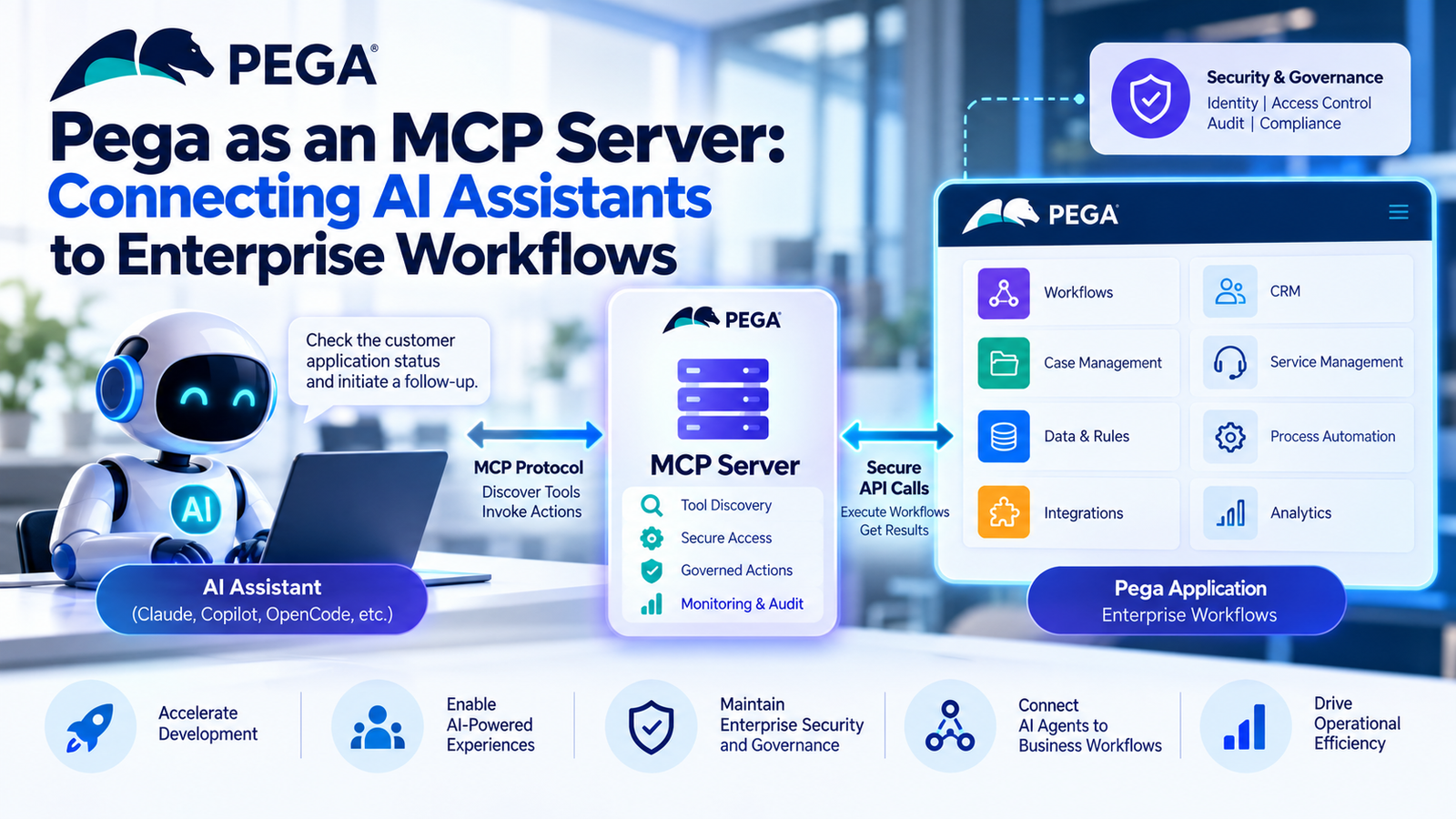
AI assistants are becoming more powerful. However, they need access to business applications and workflows to perform useful tasks.
This is where the Pega MCP Server becomes important. It allows compatible AI assistants to connect with Pega applications through the Model Context Protocol (MCP).
With Pega Infinity ’26, organizations can connect AI agents to application development tools and business workflows. As a result, developers can explore new ways to simplify development and automate approved business tasks.
However, connecting AI to enterprise systems requires careful planning. Security, user permissions, and business rules must remain in place.
In this blog, we explain how Pega MCP works, explore its main features, and discuss the best practices developers should follow.
What Is the Model Context Protocol (MCP)?
The Model Context Protocol (MCP) is an open standard that allows AI applications to connect with external tools, data sources, and services.
Without a common protocol, developers may need separate integrations for different AI assistants. MCP helps simplify this process by providing a common way to discover and use available tools.
For example, an AI assistant may need to check a customer’s application status. Through an approved MCP tool, it can request the latest information from an enterprise application.
The connected application still manages its business rules and permissions. Therefore, the AI assistant cannot automatically access every piece of information or perform every action.
How Does MCP Work?
A typical MCP connection follows this flow:
AI Assistant → MCP Client → MCP Server → Enterprise Tools → Business Application
Each component has a specific role:
- AI assistant: Understands the user’s request.
- MCP client: Connects to the MCP server.
- MCP server: Provides access to supported tools.
- Enterprise tools: Carry out approved operations.
- Business application: Applies business rules and processes the request.
As a result, AI assistants can work with enterprise systems through a common and controlled interface.
What Does Pega MCP Provide?
Pega Infinity ’26 supports two important MCP capabilities. One helps developers build applications with AI assistance, while the other allows AI agents to interact with business workflows.
1. Infinity Build MCP
Infinity Build MCP connects supported external AI coding agents with Pega application development tools.
This helps developers use AI assistance while building Pega applications. For example, a compatible coding agent may use application context to assist with supported development tasks.
According to the source document, supported coding agents include Claude Code, GitHub Copilot, and OpenCode.
Key benefits include:
- Supporting AI-assisted application development.
- Helping developers work with Pega application context.
- Reducing repetitive development tasks.
- Improving development workflows.
However, the available features depend on the supported tools and the configured environment.
2. Infinity Run MCP
Infinity Run MCP focuses on business operations during application execution.
It allows authorized AI agents to discover and use exposed Pega workflows, tools, and utilities.
For example, an insurance company could allow an AI assistant to retrieve customer case information or start an approved service request.
Pega continues to manage the underlying business process. Therefore, the assistant must follow the permissions and rules configured in the application.
Key benefits include:
- Connecting AI agents with approved business workflows.
- Supporting controlled workflow execution.
- Making selected Pega tools available to compatible AI applications.
- Maintaining governance over business operations.
The main difference is simple: Infinity Build MCP supports AI-assisted application development, while Infinity Run MCP supports business operations at runtime.
How Pega MCP Works: A Practical Example
Consider an insurance company that manages customer proposals through a Pega application.
A customer service employee asks an AI assistant:
“Check this customer’s proposal status and initiate a follow-up if additional information is required.”
Without a suitable integration, the assistant may not have access to the latest proposal information or the tools needed to start the follow-up.
With a properly configured MCP integration, the process could work as follows:
- The employee submits a request to the AI assistant.
- The assistant identifies the required operation.
- The MCP client discovers an available tool.
- The authorized request reaches the relevant Pega capability.
- Pega executes the applicable workflow.
- The result returns to the assistant.
- The assistant presents the result to the employee.
For this process to work, the required tool must be available and the agent must have the correct permissions.
Furthermore, the workflow must support the requested operation. The assistant should not bypass business rules or access restricted information.
This approach allows AI to provide a conversational interface while Pega manages the business process.
Understanding Pega MCP Architecture
A Pega MCP implementation includes several components that work together.
| Component | Responsibility |
|---|---|
| AI assistant or agent | Understands the user’s request and identifies the required tool. |
| MCP client | Communicates with the MCP server. |
| Pega MCP service | Exposes supported Pega capabilities or connects to external MCP services. |
| Pega application | Executes business workflows and rules. |
| Security controls | Apply identity checks and access permissions. |
| Audit mechanisms | Record supported interactions and actions. |
The exact architecture depends on the intended use case.
For example, an application development project may use Infinity Build MCP. In contrast, a project that connects AI agents to business workflows may use Infinity Run MCP.
Together, these capabilities allow Pega to work with a wider range of AI tools and agents.
Pega MCP vs. Traditional REST Integration
Pega developers already use REST APIs to connect applications with external systems. However, MCP offers a different way for compatible AI applications to discover and use tools.
REST APIs generally expose predefined endpoints. Clients call these endpoints according to an established API contract.
MCP provides a common protocol for AI applications to discover and invoke available tools.
| Feature | REST Integration | MCP Integration |
|---|---|---|
| Primary purpose | Application-to-application communication | AI-to-tool interaction |
| Interface | Predefined API endpoints | Tools exposed through MCP |
| Tool discovery | Usually handled through API documentation or configuration | Supported tools can be discovered through MCP |
| AI integration | May require additional integration work | Designed to standardize AI access to tools |
| Business logic | Managed by the connected application | Managed by the connected application |
| Security | Uses applicable authentication and authorization | Requires appropriate MCP and enterprise access controls |
MCP does not automatically replace REST APIs.
Instead, both approaches can work together. For example, a Pega application can continue using REST for conventional integrations while exposing selected tools through MCP for AI assistants.
The right approach depends on the application’s requirements and security architecture.
Security and Governance Considerations
Connecting AI agents to enterprise workflows requires careful planning. An AI assistant should not become a shortcut around existing application permissions.
Therefore, organizations must ensure that every request follows the appropriate access controls and business rules.
Here are six important practices to consider.
1. Apply Least-Privilege Access
Give AI agents access only to the tools they need.
For example, an assistant that retrieves customer proposal information should not automatically receive permission to delete cases or modify financial records.
2. Validate User Identity
Configure authentication and identity integration before allowing access to sensitive business operations.
This helps ensure that users and agents can perform only the actions permitted to them.
3. Validate Inputs
AI-generated parameters should be treated as external input.
Check identifiers, required fields, data formats, and business constraints before executing an operation. As a result, invalid requests are less likely to cause problems.
4. Keep Business Rules in Pega
Reuse existing application validation, authorization, and workflow logic.
Do not rely only on the AI assistant to decide whether an action is permitted. Instead, let the connected application enforce its established rules.
5. Maintain an Audit Trail
Where supported, record relevant requests, responses, and business actions.
These records help teams investigate unexpected behavior. They can also support reviews of workflow execution.
6. Control High-Impact Actions
Some operations require additional approval because they involve sensitive information or irreversible changes.
For example, an organization might require an employee to confirm a financial change before the workflow proceeds.
These practices help organizations introduce AI-assisted workflows while maintaining appropriate security and governance.
MCP vs. A2A: What Is the Difference?
MCP and Agent2Agent (A2A) are used in agentic AI systems. However, they serve different purposes.
MCP allows AI agents to access tools, data, and application capabilities.
A2A allows AI agents to communicate and collaborate with other agents.
For example, an insurance AI agent could use MCP to retrieve policy information from Pega. Meanwhile, a separate fraud-detection agent could collaborate with another agent through an appropriate A2A connection.
The two protocols can work together in a larger enterprise architecture.
Best Practices for Pega Developers
Before implementing MCP in a Pega application, developers should evaluate the use case, integration requirements, and security needs.
Follow these best practices:
- Start with a specific use case: Choose one development task or business workflow that would benefit from AI integration.
- Expose clear capabilities: Use tools with well-defined purposes and predictable inputs and outputs.
- Reuse existing business logic: Avoid duplicating validation and decision rules in external AI agents.
- Plan for failures: Handle timeouts, unavailable services, invalid requests, and unsuccessful operations.
- Test permissions: Confirm that users and agents cannot access tools beyond their authorization.
- Monitor execution: Track relevant failures, response times, and unexpected behavior.
- Keep humans involved when needed: Require review or approval for sensitive operations.
Additionally, test successful requests, invalid inputs, authorization failures, and service interruptions before deployment.
The goal is not simply to connect an AI assistant to Pega. Instead, it is to provide a reliable and controlled way for AI to use business capabilities.
Conclusion
The Pega MCP Server approach creates new opportunities to connect AI assistants with enterprise application development and business workflows.
Infinity Build MCP supports AI-assisted application development. Meanwhile, Infinity Run MCP allows authorized AI agents to interact with exposed business capabilities at runtime.
Together, these capabilities can help organizations improve development workflows and simplify access to approved business operations.
However, successful implementation requires careful attention to security, permissions, input validation, error handling, and auditability.
For Pega developers, understanding MCP is an important step toward building enterprise applications that work effectively with AI agents.
The goal is simple: allow AI to interact with enterprise systems while keeping business operations secure, governed, and predictable.
Frequently Asked Questions
1. What is a Pega MCP Server?
A Pega MCP Server exposes supported Pega capabilities through the Model Context Protocol. This allows compatible AI applications to discover and use authorized tools.
2. What is Infinity Build MCP?
Infinity Build MCP connects supported external AI coding agents with Pega application development capabilities.
3. What is Infinity Run MCP?
Infinity Run MCP allows authorized AI agents to use exposed Pega workflows, tools, and utilities at runtime.
4. Does MCP replace REST APIs in Pega?
No. REST APIs remain useful for conventional system integrations. In contrast, MCP standardizes how compatible AI applications discover and use exposed tools.
5. Is Pega MCP secure?
Pega MCP supports enterprise security and governance controls. However, the security of a particular implementation depends on authentication, authorization, configuration, and operational practices.
6. What is the difference between MCP and A2A?
MCP focuses on accessing tools and data, while A2A focuses on communication between AI agents. Both can work together in an enterprise architecture.
