
Introduction
In Pega, every interaction with the application uses a Requestor. A Requestor represents the connection or session between a client and the Pega Platform.
Developers usually focus on cases, activities, Data Pages, flows, and user interfaces. However, the Requestor quietly manages many of the runtime details needed to process these operations.
Understanding the Requestor lifecycle gives developers a clearer view of how Pega manages sessions, authentication, Clipboard data, application context, transactions, connections, and resource cleanup.
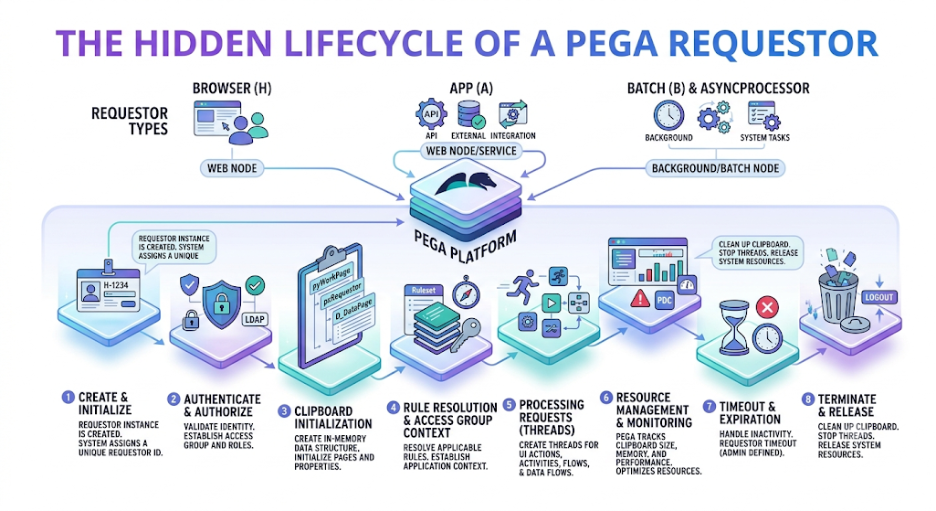
The lifecycle can be summarized as:
Connection → Requestor Creation → Authentication → Initialization → Processing → State Management → Timeout/Passivation → Cleanup
This lifecycle becomes especially useful when troubleshooting session behavior, memory usage, performance issues, authentication problems, and unexpected Clipboard data.
What Is a Pega Requestor?
A Requestor is the runtime representation of a client connection to the Pega Platform.
It can support several types of interactions, including:
- Browser sessions
- REST API requests
- SOAP service requests
- Background processing
- Asynchronous processing
- Application-to-application communication
The Requestor provides the runtime context that Pega needs to process an interaction.
For example, it can maintain information such as:
- Operator context
- Application context
- Access Group
- Locale
- Time zone
- Clipboard
- Session information
- Authentication information
- Processing state
As a result, the Requestor acts as an important part of the runtime environment.
Why Does the Requestor Matter?
A Pega application may handle thousands or even millions of requests. Each request, however, needs an execution context.
The Requestor provides that context. For instance, when a user opens a case, Pega needs to determine:
- Who is making the request?
- Which application are they using?
- What permissions do they have?
- What case are they accessing?
- What data is available?
- Which rules should execute?
Therefore, the Requestor helps establish the environment in which Pega processes the request.
Understanding the Requestor Lifecycle
A simplified Requestor lifecycle looks like this:
Client Connection
↓
Requestor Created
↓
Authentication
↓
Application Initialization
↓
Clipboard Initialization
↓
Request Processing
↓
Transaction Management
↓
Response
↓
Requestor Remains Active
↓
Timeout / Passivation
↓
Requestor Cleanup
The exact lifecycle can vary based on the Requestor type and processing model. Therefore, developers should treat this flow as a simplified representation rather than a fixed sequence for every interaction.
Step 1: Client Connection
The lifecycle starts when a client connects to Pega.
The client could be:
- A web browser
- A mobile application
- A REST client
- An external application
- An internal service
- A background process
The Pega application infrastructure receives the incoming connection. Next, Pega establishes the runtime context required to handle the interaction.
Step 2: Requestor Creation
Pega creates or associates a Requestor with the interaction.
At this stage, the Requestor becomes the runtime context for the session. It provides the environment in which Pega can execute:
- Rules
- Activities
- Data Transforms
- Data Pages
- Flows
- Integrations
- Case operations
However, the complete application context may not be available immediately. Pega establishes additional context as the interaction continues.
Step 3: Authentication
For authenticated interactions, Pega identifies the user or calling system.
Authentication can involve mechanisms such as:
- User credentials
- Single sign-on (SSO)
- OAuth
- API authentication
- Service authentication
Once authentication succeeds, Pega can establish the appropriate security context.
As a result, subsequent processing can use the identity and permissions associated with the interaction.
Step 4: Access Group and Application Context
After authentication, the runtime context determines which application configuration and access permissions apply.
This context can influence:
- Available rules
- Roles
- Privileges
- Case types
- Navigation
- Application behavior
The Access Group plays an important role because it helps establish the application context under which the user operates.
Consequently, the Requestor can process requests within the appropriate application and security environment.
Step 5: Clipboard Initialization
The Requestor works with a Clipboard that stores runtime data during processing.
The Clipboard can contain:
- User information
- Request parameters
- Case data
- Data Pages
- Temporary pages
- Process information
- Integration responses
In simple terms, the Clipboard acts as an in-memory workspace for request processing.
Because this data remains available during processing, developers should avoid loading unnecessary information into it.
Step 6: Request Processing
Once the Requestor has the required context, Pega begins processing the request.
For example, a case submission may follow this general flow:
User clicks Submit
↓
Request reaches Pega
↓
Requestor context is identified
↓
Clipboard is updated
↓
Validation runs
↓
Business rules execute
↓
Flow advances
↓
Database transaction occurs
↓
Response is generated
The Requestor remains involved throughout this processing.
Therefore, any inefficient processing, excessive data loading, or long-running operation can affect the overall request experience.
Step 7: Rule Execution
Pega executes rules within the Requestor’s runtime context.
Examples include:
- Data Transforms
- Activities
- When Rules
- Decision Tables
- Declare Expressions
- Validation rules
- Flow rules
These rules can read and modify information stored on the Clipboard.
For this reason, developers should understand how their rules use runtime data. Efficient rule execution can help reduce unnecessary processing and improve application performance.
Step 8: Data Page Interaction
Data Pages can also participate in Requestor processing.
Depending on their scope and configuration, Data Pages can provide reusable data during a request.
A simplified flow may look like this:
Requestor
↓
Data Page
↓
Customer Data
↓
Clipboard
↓
Business Logic
Data Pages can reduce repeated data retrieval when developers configure them appropriately.
As a result, effective Data Page usage can help improve application efficiency while reducing unnecessary data access.
Step 9: Transaction Processing
Transaction processing becomes important when a request changes persistent information.
A simplified transaction flow looks like this:
Clipboard Changes
↓
Validation
↓
Business Processing
↓
Persistence
↓
Commit
If processing succeeds, the appropriate database changes can be committed.
However, if an error occurs, transaction handling can help prevent incomplete updates from becoming permanent.
Therefore, developers should consider validation, business processing, persistence, and error handling together when troubleshooting transaction-related issues.
Step 10: Response Generation
After Pega finishes processing the request, it generates a response.
The response format depends on the type of interaction.
For example:
- A browser interaction may return updated UI information.
- A REST request may return JSON.
- A service interaction may use the response format defined by its interface.
In each case, the Requestor provides the runtime context required to complete the operation.
Step 11: The Requestor Remains Active
The completion of one request does not always mean that the Requestor immediately disappears.
For interactive sessions, the Requestor can remain available for later requests.
For example:
Login
↓
Requestor Created
↓
Open Case
↓
Request Completed
↓
Requestor Remains Active
↓
Update Case
↓
Request Completed
This behavior allows the application to maintain session-related context across multiple interactions.
Understanding Requestor State
A Requestor can move through different runtime states during its lifecycle.
Conceptually, the state flow looks like this:
Created → Active → Idle → Passivated → Activated → Active → Terminated
The exact behavior depends on the Requestor type and platform configuration.
Nevertheless, this model helps developers understand why a Requestor may continue to exist after an individual request has finished.
Requestor Passivation
When an interactive Requestor remains inactive for a period of time, the platform can manage its resources to reduce memory usage.
Passivation becomes particularly important when an environment has many concurrent sessions.
Instead of keeping every idle session fully active in memory, the platform can reduce its active resource footprint.
As a result, passivation can help balance session continuity with server resource utilization.
Requestor Activation
A passivated Requestor may need to become active again when a new request arrives.
A simplified flow looks like this:
Active Requestor
↓
Inactive
↓
Passivated
↓
New Request
↓
Activated
↓
Processing Continues
This process allows the platform to continue working with the session while managing available resources.
Requestor Timeout
Requestor timeout is another important lifecycle event.
If an interactive session remains inactive beyond the configured timeout period, the session may be terminated.
This behavior helps prevent unused sessions from consuming resources indefinitely.
Therefore, session timeout settings can play an important role in environments with many users or long periods of inactivity.
Requestor Termination
When the Requestor is no longer required, Pega terminates it.
Termination can occur because of:
- User logout
- Session timeout
- Application shutdown
- Service completion
- System-level cleanup
During termination, the platform releases runtime resources associated with the Requestor.
Consequently, proper lifecycle management helps prevent unnecessary resource usage.
Clipboard and Requestor Relationship
One of the most important concepts for developers is the relationship between the Requestor and the Clipboard.
Conceptually, the relationship looks like this:
Requestor
- Application Context
- User Context
- Session Information
- Clipboard
- Case Data
- Data Pages
- Parameters
- Temporary Pages
The Clipboard forms part of the runtime processing environment associated with the Requestor.
Therefore, Clipboard size and content can directly influence the amount of runtime data associated with a session.
Why Can a Large Clipboard Be a Problem?
A Requestor that continuously accumulates unnecessary Clipboard data can consume significant memory.
Common causes include:
- Large Page Lists
- Unnecessary Data Pages
- Large integration responses
- Temporary pages that remain longer than required
- Excessive case data
- Repeated data loading
Over time, this extra data can contribute to memory pressure and poor application performance.
For that reason, developers should load only the data that the application actually needs.
Requestor-Level Performance Problems
Requestor-related issues can appear in several ways.
Common symptoms include:
- Slow response times
- High memory consumption
- Session instability
- Large Clipboard sizes
- Excessive database interactions
- Long-running requests
When these symptoms appear, developers should examine both the request-processing logic and the Requestor’s runtime behavior.
For example, a slow request may involve inefficient rules, repeated database operations, large Clipboard data, or slow external integrations.
Requestor Types
Pega supports different categories of Requestors for different interaction models.
Common examples include:
- Browser-based Requestors
- Service Requestors
- Background Requestors
- Application Requestors
Each type supports a specific processing model. Therefore, lifecycle behavior can differ between Requestor types.
Service Requestors
A Service Requestor supports service-based communication.
For example:
External System
↓
REST Request
↓
Service Requestor
↓
Pega Processing
↓
Response
The lifecycle for this type of interaction can be shorter than that of a long-lived browser session.
The exact behavior, however, depends on the service and platform configuration.
Background Processing
Background processing may also require a runtime execution context.
Examples include:
- Scheduled processing
- Queue-based processing
- Asynchronous operations
- Background jobs
These interactions generally use a different processing model from long-lived interactive sessions.
As a result, developers should consider the Requestor type when analyzing background processing behavior.
Requestor and Database Connections
A Requestor should not be treated as the same thing as a single database connection.
Pega manages database access through its persistence infrastructure and connection management mechanisms.
A Requestor can initiate processing that requires database operations. However, the platform handles database connection management separately.
This distinction is important when troubleshooting database performance.
Therefore, developers should avoid assuming that every Requestor represents one continuously active database connection.
Requestor and Authentication Context
The Requestor also helps maintain the security context under which processing occurs.
This context allows Pega to determine:
- Which operator is executing the request
- Which roles apply
- Which Access Group is active
- What resources can be accessed
- Which security policies should be enforced
Security context is therefore an important part of the Requestor lifecycle.
Understanding this relationship can also help developers investigate authentication and authorization problems.
Requestor and Concurrency
Multiple users can have multiple Requestors processing requests at the same time.
For example:
User A → Requestor A
User B → Requestor B
User C → Requestor C
User D → Requestor D
Each interactive session has its own runtime context.
This separation helps prevent one user’s Clipboard state from becoming directly mixed with another user’s session.
As concurrency increases, however, the number of active Requestors and the amount of runtime data can also increase.
Requestor and Performance Monitoring
When investigating performance problems, developers should examine several factors:
- Request duration
- Number of database operations
- Clipboard size
- Rule execution time
- Integration latency
- Session activity
- Memory consumption
Tools such as Tracer, performance diagnostics, application logs, and browser network analysis can help identify where processing time is being spent.
For example, a large Clipboard may point to unnecessary data loading, while high integration latency may indicate a slow external dependency.
Common Requestor Problems
Large Clipboard
Too much data can remain in memory and increase the runtime footprint.
Long-Running Requests
A request may perform expensive processing or wait for an external dependency.
Session Timeout
A user may remain inactive beyond the configured session limits.
Memory Pressure
Many active sessions or excessively large runtime data structures can consume significant resources.
Unexpected Session Behavior
Incorrect assumptions about Requestor state can lead to confusing application behavior.
Understanding the lifecycle can make these problems easier to investigate.
Best Practices for Managing Requestors
Developers should follow several practices when designing Pega applications:
- Avoid loading unnecessary data onto the Clipboard.
- Keep request processing lightweight.
- Avoid unnecessarily large Page Lists.
- Use Data Pages appropriately.
- Avoid unnecessary database operations.
- Design integrations with suitable timeouts.
- Monitor long-running requests.
- Understand session timeout behavior.
- Clean up temporary runtime data when appropriate.
- Monitor memory usage in high-concurrency environments.
These practices can help reduce unnecessary resource usage and make performance problems easier to identify.
Why Developers Should Understand the Requestor Lifecycle
Understanding Requestors can explain many behaviors that otherwise seem mysterious.
For example, developers may ask:
Why Is Session Information Still Available?
The Requestor may remain active across multiple requests.
Why Does an Idle Session Consume Resources?
An active Requestor can retain runtime state.
Why Can a Large Clipboard Affect Performance?
The Clipboard forms part of the Requestor’s runtime processing context.
Why Does a Service Request Behave Differently From a Browser Session?
Different Requestor types support different lifecycle and processing models.
Therefore, understanding the Requestor provides a stronger foundation for troubleshooting and performance analysis.
Conclusion
The Pega Requestor is an important runtime concept behind Pega application execution. However, it often remains invisible to developers during everyday development.
Every interaction needs a runtime context in which authentication, application configuration, Clipboard data, business rules, transactions, and responses can be managed.
Understanding the Requestor lifecycle—from creation and authentication to processing, idle states, passivation, timeout, and termination—provides deeper insight into how Pega manages application resources.
For developers and architects, this knowledge is especially useful when troubleshooting session behavior, memory consumption, Clipboard growth, performance issues, concurrency, authentication problems, and long-running requests.
The Requestor may remain hidden behind the application interface, but it works continuously behind the scenes to provide the runtime foundation for Pega applications.
