
Modern applications need to communicate when something happens. A payment may complete, a user may sign up, a developer may push code, or a customer may place an order.
Instead of checking another system again and again, an application can use webhooks. Webhooks send automatic notifications when a specific event occurs.
As a result, applications can react to changes faster and reduce unnecessary API requests.
What Is a Webhook?
A webhook is an HTTP callback that sends event information from one application to another.
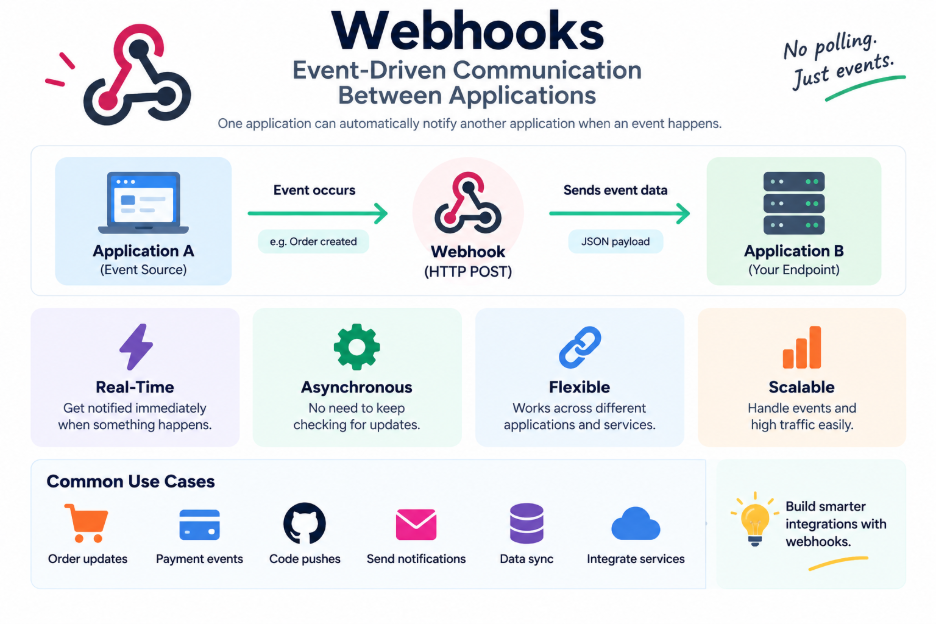
The receiving application creates a URL called a webhook endpoint. When a subscribed event occurs, the source application sends an HTTP request to that endpoint. The request usually uses the POST method and contains information about the event.
The basic flow is:
Event Occurs → Webhook Triggered → HTTP Request Sent → Application Processes Event
For example:
Payment Completed → Payment Service → Webhook → Your Application
Your application can then update an order, send an email, change a database record, or start another process.
How Do Webhooks Work?
A typical webhook integration follows a few simple steps.
1. Create a Webhook Endpoint
First, the receiving application creates a URL that can accept webhook requests.
For example:
2. Register the Endpoint
Next, the application owner adds the endpoint to the service that will send the events.
You can usually select which events the service should send.
3. An Event Occurs
After registration, the system waits for an event.
For instance, a customer may successfully complete a payment.
4. The Webhook Sends a Request
Once the event occurs, the source system sends an HTTP request to the registered endpoint.
The request contains information about the event.
5. The Application Processes the Event
The receiving application checks the request and processes the event.
It may update an order, send a notification, or trigger another service.
6. The Endpoint Returns a Response
Finally, the application returns a successful HTTP response after receiving the request.
Services such as GitHub and Stripe use webhooks to connect their systems with external applications.
Webhooks vs. Polling
Applications can use either webhooks or polling to detect changes.
With polling, an application repeatedly asks another service whether something has changed.
For example:
Polling:
Application → “Has the payment completed?”
Application → “Has the payment completed?”
Application → “Has the payment completed?”
This approach can create many unnecessary API requests.
With a webhook, the source system sends information when the event happens:
Webhook:
Payment Completed → “Here is the event.”
Therefore, webhooks can reduce repeated requests and help applications respond to events more efficiently.
What Does a Webhook Request Contain?
A webhook request usually contains several important parts:
- HTTP method: Usually POST
- Endpoint URL: The destination for the event
- Headers: Information such as signatures or delivery IDs
- Payload: Data that describes the event
For example, a payment webhook might contain:
{
  "event": "payment.completed",
  "orderId": "ORD-1024",
  "amount": 4999
}
The receiving application can read the event type and payload. It can then decide what action to take.
Common Webhook Use Cases
Webhooks support many types of integrations. They are especially useful when applications need to react to events quickly.
Payment Processing
Payment providers can send webhook notifications when a payment succeeds, fails, or gets disputed.
The application can then update the order status automatically.
For example:
Payment Completed → Webhook → Order Updated
CI/CD
Development teams can connect code repositories with CI/CD systems.
When a developer pushes new code, the repository can send a webhook. The CI/CD system can then start a build or deployment process.
Code Push → Webhook → CI/CD Pipeline → Build → Deploy
Notifications
Webhooks can also trigger notifications.
For example, an application can send event information to email systems, Slack, Discord, or other notification platforms.
Order Processing
E-commerce platforms can use webhooks to connect different services.
When a customer creates an order, the system can notify inventory, shipping, and notification services.
Data Synchronization
Applications can use webhooks to notify other systems when data changes.
The receiving system can then synchronize the required information.
Webhook Security
Security is an important part of webhook development. External systems send requests to your application, so you should always verify incoming data.
Here are some common security practices:
- Use HTTPS for webhook endpoints.
- Verify webhook signatures or shared secrets.
- Validate the event type before processing it.
- Never trust incoming data without verification.
- Protect against duplicate event processing.
- Store important delivery information for troubleshooting.
- Keep webhook endpoints protected from unauthorized requests.
For example, GitHub supports webhook secrets that help applications verify incoming requests.
How to Handle Webhook Failures
Webhook delivery can fail for several reasons. A network problem, server outage, or temporary service issue can prevent your application from receiving a request.
Many webhook providers retry failed deliveries.
Therefore, your application should handle:
- Retries
- Duplicate events
- Delayed events
- Invalid payloads
- Temporary service failures
A reliable webhook system should also support idempotent processing. This means the application can safely process the same event more than once without creating incorrect results.
For example, if a payment webhook arrives twice, your application should not create two separate orders.
Why Fast Webhook Responses Matter
Webhook providers usually expect a quick response from your endpoint.
However, some events require heavy processing. Generating reports, updating several databases, or calling multiple external services can take time.
Instead of performing all these tasks during the webhook request, the application can place the event in a queue.
The basic process becomes:
Webhook → Validate Request → Add to Queue → Return Response → Process Event
This approach keeps the webhook endpoint fast and improves reliability.
Webhooks in Modern Applications
Webhooks play an important role in modern software systems.
Developers commonly use them with:
- Microservices
- SaaS integrations
- Payment systems
- E-commerce platforms
- CI/CD pipelines
- Notification systems
- Event-driven applications
- Data synchronization systems
Webhooks create a simple connection between independent applications.
The overall flow looks like this:
System A
↓
Event Occurs
↓
Webhook Request
↓
System B
↓
Action
Because of this model, applications can remain loosely connected while still responding to important events.
Webhooks vs. APIs
Webhooks and APIs both help applications communicate, but they work differently.
An API usually requires an application to send a request when it wants information.
A webhook sends information automatically when a specific event occurs.
For example:
API:
Your application asks, “Has the payment completed?”
Webhook:
The payment service tells your application, “The payment has completed.”
Therefore, APIs work well when applications need to request data, while webhooks work well when applications need automatic event notifications.
Best Practices for Webhooks
A reliable webhook implementation should follow a few basic practices:
Use HTTPS
Always protect webhook communication with HTTPS. This helps keep data secure while it travels between systems.
Verify Requests
Use signatures, tokens, or shared secrets to confirm that requests come from a trusted source.
Validate Payloads
Check the structure and content of every incoming request before processing it.
Handle Duplicates
Design your system to safely process repeated events.
Respond Quickly
Acknowledge webhook requests quickly and move longer tasks to background jobs.
Log Important Events
Keep useful logs for webhook requests, responses, failures, and retries. These logs can help developers troubleshoot problems.
Plan for Retries
Expect temporary failures and design your application to handle repeated delivery attempts.
Conclusion
Webhooks provide a simple way for applications to communicate through events. Instead of repeatedly asking whether something has changed, an application can receive a notification when the event occurs.
As a result, webhooks can reduce unnecessary API requests and help applications respond faster.
However, reliable webhook systems need more than simple event delivery. Developers should also consider security, validation, duplicate events, retries, logging, and background processing.
With these practices in place, webhooks can provide a reliable foundation for connecting modern applications and services.
